
Cuboid Construction and Properties
Loading the math board and drawing, please wait…
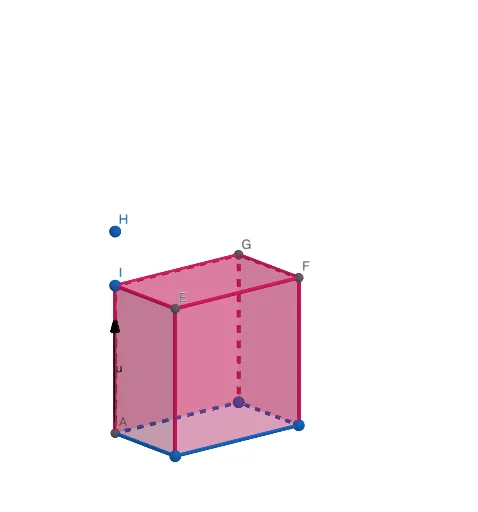
This example dynamically demonstrates the construction and geometric properties of a cuboid using GeoGebra. It involves core math concepts like vectors, polygons, coordinate geometry, and solid geometry. Key GeoGebra commands and objects used in the construction include Vector, Intersect, Polygon, Translate, Point, and Prism. Suitable for high school students and math enthusiasts for learning and visualizing solid geometry.
GeoGebra Commands & Parameters
Vector((0, 0, 0), (0, 0, 12)) → uIntersect(xAxis, yAxis) → APolygon(A, B, C, D) → q1, a, b, c, dTranslate(q1, u) → q1'Point(zAxis) → HPoint(zAxis) → IPrism(q1, I) → e, E, edgeBE, edgeCF, edgeDG, edgeEI, edgeEF, edgeFG, edgeGI, F, G, faceABEI, faceBCFE, faceCDGF, faceADGI, faceEFGI, edgeAI
AI Drawing Prompt Reference
Draw a cuboid to demonstrate its construction and geometric properties. Start by creating three perpendicular vectors, then use these vectors to form the base of the cuboid, which is a quadrilateral. Next, translate the base along the vertical vector to create the top face. Finally, connect the base and top face to form the complete cuboid, labeling key points and edges.
The prompt above was compiled from the original drawing commands and is for reference only.