
Cubic Curve and Ellipse: Intersections and Tangents
Loading the math board and drawing, please wait…
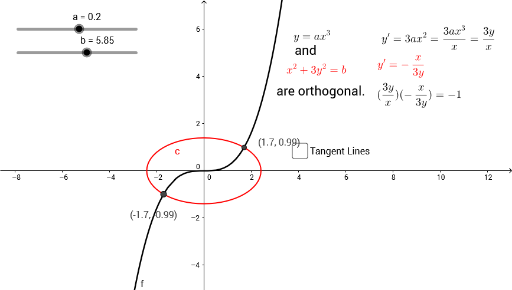
This GeoGebra example demonstrates the intersection of a cubic function and an ellipse in the same coordinate plane, with a focus on tangent lines at the intersection points. The core mathematical concepts include cubic polynomial graphs, ellipse equations, solving systems of equations for intersection points, and the geometric meaning of tangents. The construction uses the Intersect command to find points A and B where the cubic f and ellipse a meet, and the Tangent command to draw tangent lines at these points or other relevant locations. Multiple text objects (text1 through text7) are used to display dynamic values such as coordinates, slopes, or equations. This resource is suitable for high school or early college students studying analytic geometry, algebra, or introductory calculus, and serves as a visual aid for understanding how different curve types interact and how tangent lines behave at their intersections.
GeoGebra Commands & Parameters
Intersect(f, c) → A, BTangent(B, f) → gTangent(A, f) → hTangent(B, c) → i,Tangent(A, c) → j,
AI Drawing Prompt Reference
Draw a cubic function curve and an ellipse on a coordinate plane, marking their intersection points. From these points, draw tangent lines for both the cubic function and the ellipse, displaying their equations and the coordinates of the intersection points. Use dynamic text to show values like slopes and coordinates, illustrating how different curves interact and the behavior of tangents at their intersections.
The prompt above was compiled from the original drawing commands and is for reference only.