
Coordinate Rotation
Loading the math board and drawing, please wait…
In collections
Coordinate Transformations
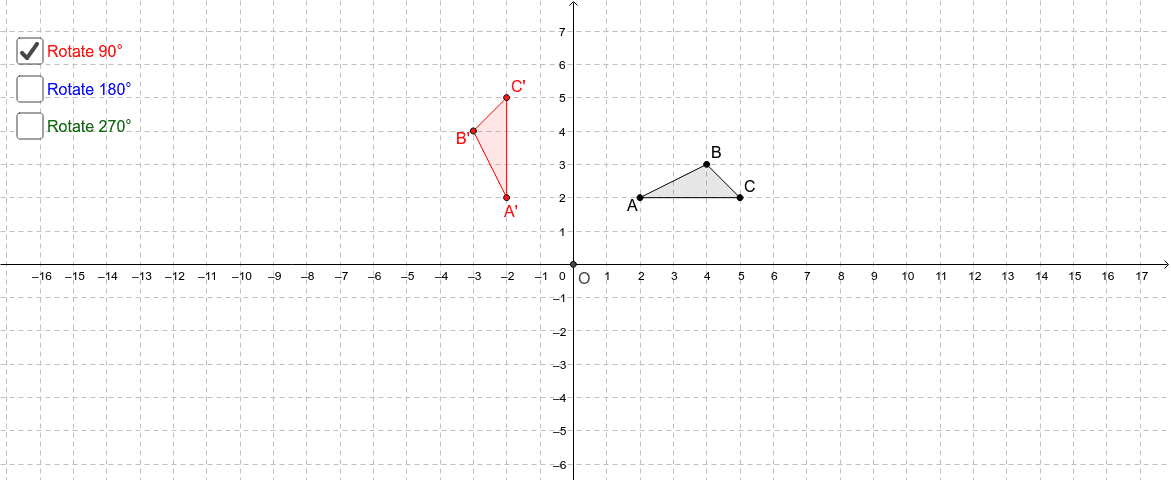
This example demonstrates the rotation of a polygon in three-dimensional space and its coordinate changes. Core math concepts include coordinate geometry, rotation transformation, and three-dimensional vectors. It uses commands like Polygon, Intersect, and Rotate in GeoGebra. Suitable for high school and university-level mathematics education focusing on spatial geometry and transformations.
GeoGebra Commands & Parameters
Polygon(A, B, C) → poly1, c, a, bIntersect(xAxis, yAxis) → ORotate(A, 90*°, O) → A'Rotate(B, 90*°, O) → B'Rotate(C, 90*°, O) → C'Polygon(A', B', C') → poly1', c', a', b'Rotate(A, 180*°, O) → A'_1Rotate(B, 180*°, O) → B'_1Rotate(C, 180*°, O) → C'_1Polygon(A'_1, B'_1, C'_1) → poly1'_1, c'_1, a'_1, b'_1Rotate(A, 270*°, O) → A'_2Rotate(B, 270*°, O) → B'_2Rotate(C, 270*°, O) → C'_2Polygon(A'_2, B'_2, C'_2) → poly1'_2, c'_2, a'_2, b'_2
AI Drawing Prompt Reference
Draw a polygon in 3D space and show its three new polygons after rotating 90°, 180°, and 270° clockwise around the origin. Start by drawing the initial polygon, then find the intersection of the coordinate axes as the rotation center. Next, rotate each vertex of the initial polygon around this center by 90°, 180°, and 270°, and draw the three resulting polygons to clearly illustrate the rotation effects and coordinate changes.
The prompt above was compiled from the original drawing commands and is for reference only.