
Construction of a Rhombus by jrector
Loading the math board and drawing, please wait…
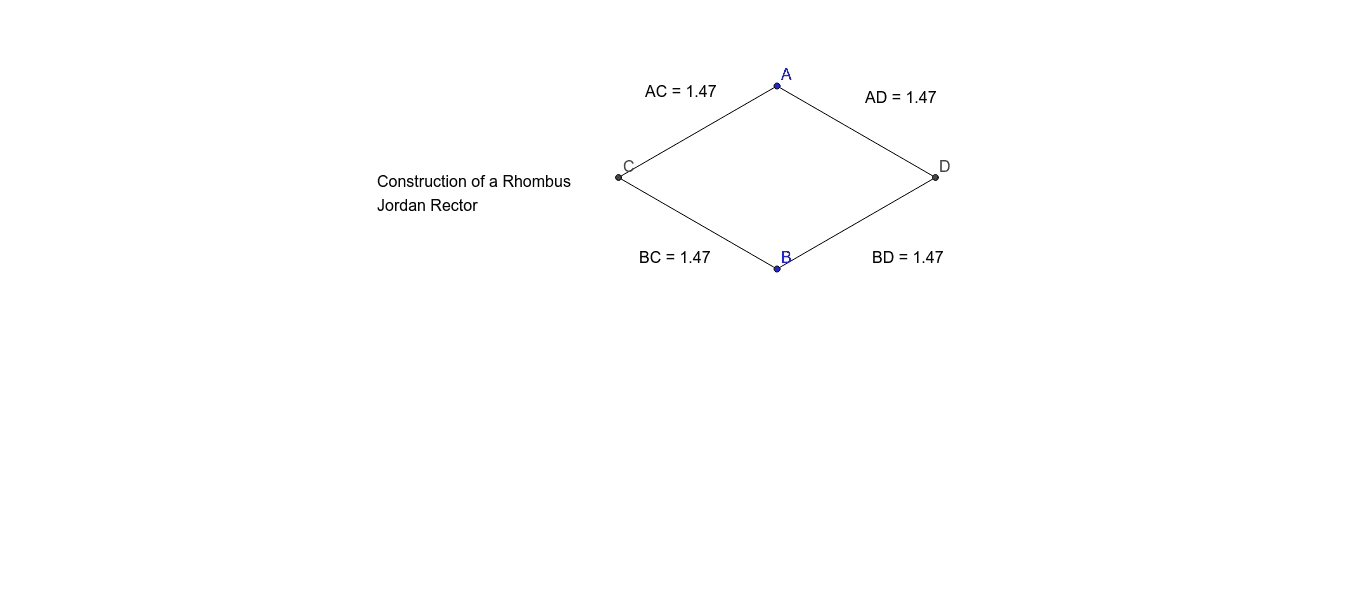
This GeoGebra example demonstrates how to construct a rhombus step-by-step using circles, segments, and midpoints, while dynamically displaying side lengths and diagonal lengths. The core mathematical concept is the definition of a rhombus (all four sides equal) and its property that diagonals bisect each other at right angles, involving triangles, distance measurement, and text annotations. The construction uses the Circle command to draw a circle centered at point A with radius AB, the Intersect command to find the intersection point C of two circles, the Segment command to connect vertices forming the quadrilateral, the Midpoint command to mark diagonal midpoints, and the Distance command to compute and display lengths of sides and diagonals. This example is suitable for middle school geometry, helping students intuitively understand the construction conditions and properties of a rhombus, and can be used to explore relationships between diagonal lengths and side length.
GeoGebra Commands & Parameters
Circle(A, B) → cCircle(B, A) → dIntersect(c, d, 2) → CCircle(C, A) → eIntersect(c, d, 1) → DCircle(D, B) → fSegment(A, D) → aSegment(D, B) → bSegment(B, C) → gSegment(C, A) → hDistance(A, D) → distanceADMidpoint(A, D) →Distance(A, C) → distanceACMidpoint(A, C) →Distance(B, C) → distanceBCMidpoint(B, C) →Distance(B, D) → distanceBDMidpoint(B, D) →
AI Drawing Prompt Reference
Draw a rhombus using circles, line segments, and midpoints, dynamically displaying side lengths and diagonal lengths. The rhombus has all equal sides, and its diagonals bisect each other at right angles. Use circle intersections to find diagonal intersections, connect vertices with line segments to form the quadrilateral, and mark diagonal midpoints with midpoints. Distance measurements can display side and diagonal lengths, helping to intuitively understand the construction conditions and properties of a rhombus.
The prompt above was compiled from the original drawing commands and is for reference only.