
Constructing Right Triangles: From Circle and Intersections
Loading the math board and drawing, please wait…
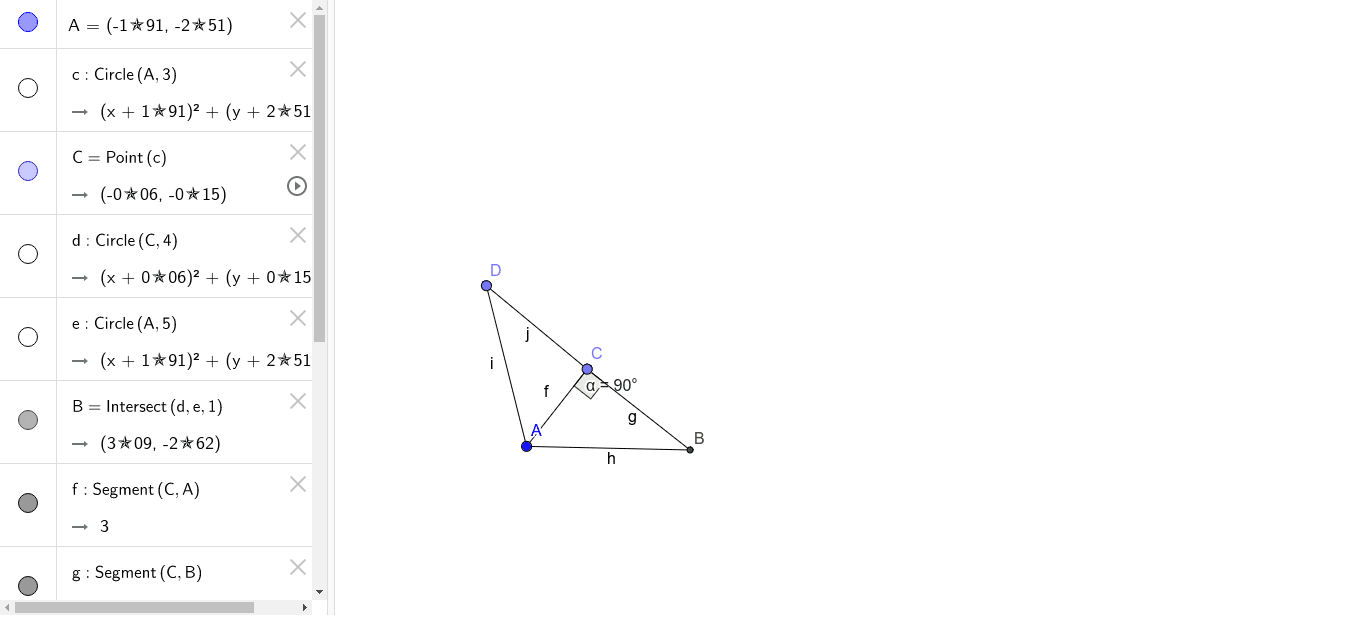
① This example demonstrates how to construct a right triangle using a circle, points, intersections, and segments, with the right angle clearly marked. ② Core mathematical concepts include the definition of right triangles, the theorem that an angle inscribed in a semicircle is a right angle, basic geometric construction steps, and angle measurement. ③ Construction highlights: based on the summary, commands such as Circle, Point, Intersect, Segment, and Angle are used, involving objects A, c, C, d, e, B, f, g, h, D, i, j, α. The process starts by drawing a circle, placing points, connecting them with segments, finding intersections, and finally forming a right triangle with the right angle labeled. ④ Suitable for middle school geometry lessons, introductory geometric construction practice, and for understanding the relationship between circles and triangles, as well as using dynamic geometry software tools.
GeoGebra Commands & Parameters
Circle(A, 3) → cPoint(c) → CCircle(C, 4) → dCircle(A, 5) → eIntersect(d, e, 1) → BSegment(C, A) → fSegment(C, B) → gSegment(A, B) → hPoint(d) → DSegment(D, A) → iSegment(D, C) → jAngle(A, C, B) → α
AI Drawing Prompt Reference
Draw a circle centered at point A with radius 3, then draw a circle centered at point C on circle c with radius 4, followed by a circle centered at point A with radius 5. The two circles d and e intersect at point B. Connect points C and A, C and B, and A and B to form triangle ABC. Draw another circle centered at point D with radius 4, intersecting circle c at points A and D. Connect points D and A, and D and C. Finally, measure angle ACB to form a right triangle ABC with the right angle at point C.
The prompt above was compiled from the original drawing commands and is for reference only.