
Constructing Polygons with GeoGebra
Loading the math board and drawing, please wait…
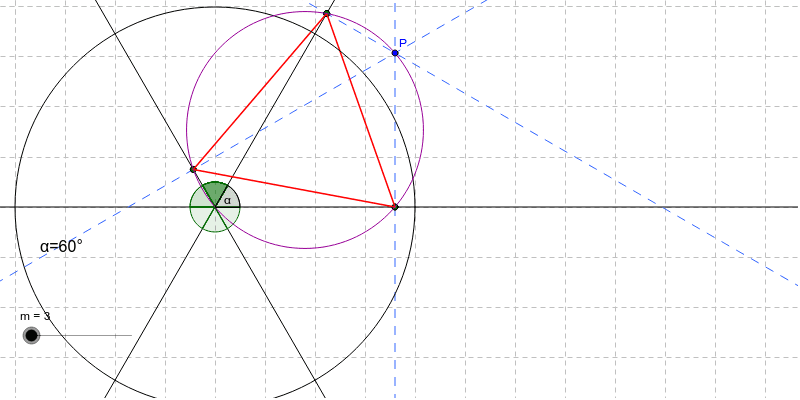
This example demonstrates how to dynamically construct polygons using GeoGebra software. It involves key mathematical concepts such as polygon properties and dynamic geometry transformations. By using commands like Sequence, Append, Angle, and Join, you can create draggable polygons and observe their size changes. Suitable for middle school and above students to learn geometric construction and dynamic geometry.
GeoGebra Commands & Parameters
Sequence(n, n, 1, m) → ZSequence((Element[list1, n], Element[list2, n]), n, 1, m) → list4Sequence((0, 0), n, 1, m) → list5Sequence(Line[Element[list5, n], Element[list4, n]], n, 1, m) → linesSequence(OrthogonalLine[P, Element[lines, n]], n, 1, m) → linesPerpendicularSequence(Intersect[Element[lines, n], Element[linesPerpendicular, n]], n, 1, m) → IntersectionPointsAppend(IntersectionPoints, Element[IntersectionPoints, 1]) → IntersectionPointsClosedSequence(Segment[Element[IntersectionPointsClosed, n], Element[IntersectionPointsClosed, n + 1]], n, 1, m) → ConnectedPointsAngle((1, 0), (0, 0), Element[list4, 1]) → αAngle(Element[list4, 1], (0, 0), Element[list4, 2]) → βJoin({list4, -list4, {Element[list4, 1]}}) → list7Sequence(Angle[Element[list4, k], (0, 0), Element[list4, k + 1]], k, 1, m) → list6Sequence(Angle[Element[list7, k], (0, 0), Element[list7, k + 1]], k, 1, 2 * m) → list8Sequence(Angle[Element[list7, 1], (0, 0), Rotate[Element[list7, 1], 180 * ° / m, (0, 0)]], k, 1, 2 * m) → list9Midpoint((0, 0), P) → ACircle(A, (0, 0)) → dText("α=" + α, (-3.5, -0.9)) → text1
AI Drawing Prompt Reference
Starting from the origin, generate several rays at given angles, each with a point on it, forming a sequence of polygon vertices. Through each vertex, draw a line perpendicular to its corresponding ray; these perpendiculars intersect adjacent rays, yielding a series of intersection points. Connect these points in order to form a closed polygon. Additionally, draw a reference circle centered at the origin with radius equal to the distance to one of the vertices, and label the angle between the first vertex and the origin. The entire figure is dynamic, allowing the polygon to change size as vertices are dragged.
The prompt above was compiled from the original drawing commands and is for reference only.