
Constructing Ellipse Equations from Given Conditions
Loading the math board and drawing, please wait…
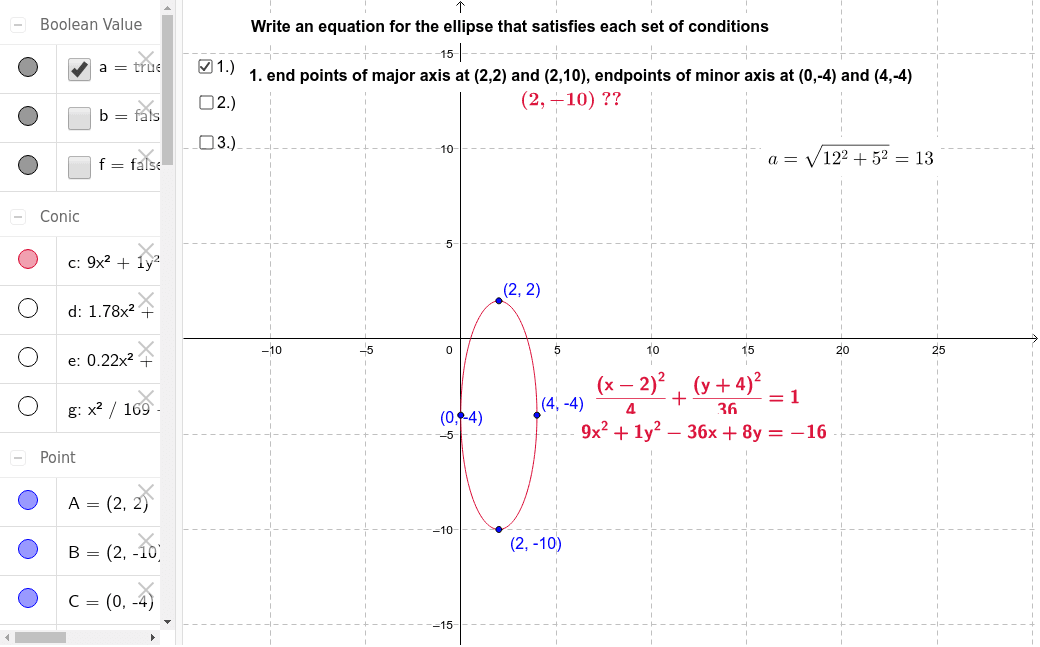
This GeoGebra example demonstrates how to write the standard equation of an ellipse that satisfies a set of given conditions, such as specified foci, major/minor axes, or points through which the ellipse passes. The construction visually verifies the algebraic equation by dynamically building the ellipse and its related geometric elements. Core mathematical concepts include the definition of an ellipse (sum of distances to two foci is constant), standard equation forms, focus coordinates, major and minor axes, eccentricity, and the correspondence between geometric conditions and algebraic parameters. The construction uses the Ellipse command to create the curve, LaTeX text objects to display the equation, and multiple points (A, B, C, D, E, F, G, H, I, J, K, L, M), foci F_1 and F_2, and segments a, b, c, d, e, f, g as auxiliary objects. Sliders or input conditions allow adjusting parameters to observe how the shape and equation change. This resource is suitable for high school analytic geometry or pre-university courses, and can be used by teachers for classroom demonstrations or by students for self-guided exploration of ellipse properties and equation derivation.
GeoGebra Commands & Parameters
Ellipse(F_1, F_2, C) → cLaTeX(c, true, false) → szöveg4Ellipse(L, M, J) → g
AI Drawing Prompt Reference
Draw an ellipse with two foci and display its standard equation. The ellipse should pass through a specified point, with its major and minor axes labeled. Visually demonstrate the ellipse's definition, where the sum of distances to the two foci is constant. Include text to show the equation and auxiliary line segments and points to observe how changes in parameters affect the shape and equation.
The prompt above was compiled from the original drawing commands and is for reference only.