
Constructing an Isosceles Trapezoid by FLINK-Team
Loading the math board and drawing, please wait…
In collections
Trapez - Eigenschaften und Konstruktionen
This example demonstrates how to construct an isosceles trapezoid using compass and straightedge. Key math concepts include polygons, angles, and geometric construction. Construction highlights involve GeoGebra commands such as Point, Segment, Rotate, Angle, Circle, CircleArc, Intersect, Line, and Polygon. Suitable for upper elementary or beginner students learning geometric construction techniques.
GeoGebra Commands & Parameters
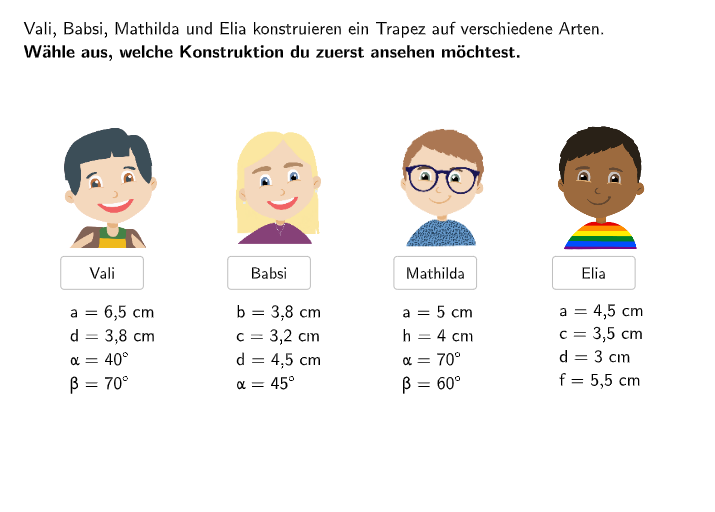
Point(Circle[PunktA, 6.5]) → PunktBSegment(PunktA, PunktB) → SeiteaRotate(PunktB, 40°, PunktA) → PunktB'Angle(PunktB, PunktA, PunktB') → αSegment(PunktA, PunktB') → Schenkelalpha1Rotate(PunktA, -70°, PunktB) → PunktA'Angle(PunktA', PunktB, PunktA) → βSegment(PunktA', PunktB) → Schenkelbeta1Point(Schenkelalpha1) → APoint(Schenkelbeta1) → CCircle(PunktA, 3.8) → kreisdPoint(kreisd) → D_{1}Point(kreisd) → ECircleArc(PunktA, D_{1}, E) → BogendSegment(A, PunktA) → Schenkelalpha2Segment(C, PunktB) → Schenkelbeta2Intersect(Bogend, Schenkelalpha2) → PunktD,Line(PunktD, Seitea) → ParallelecPoint(Parallelec) → GSegment(PunktD, G) → StreckeparalleleIntersect(Schenkelbeta2, Streckeparallele) → PunktCSegment(PunktA, PunktD) → SeitedSegment(PunktD, PunktC) → SeitecSegment(PunktB, PunktC) → SeitebSegment((x(PunktA), y(PunktA) + 0.1), (x(PunktA), y(PunktA) - 0.1)) → beiASegment((x(PunktB), y(PunktB) + 0.1), (x(PunktB), y(PunktB) - 0.1)) → beiBCircle(PunktA1, 4.5) → kreisd1Point(kreisd1) → PunktD1Rotate(PunktD1, -45°, PunktA1) → PunktD1'Angle(PunktD1', PunktA1, PunktD1) → γPoint(Circle[PunktD1, 6]) → BSegment(PunktD1, B) → Streckenparallele1Segment(PunktA1, PunktD1) → Seited1Segment(PunktA1 - (0, 0.15), PunktA1 + (0, 0.15)) → BeiA1Segment(PunktD1 + (0, -0.15), PunktD1 + (0, 0.15)) → beiD1Circle(PunktD1, 3.2) → kreiscPoint(kreisc) → FPoint(kreisc) → HCircleArc(PunktD1, H, F) → BogencIntersect(Bogenc, Streckenparallele1) → PunktC1,Circle(PunktC1, 3.8) → kreisbSegment(PunktA1, PunktD1' + (5, 0)) → Seitea1Intersect(kreisb, Seitea1) → K, PunktB1Point(kreisb) → IPoint(kreisb) → JCircleArc(PunktC1, I, J) → BogenbSegment(PunktC1, PunktB1) → Seiteb1Angle(PunktD, PunktC, PunktB) → δAngle(PunktA, PunktD, PunktC) → εAngle(PunktC1, PunktB1, PunktA1) → ζAngle(PunktD1, PunktC1, PunktB1) → ηAngle(PunktA1, PunktD1, PunktC1) → θSegment(PunktA1, PunktB1) → SeiteaNeuPolygon(L, M, N, O) → q1, l, m, n, oSpeechBubbleRight(PBubble, 6.5, 2.7) → SpeechBubbleSegment(P, Q) → fSegment(PunktA2, PunktB2) → Seitea2Segment((3.5, 7.5), (9.5, 7.5)) → Seitec3Rotate(PunktA2, -40°, PunktB2) → PunktA2'Angle(PunktB2, PunktA2, PunktA2') → ιRay(PunktA2, PunktA2') → hPoint(h) → TSegment(PunktA2, T) → Seited2Intersect(Seited2, Seitec3) → RRotate(PunktA2, -60°, PunktB2) → PunktA2'_{1}Angle(PunktA2, PunktB2, PunktA2'_{1}) → κSegment(PunktB2, PunktA2'_{1}) → Seiteb2Angle(PunktA2'_{1}, PunktB2, PunktA2) → λIntersect(Seitec3, Seiteb2) → PunktC2Angle(R, PunktC2, PunktB2) → μAngle(PunktA2, R, PunktC2) → νSegment(PunktB2, PunktC2) → Seiteb3Segment(PunktA, PunktB4) → Seitea4Circle(PunktB4, 5.5) → cPoint(c) → SPoint(c) → UCircleArc(PunktB4, U, S) → dCircle(PunktA, 3) → ePoint(e) → VPoint(e) → WCircleArc(PunktA, W, V) → gIntersect(d, g) → PunktD4, , ,Point(Circle[PunktD4, 3.5]) → PunktC4Segment(PunktD4, PunktC4) → Seitec4Segment(PunktA, PunktD4) → Seited4Segment(PunktB4, PunktC4) → Seiteb4Angle(PunktB4, PunktA, PunktD4) → ξAngle(PunktA, PunktD4, PunktC4) → οAngle(PunktC4, PunktB4, PunktA) → ρAngle(PunktD4, PunktC4, PunktB4) → σSegment(PunktA2 + (0, 0.12), PunktA2 - (0, 0.12)) → seg1Segment(PunktB2 + (0, 0.12), PunktB2 - (0, 0.12)) → seg2Intersect(f, Seitea2) → DAngle(PunktB2, D, P) → τCircle(D, 4) → kPoint(k) → ZPoint(k) → A_1CircleArc(D, Z, A_1) → pSegment(PunktA + (0, 0.12), PunktA - (0, 0.12)) → seg3Segment(PunktB4 + (0, 0.12), PunktB4 - (0, 0.12)) → seg4Segment(PunktD4, PunktD4 + (5, 0)) → iCircle(PunktD4, 3.5) → qPoint(q) → B_1Point(q) → C_1CircleArc(PunktD4, B_1, C_1) → r
AI Drawing Prompt Reference
Construct an isosceles trapezoid in the plane. Start by drawing a circle centered at a base point and taking a point on it, then rotate this point counterclockwise by 40 degrees around the base point to create a new point, connecting the base point with both points to form the first angle. Next, rotate the base point clockwise by 70 degrees around the first point to obtain another new point, and connect these two points to form a second angle. Select points on each ray of the first angle and on one ray of the second angle. Draw an arc centered at the point on the first angle's ray, and find its intersection with a line through that point parallel to the base segment to determine one vertex of the trapezoid. Use the intersection of this parallel line with the other leg to find the adjacent vertex, then connect all vertices sequentially to complete the isosceles trapezoid.
The prompt above was compiled from the original drawing commands and is for reference only.