
Constructing an Easter Egg
Loading the math board and drawing, please wait…
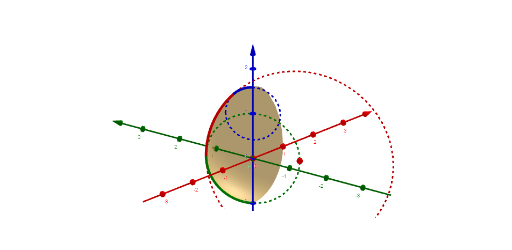
This example demonstrates how to construct an Easter egg using GeoGebra. The core mathematical concepts involved include rotation, surface, and center. By using commands like Rotate, Surface, and Center, specific rotation angles and center points can be achieved to construct the surface. Suitable for high school mathematics education and learning coordinate geometry.
GeoGebra Commands & Parameters
Rotate(Circle[(-1, 0, 0), 2, yAxis], α, zAxis) → bSurface((cxy(v) * cos(u)) + ((r(v) * cos(u)) * cos(v)), (cxy(v) * sin(u)) + ((r(v) * sin(u)) * cos(v)), cz(v) + (r(v) * sin(v)), u, 0, α, v, -1.5708, 1.5708) → aRotate(Circle[(0, 0, 1), 0.5857864376269049, yAxis], α, zAxis) → cRotate(Circle[(0, 0, 0), 1, yAxis], α, zAxis) → dRotate(CurveCartesian[-1 + (2 * cos(t)), 0, (2 * sin(t)), t, 0, 0.7854], α, zAxis) → bbRotate(CurveCartesian[((2 - sqrt(2)) * cos(t)), 0, 1 + ((2 - sqrt(2)) * sin(t)), t, 0.7854, 1.5708], α, zAxis) → ccRotate(CurveCartesian[cos(t), 0, sin(t), t, -1.5707963267948966, 0], α, zAxis) → ddCenter(b) → A