
Constructing a Parallel using the Rhombus Method
Loading the math board and drawing, please wait…
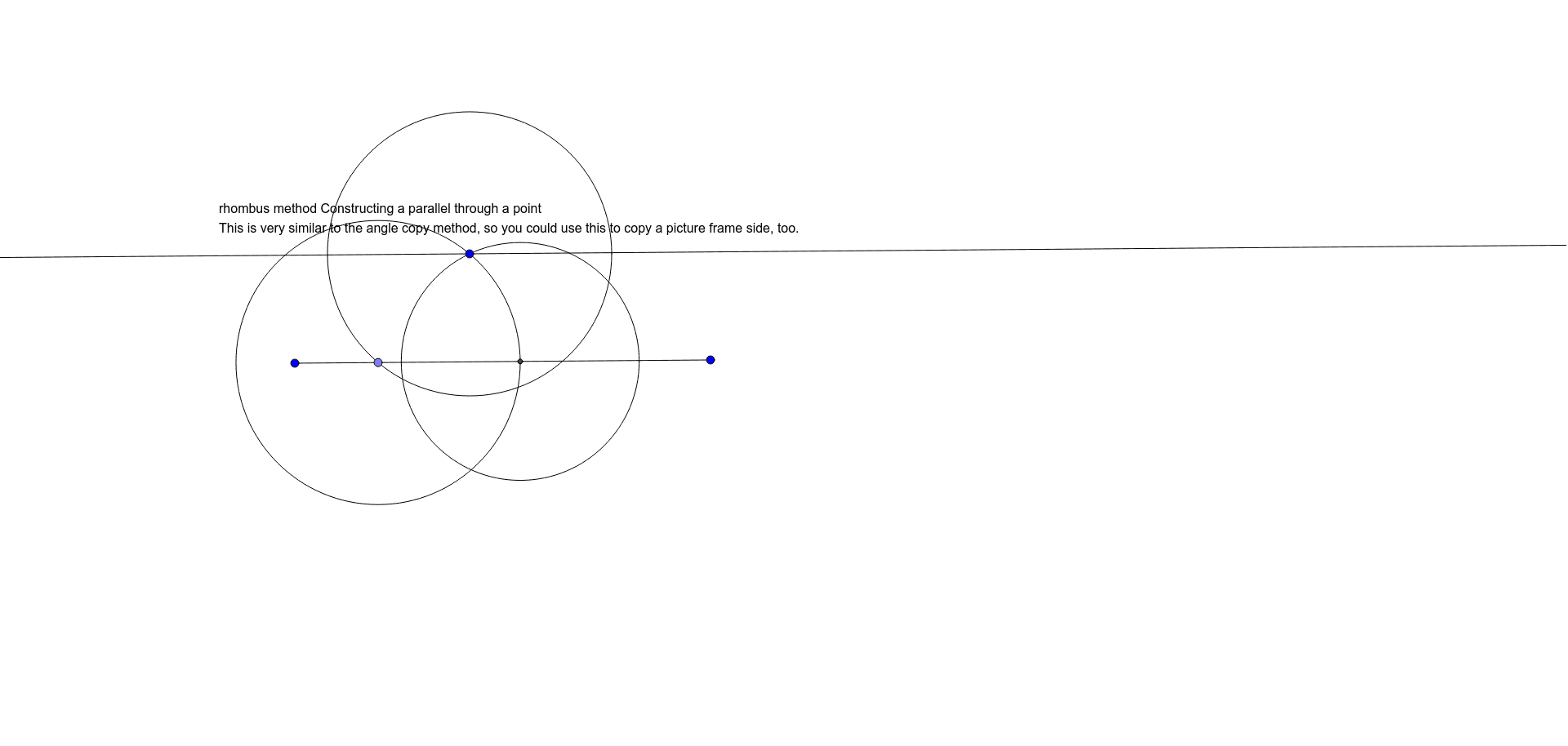
This example demonstrates how to construct a parallel line from a point using the rhombus method. It involves core mathematical concepts such as the properties of a rhombus, reflection principles, and slope. Construction highlights include the use of GeoGebra commands/objects: Segment, Point, Circle, Intersect, Line; objects: C, A, B, f, D, c, d, E, e, g, text1. Suitable for middle school and above learning geometric constructions and parallel line properties.
GeoGebra Commands & Parameters
Segment(A, B) → fPoint(f) → DCircle(C, Segment[C, D]) → cCircle(D, Segment[C, D]) → dIntersect(d, f, 1) → ECircle(E, Segment[E, C]) → eLine(C, f) → g
AI Drawing Prompt Reference
Construct a line through point D that is parallel to line segment AB. First, draw a line segment f connecting point C and point B. Then, choose point D on line segment f. Next, draw two circles with radii equal to the length of line segment CD, one centered at C and the other at D. The intersection point E of these two circles is a point on the desired parallel line. Finally, draw a line g connecting point C and point E, which is the parallel line you need.
The prompt above was compiled from the original drawing commands and is for reference only.