
Constructing a Parabola Given Focus and Directrix
Loading the math board and drawing, please wait…
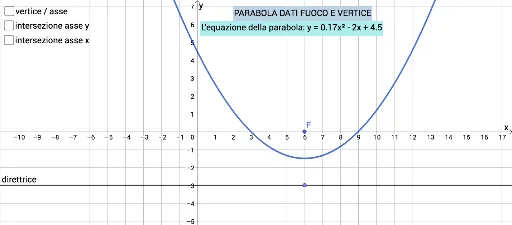
This GeoGebra example demonstrates how to construct a parabola from a given focus point and a directrix line, illustrating the fundamental definition of a parabola as the locus of points equidistant from a fixed point (focus) and a fixed line (directrix). The construction uses the Point command to place the focus F and a point D on the directrix, the Parabola command to generate the curve directly, and the Intersect command to find the vertex V and other intersection points with the axis. Key objects include the axis (asse), directrix (direttrice), and auxiliary segments and text labels. The example is ideal for high school analytic geometry lessons, helping students visualize the relationship between focus, directrix, vertex, and the parabola's shape. It can also serve as a quick demonstration in introductory college geometry courses.
GeoGebra Commands & Parameters
Point(asse) → DParabola(F, direttrice) → cIntersect(c, asse, 1) → VIntersect(c, xAxis) → A, BIntersect(c, yAxis) → C,
AI Drawing Prompt Reference
Draw a parabola given a focus point and a directrix line. Start with a horizontal directrix and a focus point above it. Construct the axis as the perpendicular line through the focus to the directrix. Mark the vertex at the midpoint between the focus and the directrix along the axis. Then draw the parabola such that every point on it is equidistant from the focus and the directrix. Finally, indicate the intersections of the parabola with the coordinate axes, and label the focus, directrix, and vertex.
The prompt above was compiled from the original drawing commands and is for reference only.