
Construct Square Root of Two Lengths with Feedback
Loading the math board and drawing, please wait…
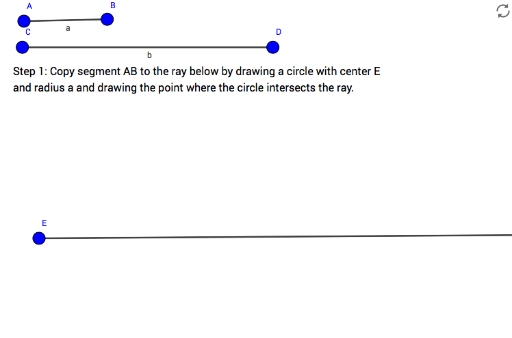
① This example demonstrates how to geometrically construct the square root of the product of two given segment lengths, with an interactive feedback system to verify correctness. ② Core mathematical concepts include square roots, the Pythagorean theorem, segment ratios, and geometric construction principles, particularly the relationship between the hypotenuse and legs of a right triangle. ③ Construction details: Using GeoGebra commands such as Segment, Ray, Circle, Intersect, LineBisector, Point, and Tangent, the construction involves objects A, B, a, C, D, b, E, F, h, d, e, H, G, zBisector, I, zCircle, j, zTangent, J, m, c, sqrtab, along with step-by-step hints (step1 to step6) and a success feedback (wellDone). ④ Suitable for middle or high school mathematics and geometry courses, this example is ideal for teaching square roots and the Pythagorean theorem, and can be used by teachers for demonstrations or by students for self-guided exploration of geometric construction and verification.
GeoGebra Commands & Parameters
Segment(A, B) → aSegment(C, D) → bRay(E, F) → hCircle(E, Segment[A, B]) → dCircle(E, Segment[C, D]) → eIntersect(e, h, 1) → HIntersect(d, h, 1) → GLineBisector(H, G) → zBisectorPoint(zBisector) → ICircle(I, Segment[I, G]) → zCircleTangent(E, zCircle) → j, zTangentIntersect(zCircle, zTangent, 1) → JSegment(E, J) → mTangent(E, zCircle) → f, gIntersect(zCircle, f, 1) → K
AI Drawing Prompt Reference
Draw two line segments and a ray. With the first segment as radius, draw a circle intersecting the ray at two points. With the second segment as radius, draw another circle intersecting the ray at two other points. Connect these points to form two right triangles. Find the perpendicular bisectors of the hypotenuses of these triangles and let them intersect. This intersection is the center of a new circle. Draw a circle with this center and the radius equal to half the hypotenuse, intersecting the perpendicular bisector at a point. Connect the center to this point to form the desired segment, verifying its proportional relationship to the original segments.
The prompt above was compiled from the original drawing commands and is for reference only.