
Congruent Triangles: Dynamic Construction and Verification
Loading the math board and drawing, please wait…
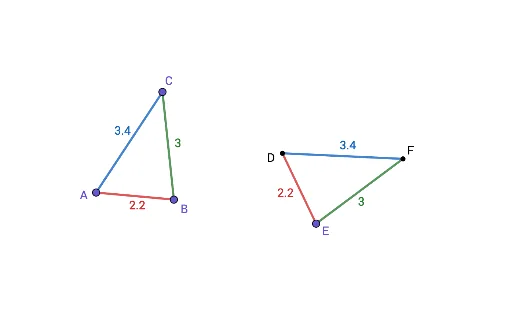
This GeoGebra example demonstrates the dynamic construction and verification of congruent triangles. It visually shows how two triangles can be made congruent through rotation and measurement of corresponding sides and angles. Core mathematical concepts include triangle congruence, corresponding parts, and congruence criteria such as SAS or SSS. The construction uses commands like Segment, Angle, Point, Rotate, Ray, and Intersect, with objects including vertices A, B, C, sides a, b, c, and rotated points D, E, F with associated angles α, β, γ, δ. Suitable for middle school geometry, this interactive tool helps students grasp the definition and properties of congruent triangles, explore sufficient conditions for congruence, and develop spatial reasoning through hands-on manipulation.
GeoGebra Commands & Parameters
Segment(B, A) → cSegment(A, C) → bSegment(C, B) → aAngle(B, A, C) → αPoint(Circle[D, c]) → ESegment(D, E) → fRotate(E, α, D) → E'Angle(E, D, E') → βRay(D, E') → gAngle(A, B, C) → γRotate(D, (-γ), E) → D'Angle(D', E, D) → δRay(E, D') → hIntersect(g, h) → FSegment(D, F) → iSegment(F, E) → j
AI Drawing Prompt Reference
Draw a triangle with three sides and mark one of its interior angles. Then construct a congruent triangle by first drawing a circle centered at a new vertex with radius equal to one side of the original triangle. Pick a point on the circle as another vertex, connect it to the center to form a side. Rotate this side around the center by the measure of the original angle to get a ray. Then rotate the center around the new vertex by the negative of another original angle to get another ray. The intersection of the two rays gives the third vertex. Connect all vertices to form the new triangle, and label the corresponding sides and angles.
The prompt above was compiled from the original drawing commands and is for reference only.