
Comparing Fractions by Pedro_Arlindo
Loading the math board and drawing, please wait…
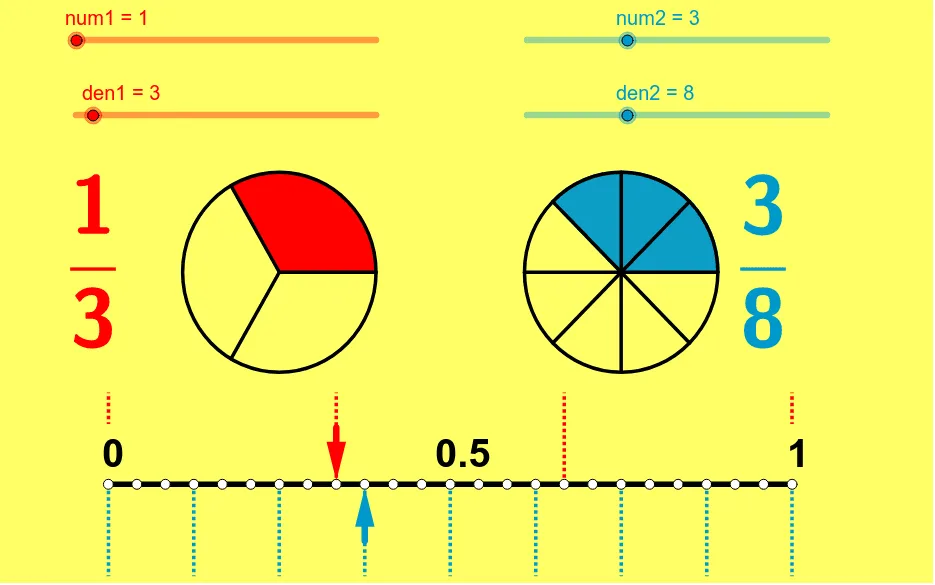
This applet is designed for comparing and ordering fractions. It involves fundamental concepts of fractions and visually demonstrates the relationship between the size of fractions by dynamically adjusting the numerator and denominator. Commands such as Sequence, CircleSector, Segment, Vector, and LCM are used, making it suitable for students from upper elementary to middle school to learn fraction comparison and ordering.
GeoGebra Commands & Parameters
Sequence((sqrt(2) * cos(i * 360 * ° / den1) + x(B), sqrt(2) * sin(i * 360 * ° / den1) + y(B)), i, 1, den1) → leftptsSequence((sqrt(2) * cos(i * 360 * ° / den2) + x(A), sqrt(2) * sin(i * 360 * ° / den2) + y(A)), i, 1, den2) → rightptsSequence(Segment[B, Element[leftpts, i]], i, 1, den1) → segleftSequence(Segment[A, Element[rightpts, i]], i, 1, den2) → segrightCircleSector(B, Element[leftpts, den1], Element[leftpts, num1]) → eCircleSector(A, Element[rightpts, den2], Element[rightpts, num2]) → fSegment(D, C) → aVector(F, E) → uVector(G, H) → vSequence((-5 + i * 10 / den1, 0), i, 0, den1) → list1Sequence((-5 + i * 10 / den1, 1.3), i, 0, den1) → list2Sequence(Segment[Element[list1, i], Element[list2, i]], i, 1, den1 + 1) → list3Sequence((-5 + i * 10 / den2, 0), i, 0, den2) → list4Sequence((-5 + i * 10 / den2, -1.3), i, 0, den2) → list5Sequence(Segment[Element[list4, i], Element[list5, i]], i, 0, den2 + 1) → list6LCM(den1, den2) → bSequence((-5 + i * 10 / b, 0), i, 0, b) → list7
AI Drawing Prompt Reference
Create a visual for comparing fractions. On the left, draw a circle centered at one point, divide its circumference into equal parts according to the first denominator, draw segments from the center to each division point, and highlight a sector corresponding to the numerator. On the right, do the same with another point and the second denominator. Between the circles, draw a horizontal segment and two vectors indicating the relative sizes. Below, draw two parallel number lines, each divided according to one denominator, with vertical tick marks; then add a finer scale based on the least common multiple of the denominators for alignment.
The prompt above was compiled from the original drawing commands and is for reference only.