
Compare Exponential Functions
Loading the math board and drawing, please wait…
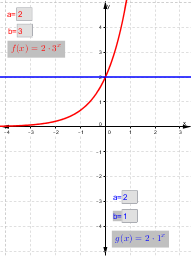
This is a simple calculator to help students compare different exponential functions. The key mathematical concepts involved are exponential functions, function graphs, and limits. Using GeoGebra's text field, input boxes, and text objects, students can dynamically input different parameters of the exponential functions to observe the changes in the graph.
GeoGebra Commands & Parameters
Textfield(a) → inputBox1Textfield(b) → inputBox2Textfield(c) → inputBox3Textfield(d) → inputBox4
AI Drawing Prompt Reference
Draw the graphs of two exponential functions, where parameters a, b, c, and d control the shapes of the functions y = a * e^(b*x) and y = c * e^(d*x), respectively, and observe the changes in their graphs.
The prompt above was compiled from the original drawing commands and is for reference only.