
Colored Astroid
Loading the math board and drawing, please wait…
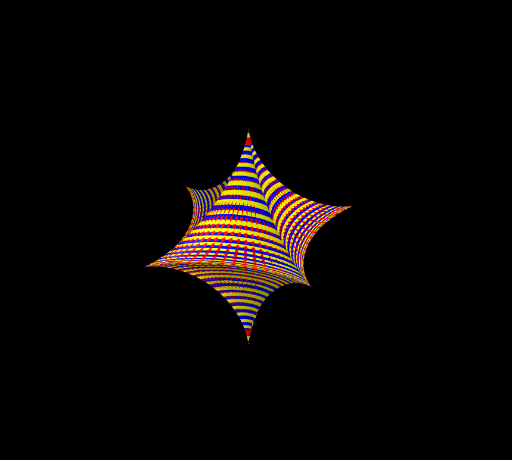
This example demonstrates the colored representation of an astroid, a special type of cubic curve with the equation x^(2/3) + y^(2/3) = a^(2/3). By adjusting the parameter a, the shape of the astroid can be changed. Using the Surface command, the astroid is filled in 3D space with color, providing a more intuitive visualization of its geometric properties. Suitable for high school mathematics education, particularly for learning about coordinate geometry and parametric equations.
GeoGebra Commands & Parameters
Surface((cos(v)^(3) * cos(u)^(3)), (cos(v)^(3) * sin(u)^(3)), sin(v)^(3), u, Umin, Umax, v, Vmin, Vmax) → astroidSurface((cos(v)^(3) * cos(u)^(3)), (cos(v)^(3) * sin(u)^(3)), sin(v)^(3), u, Umin + r, Umax - r, v, Vmin, Vmax) → aSurface((cos(v)^(3) * cos(u)^(3)), (cos(v)^(3) * sin(u)^(3)), sin(v)^(3), u, Umin, Umax, v, Vmin + b, Vmax - b) → b_1
AI Drawing Prompt Reference
Draw a colored astroid, a special cubic curve with the equation x^(2/3) + y^(2/3) = a^(2/3). By adjusting the parameter a, change the shape of the astroid. Use the surface command to fill the curve in 3D space with color, providing an intuitive visualization of its geometric properties.
The prompt above was compiled from the original drawing commands and is for reference only.