
Circumscribed Regular Polygons: Dynamic Construction and Geometric Relations
Loading the math board and drawing, please wait…
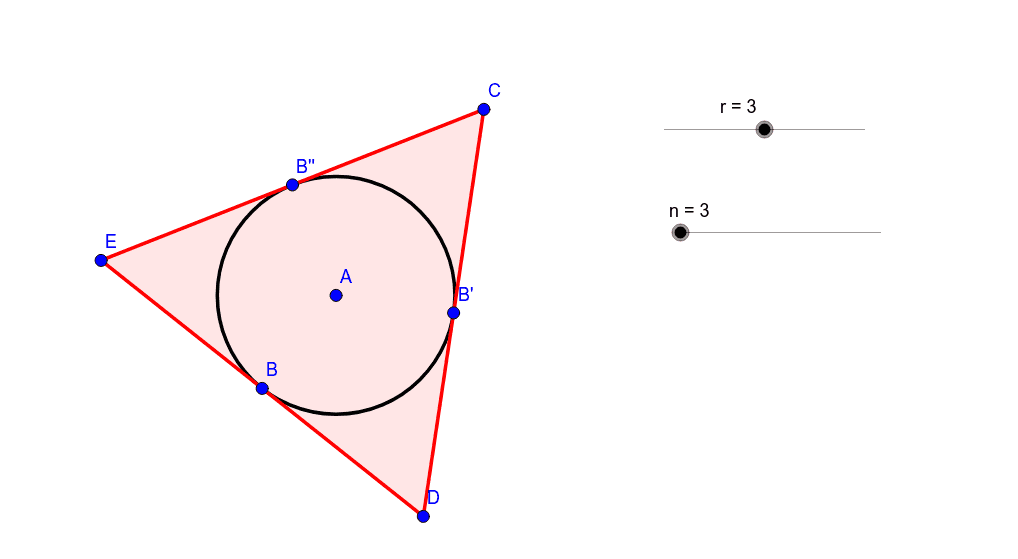
This GeoGebra example demonstrates how to construct a series of regular polygons circumscribed around a common circle, allowing dynamic observation of the relationships between the number of sides, side length, and the inradius. Core mathematical concepts include the circumscribed property of regular polygons, tangent-chord theorems, rotational symmetry, and geometric transformations. The construction uses commands such as Circle, Point, Rotate, Angle, Tangent, Intersect, and Polygon, with objects including sliders r (radius) and n (number of sides), auxiliary points, segments, and angle variables. By adjusting the sliders, users can see the polygon change in real time. This is suitable for middle and high school geometry classes, math labs, or dynamic geometry explorations, helping students intuitively grasp the relationship between regular polygons and their circumscribed circles, as well as parametric construction techniques.
GeoGebra Commands & Parameters
Circle(A, r) → cPoint(c) → BRotate(B, (360 * ° / n), A) → B'Angle(B, A, B') → αTangent(B, c) → a,Tangent(B', c) → b,Rotate(B', (360 * ° / n), A) → B''Angle(B', A, B'') → βTangent(B'', c) → d,Intersect(b, d) → CIntersect(a, b) → DPolygon(D, C, n) → poly1, d_1, l, m, p, E, F, G, H, I, J, K, c_1, L, M, N, e, f, g, h, i, j, k
AI Drawing Prompt Reference
Draw a circle with adjustable radius centered at a fixed point. Pick a point on the circle, then rotate it around the center by an angle determined by a variable number of sides, obtaining a second point. Draw tangents to the circle at both points; they intersect at a vertex. Rotate the second point again by the same angle to get a third point, draw its tangent, and intersect with the previous tangent. Continue this process to generate all tangents, then connect consecutive intersection points to form a regular polygon circumscribed about the circle. The number of sides and the radius can be adjusted via sliders, updating the figure dynamically.
The prompt above was compiled from the original drawing commands and is for reference only.