
Characterization of a Trapezoid
Loading the math board and drawing, please wait…
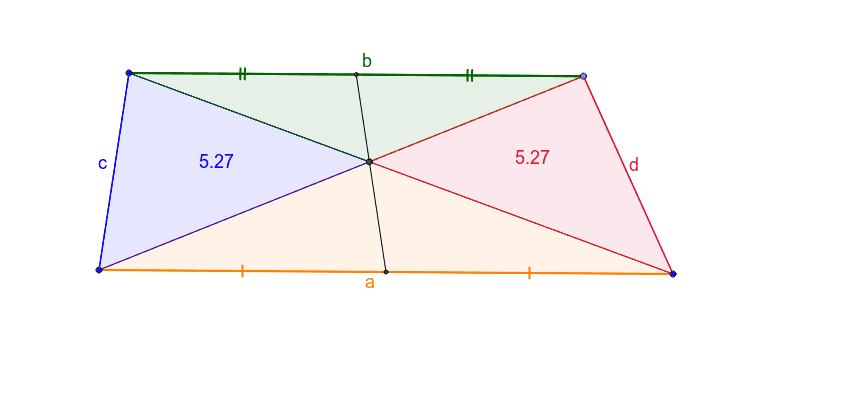
This example demonstrates the properties of a trapezoid. It involves key mathematical concepts such as geometric construction and polygons. Using GeoGebra commands like Segment, Line, Point, Intersect, and Polygon, the trapezoid is constructed and its properties are explored. Suitable for middle school and above students or teachers.
GeoGebra Commands & Parameters
Segment(A, B) → aSegment(A, D) → cLine(D, a) → c_3Point(c_3) → CSegment(D, C) → bSegment(C, B) → dSegment(A, C) → eSegment(B, D) → fIntersect(e, f) → EPolygon(A, B, E) → poly1, e_1, a_1, b_1Polygon(A, E, D) → poly2, c_1, a_2, e_2Polygon(C, E, D) → poly3, c_2, d_1, e_3Polygon(C, E, B) → poly4, b_2, d_2, e_4Midpoint(b) → GMidpoint(a) → ISegment(I, G) → gSegment(A, I) → hSegment(I, B) → iSegment(C, G) → jSegment(G, D) → k
AI Drawing Prompt Reference
Draw a trapezoid by first creating two parallel line segments as the bases, then connecting the non-parallel sides. Locate the intersection point of the diagonals and use it to form four smaller polygons within the trapezoid. Calculate and connect the midpoints of the bases to create midlines, then link these midpoints to the vertices of the trapezoid to highlight its geometric properties.
The prompt above was compiled from the original drawing commands and is for reference only.