
Buffon's Coin: Probability Simulation of a Circle and Parallel Lines
Loading the math board and drawing, please wait…
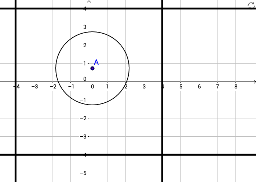
This GeoGebra example demonstrates Buffon's Coin, a classic geometric probability experiment: randomly tossing a circular coin onto a plane with equally spaced parallel lines and observing whether the coin intersects a line. The core mathematical concepts are geometric probability and stochastic simulation, where repeated trials approximate the theoretical probability, involving the positional relationship between a circle and lines (intersecting or not). Construction highlights: using the Circle command to create the coin (object A), constructing parallel line sets (objects c, f, g, h, i) and auxiliary point B, simulating random tosses by rotating or moving the coin, and optionally using matrices or median lines to analyze positions. Suitable for high school or college probability and statistics courses, this example helps visualize geometric probability models, Monte Carlo methods, and the relationship between empirical frequency and theoretical probability, as well as exploring critical conditions for circle-line intersection.
GeoGebra Commands & Parameters
Circle(A, 2) → c
AI Drawing Prompt Reference
Draw a geometric probability experiment: a set of equally spaced horizontal parallel lines spanning the canvas. Place a circular coin between the lines, with its center near one line so the circle intersects that line. Use dashed auxiliary lines to show the perpendicular distance from the coin's center to the nearest line, and indicate how this distance compares to the coin's radius. Include a slider or arrow to suggest random rotation or movement of the coin, simulating repeated tosses. Keep the style clean, emphasizing the positional relationship between the circle and the lines.
The prompt above was compiled from the original drawing commands and is for reference only.