
Balance Game
Loading the math board and drawing, please wait…
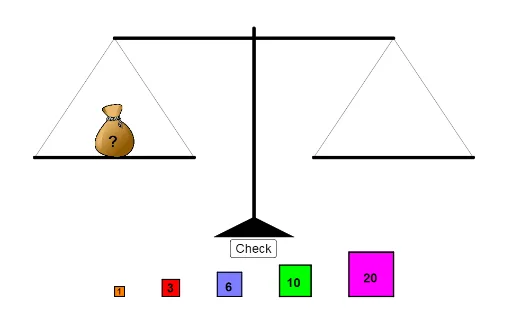
This example dynamically demonstrates the principle of leverage and torque equilibrium in a balance scale, visually illustrating core concepts like vector operations, geometric constructions, coordinate geometry, and probability statistics (e.g., expected value). It utilizes GeoGebra commands such as Join, RandomElement, Random, Point, Polygon, Segment, If, and Textfield to calculate and display dynamic balance points. Suitable for high school physics and mathematics education.
GeoGebra Commands & Parameters
Join({Sequence[Point[{i, 8}], i, -22, -10], Sequence[Point[{i, 8}], i, 6, 18]}) → startingPointRandomElement(startingPoint) → K_1anchorRandom(1, 40) → weightPoint({(-14 * cos((-tipper))), (14 * sin((-tipper))) + 20}) → leftPointPolygon(C_1 + (-2, 2), C_1 + (-2, -2), C_1 + (16, -2), C_1 + (16, 2)) → leftZone, t_1, a_1, b_1, c_1Polygon(A, B, 4) → poly1, f, g, h, i, K, LPolygon(C, D, 4) → poly2, j, k, l, m, M, NPolygon(E, F, 4) → poly3, n, p, q, r, O, PPolygon(G, H, 4) → poly4, s, t, a, b, Q, RPolygon(I, J, 4) → poly5, c, d, e, f_1, S, TPoint(xAxis) → UPoint(xAxis) → VPoint(yAxis) → WPolygon(U, V, W) → poly6, w, u, vSegment(W, Z) → g_1Point(g_1) → A_1Point({(14 * cos(tipper)), (14 * sin(tipper)) + 20}) → rightPointSegment(leftPoint, rightPoint) → h_1Segment(C_1, D_1) → i_1Segment(F_1, E_1) → j_1Segment(leftPoint, D_1) → k_1Segment(C_1, leftPoint) → l_1Segment(E_1, rightPoint) → n_1Segment(rightPoint, F_1) → m_1Polygon(F_1 + (-2, 2), F_1 + (-2, -2), F_1 + (16, -2), F_1 + (16, 2)) → rightZone, p_1, q_1, r_1, s_1If(abs(tipper) ≟ π / 6, true, false) → tippedTextfield(answerText) → InputBox1RandomElement({-1, 1}) → starterIf(Max[rightTotal, leftTotal] ≟ Min[rightTotal, leftTotal], 0, (1 / 3 * (Max[rightTotal, leftTotal] - Min[rightTotal, leftTotal])) + 4 / 3) → speed
AI Drawing Prompt Reference
Draw a dynamic balance scale demonstrating the principle of leverage and torque equilibrium. Include two fulcrums with randomly generated weights placed on either side, connected by lines. Visualize vector operations and geometric constructions to calculate and display the balance point, incorporating probability statistics and dynamic text annotations.
The prompt above was compiled from the original drawing commands and is for reference only.