
B4-1: Sphere – Exploring Natural Numbers, Equations, and Parametric Curves in So
Loading the math board and drawing, please wait…
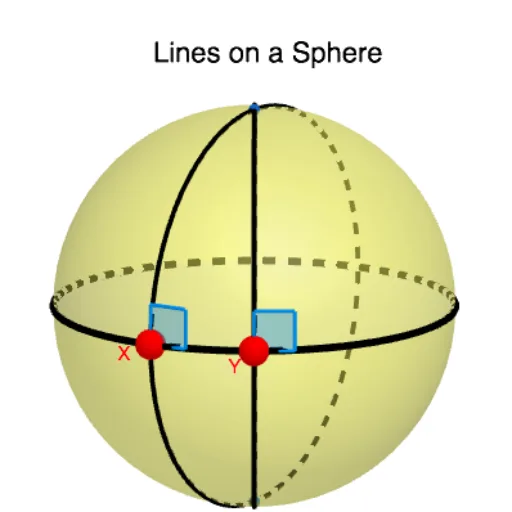
This example demonstrates the construction of a sphere and its associated geometric elements, using natural number parameters and equations to generate the spherical surface, and illustrating intersections between the sphere, planes, and curves. Core mathematical concepts include the sphere equation, parametric curves, natural numbers, cube and volume relationships, as well as tangents and angles. Construction highlights: the Sphere command creates the sphere, IntersectPath finds intersection paths, and Point, Circle, Tangent, Angle commands build auxiliary points, circles, tangents, and angles. Objects include A, a, b, c, B, C, X, e, Y, f, g, h, i, j, α, β, and text labels. Suitable for high school or university courses in solid geometry and analytic geometry, helping students understand sphere equations, parametric representations, and spatial geometric construction techniques.
GeoGebra Commands & Parameters
Sphere(A, 5) → aIntersectPath(b, a) → cPoint(c) → XCircle(B, C, X) → ePoint(c) → YCircle(B, C, Y) → fTangent(Y, c) → g,Tangent(Y, f) → h,Tangent(X, e) → i,Tangent(X, c) → j,Angle(i, j) → αAngle(h, g) → β
AI Drawing Prompt Reference
Draw a sphere with radius 5 in space. Find the intersection curve between the sphere surface and a given path, and take two points on this curve. Through these two points and another known point, draw circles respectively. At one point, draw tangents to the sphere and the circle; at the other point, draw tangents to the circle and the sphere. Finally, measure the angles between these two pairs of tangents.
The prompt above was compiled from the original drawing commands and is for reference only.