
Area of Isosceles and Equilateral Triangles
Loading the math board and drawing, please wait…
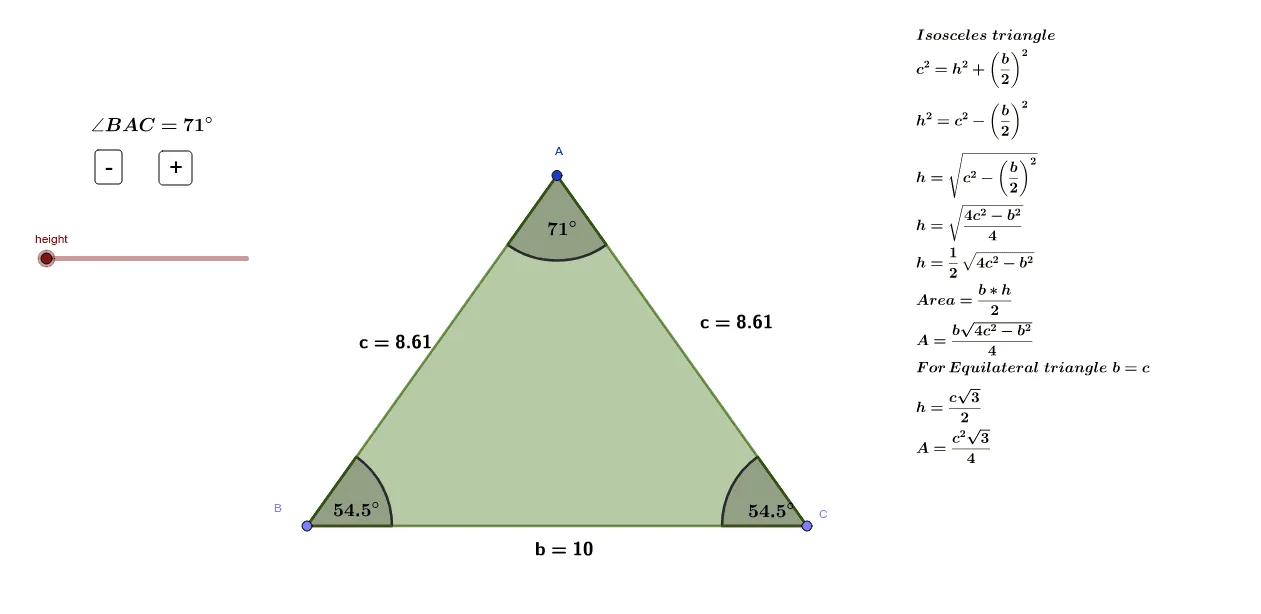
This example demonstrates the area calculation of isosceles and equilateral triangles. Key mathematical concepts include the area formula of a triangle and the properties of an equilateral triangle. Using GeoGebra commands such as Point, Mirror, Polygon, etc., the construction process of the triangles can be dynamically shown. Suitable for students at junior high school level and above to learn geometric construction and area calculation.
GeoGebra Commands & Parameters
Point(xAxis) → BMirror(B, yAxis) → CPolygon(B, A, C) → t1, b', b, a_1Angle(C, B, A) → αAngle(B, A, C) → βAngle(A, C, B) → γSegment(A, H) → fAngle(C, G, A) → δMidpoint(B, A) → DMidpoint(A, C) → E
AI Drawing Prompt Reference
Draw an isosceles triangle ABC with point A on the x-axis, point B as the mirror image of A across the y-axis, and point C as the mirror image of B across the y-axis. Then draw triangle ABC and calculate its area. Next, draw angles α, β, and γ, as well as the altitude AH and midpoints D and E.
The prompt above was compiled from the original drawing commands and is for reference only.