
Area of a Parallelogram - Interactive GeoGebra Demo
Loading the math board and drawing, please wait…
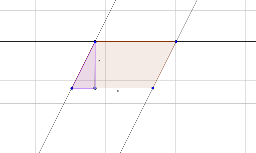
① This GeoGebra example demonstrates the area of a parallelogram through an interactive construction, showing how the area is computed and how an incircle and special points relate to the shape. ② Core math concepts include the parallelogram area formula (base × height), polygon area, properties of incircles, and special points such as midpoints and perpendicular feet, involving arithmetic and natural number operations. ③ Construction details: using commands like Line, Intersect, Polygon, Point, and Segment, the construction includes vertices A, B, C, D, sides a, b, c, d, polygons poly1 and poly2, auxiliary lines g, h, i, j, and text objects text1 and text2 displaying area values. Users can drag points to see how the area changes dynamically. ④ Suitable for middle school geometry lessons, elementary math enrichment, or teacher demonstrations, helping learners intuitively grasp the area formula and explore relationships between parallelograms and incircles.
GeoGebra Commands & Parameters
Line(A, B) → fLine(B, C) → gLine(C, f) → hLine(A, g) → iIntersect(i, h) → DPolygon(A, B, C, D) → poly1, a, b, c, dPolygon(E, F, G) → poly2, g_1, e, f_1Point(c) → HSegment(A, H) → j
AI Drawing Prompt Reference
Draw a parallelogram with an incircle and special points, showing how to calculate its area. Include dynamic vertices to observe area changes, auxiliary lines, and connecting segments, labeling area values to illustrate the relationship between the parallelogram and incircle, as well as the positions of midpoints and feet of perpendiculars.
The prompt above was compiled from the original drawing commands and is for reference only.