
Area Calculation Between Two Curves
Loading the math board and drawing, please wait…
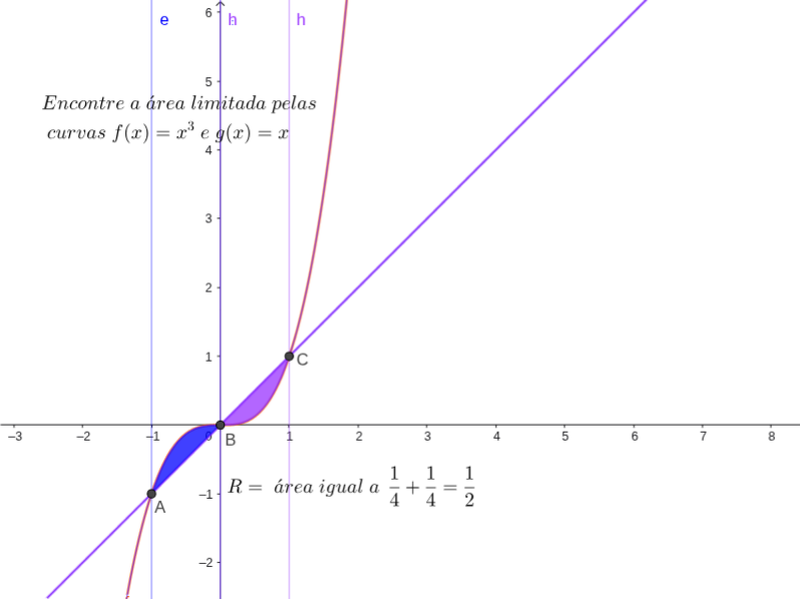
This example demonstrates how to calculate the area enclosed by two curves. The core math concepts involved include integral calculus, function graphing, and curve intersection solving. Key GeoGebra commands and objects used in the construction are Extremum (to find extrema), Intersect (to find intersections), and elements like text1, f, g, a, b, A, B, C, c, d, e, h, text2 for labeling and displaying the calculation process. It is suitable for high school and above students studying calculus and analytical geometry, helping them understand the application of definite integrals in geometry.
GeoGebra Commands & Parameters
Extremum(x^(3)) →Extremum(x^(3)) →Extremum(x^(3)) →Extremum(x^(3)) →Extremum(x^(3)) →Extremum(x^(3)) →Extremum(x^(3)) →Extremum(x^(3)) →Extremum(x^(3)) →Extremum(x^(3)) →Extremum(x^(3)) →Extremum(f) →Extremum(f) →Extremum(f) →Intersect(f, g) → A, B, C
AI Drawing Prompt Reference
Draw the graphs of two functions, find their intersection points and extrema within the domain, connect these points with thick lines to form a closed area, then calculate the area of this region and label the calculation process and coordinates of key points.
The prompt above was compiled from the original drawing commands and is for reference only.