
Area and Perimeter Calculation Demo
Loading the math board and drawing, please wait…
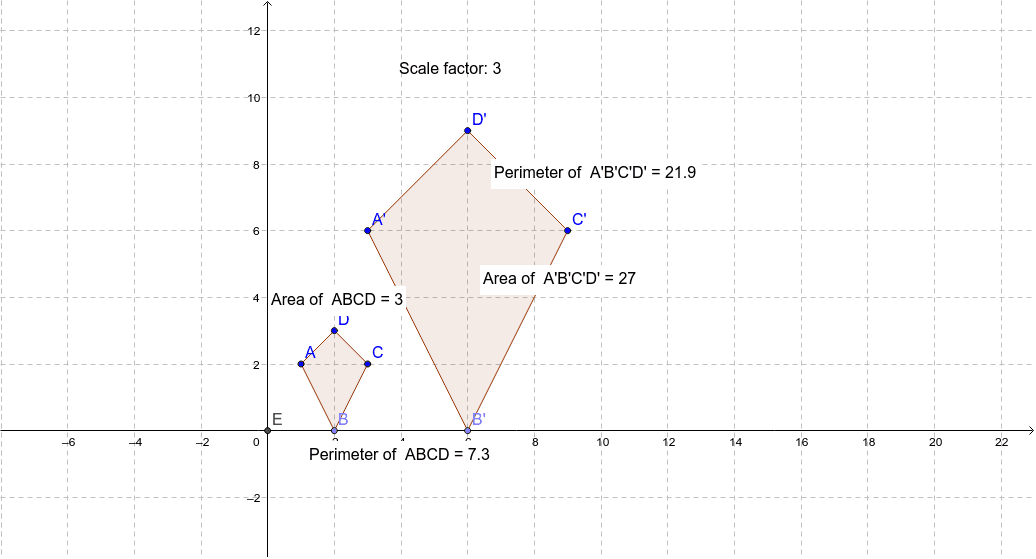
This example demonstrates how to construct polygons and calculate their area and perimeter using GeoGebra. Core math concepts include area, perimeter, geometric transformations, and coordinate geometry. Key construction steps involve commands like Point, Polygon, Intersect, Dilate, PointIn, and Perimeter. Suitable for high school students learning geometric calculations and transformation techniques.
GeoGebra Commands & Parameters
Point(xAxis) → BPolygon(A, B, C, D) → poly1, a, b, c, dIntersect(xAxis, yAxis) → EDilate(A, 3, E) → A'Dilate(B, 3, E) → B'Dilate(C, 3, E) → C'Dilate(D, 3, E) → D'Polygon(A', B', C', D') → poly1', a', b', c', d'PointIn(poly1) → Pointpoly1_1PointIn(poly1') → Pointpoly1'_1Perimeter(poly1) → perimeterpoly1PointIn(poly1) → Pointpoly1Perimeter(poly1') → perimeterpoly1'PointIn(poly1') → Pointpoly1'
AI Drawing Prompt Reference
Draw a polygon defined by four points and show its sides. Then, perform a geometric transformation by scaling the original polygon three times larger from one of its vertices, centered at the intersection point of the polygon with the coordinate axes, to create a new scaled polygon. Calculate and display the perimeter of both the original and the scaled polygon, and mark a point on each polygon.
The prompt above was compiled from the original drawing commands and is for reference only.