
Angle Classification Matching Exercise
Loading the math board and drawing, please wait…
In collections
Besondere Winkelpaare
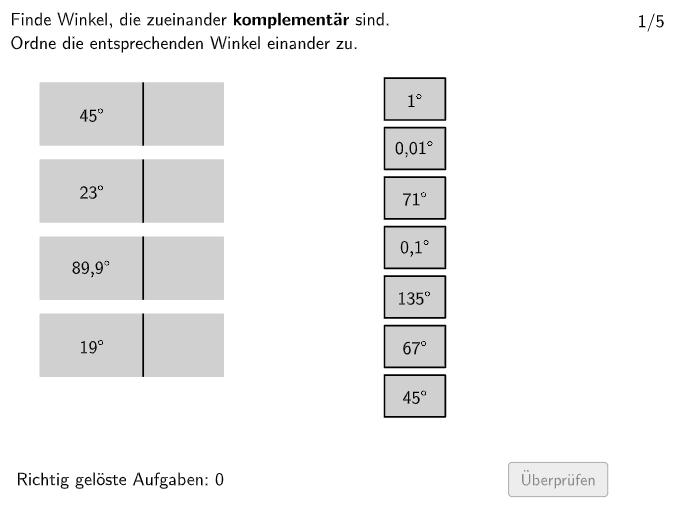
This is an interactive angle classification practice. ①What it demonstrates: Students match angles of different sizes to their correct type (acute, right, obtuse, straight, reflex, full angle) on the interactive interface. ②Core math concepts: definition and classification of angles, quantitative measurement of angles (degree system). ③Construction details: Uses Shuffle to randomize options, Textfield and Text to display questions and choices, If command to check answers, Polygon to draw angle diagrams, Sequence and Length to control the exercise flow. ④Target audience: Grade 5-6 students, suitable for classroom practice or homework review, helping students master angle concepts and classification criteria.
GeoGebra Commands & Parameters
Polygon(allowedRect4, allowedRect3, allowedRect2, allowedRect1) → allowedRect, a_1, b, c, dMax(widthsOptionsR) → widthRMax(heightsOptionsR) → heightRMax(heightR, Max[heightsOptionsL]) → heightLMax(widthsOptionsL) → widthLIf(isShuffleOptionsLechts, Shuffle[1…numOptionsR], 1…numOptionsR) → indizesOptionsRechtsIf(isShuffleOptionsLinks, Shuffle[1…numOptionsL], 1…numOptionsL) → indizesOptionsLinksTextfield(input1) → InputBox1Textfield(input2) → InputBox2Polygon(PtopLeftCornerFeedback, PtopRightCornerFeedback, PbottomRightCornerFeedback, PbottomLeftCornerFeedback) → rectangleCorrect, rectangleCorrectS3, rectangleCorrectS4, rectangleCorrectS2, rectangleCorrectS1Shuffle(Sequence[Random[0, 10], i, 1, 100]) → randomNosForX, {1, 3, 9, 9, 3, 7, 5, 2, 8, 6, 2, 6, 8, 4, 2, 0, 0, 9, 4, 4, 8, 10, 9, 0, 4, 10, 6, 6, 8, 0, 0, 7, 2, 5, 5, 2, 4, 1, 1, 2, 9, 3, 6, 6, 9, 0, 10, 6, 4, 6, 2, 5, 8, 4, 1, 2, 2, 6, 10, 9, 3, 2, 0, 0, 9, 5, 0, 9, 8, 3, 5, 3, 10, 4, 10, 3, 8, 6, 4, 9, 6, 10, 10, 8, 5, 10, 10, 10, 8, 1, 6, 0, 10, 9, 1, 6, 10, 3, 1, 0}Element(randomNosForX, Mod[questionCount, 100] + 1) → numXShuffle(Sequence[Random[0, 10], i, 1, 100]) → randomNosForY, {8, 7, 2, 1, 5, 3, 9, 10, 10, 5, 9, 5, 5, 5, 1, 6, 5, 5, 5, 5, 10, 8, 4, 5, 3, 5, 1, 2, 10, 6, 0, 10, 1, 6, 10, 10, 10, 10, 9, 10, 2, 5, 9, 3, 3, 2, 7, 0, 6, 3, 3, 9, 4, 3, 9, 2, 3, 8, 6, 0, 9, 5, 3, 0, 1, 0, 4, 9, 2, 3, 2, 2, 2, 5, 5, 8, 3, 7, 5, 7, 6, 9, 6, 2, 5, 5, 10, 10, 9, 1, 7, 5, 10, 5, 9, 10, 9, 4, 0, 10}Element(randomNosForY, Mod[questionCount, 100] + 1) → numYAppend(true, Sequence[If[randomNosForX(i) ≟ randomNosForX(i - 1), false, true], i, 2, 100]) → stayXAppend(true, Sequence[If[randomNosForY(i) ≟ randomNosForY(i - 1), false, true], i, 2, 100]) → stayYRemove(Sequence[If[stayX(i), randomNosForX(i), 0], i, 1, 100], Sequence[0, i, 1, 100]) → randomNosForXwithoutRepeatRemove(Sequence[If[stayY(i), randomNosForY(i), 0], i, 1, 100], Sequence[0, i, 1, 100]) → randomNosForYwithoutRepeatElement(randomNosForXwithoutRepeat, Mod[questionCount, Length[randomNosForXwithoutRepeat]] + 1) → numXwithoutRepeatElement(randomNosForYwithoutRepeat, Mod[questionCount, Length[randomNosForYwithoutRepeat]] + 1) → numYwithoutRepeatSequence(1) → positionsOptionsRechtsSequence(Element[optionsRAll, indizesOptionsRechts(i)], i, 1, numOptionsR) → optionsRActualLength(optionsRActual) → aSequence(Element[optionsLAll, indizesOptionsLinks(i)], i, 1, numOptionsL) → optionsLActualSequence(allOptionsL(indizesOptionsLinks(i)), i, 1, numOptionsL) → optionsLSequence(allOptionsR(indizesOptionsLinks(i)), i, 1, numOptionsL) → optionsRPolygon((-10, -2), (10, -2), (10, 10), (-10, 10)) → q1, q_1, r_1, s_1, t_1Polygon(E, F, G, H) → q2, e_1, f_2, g_2, h_2Polygon(I, J, K, L) → q3, i_2, j_2, k_1, l_1Text(optionsLActual(1), CenterOptionL1, true, true, 0, 0) → opL1Text(optionsLActual(2), CenterOptionL2, true, true, 0, 0) → opL2Text(optionsLActual(3), CenterOptionL3, true, true, 0, 0) → opL3Text(optionsLActual(4), CenterOptionL4, true, true, 0, 0) → opL4PointIn(allowedRect) → CenterOptionR1Text(optionsRActual(1), CenterOptionR1, true, true, 0, 0) → opR1Polygon(CenterOptionR1, CenterOptionR1 - (widthR / 2, heightR / 2), CenterOptionR1 + (widthR / 2, ((-heightR)) / 2), CenterOptionR1 + (widthR / 2, heightR / 2), CenterOptionR1 - (widthR / 2, ((-heightR)) / 2), CenterOptionR1 - (widthR / 2, heightR / 2)) → rectRMove1, centeroptionr1, f, g, h, i, jPointIn(allowedRect) → CenterOptionR2Text(optionsRActual(2), CenterOptionR2, true, true, 0, 0) → opR2Polygon(CenterOptionR2, CenterOptionR2 - (widthR / 2, heightR / 2), CenterOptionR2 + (widthR / 2, ((-heightR)) / 2), CenterOptionR2 + (widthR / 2, heightR / 2), CenterOptionR2 - (widthR / 2, ((-heightR)) / 2), CenterOptionR2 - (widthR / 2, heightR / 2)) → rectRMove2, centeroptionr2, k, l, m, n, pPointIn(allowedRect) → CenterOptionR3Text(optionsRActual(3), CenterOptionR3, true, true, 0, 0) → opR3Polygon(CenterOptionR3, CenterOptionR3 - (widthR / 2, heightR / 2), CenterOptionR3 + (widthR / 2, ((-heightR)) / 2), CenterOptionR3 + (widthR / 2, heightR / 2), CenterOptionR3 - (widthR / 2, ((-heightR)) / 2), CenterOptionR3 - (widthR / 2, heightR / 2)) → rectRMove3, centeroptionr3, q, r, s, t, ePointIn(allowedRect) → CenterOptionR4Text(optionsRActual(4), CenterOptionR4, true, true, 0, 0) → opR4Polygon(CenterOptionR4, CenterOptionR4 - (widthR / 2, heightR / 2), CenterOptionR4 + (widthR / 2, ((-heightR)) / 2), CenterOptionR4 + (widthR / 2, heightR / 2), CenterOptionR4 - (widthR / 2, ((-heightR)) / 2), CenterOptionR4 - (widthR / 2, heightR / 2)) → rectRMove4, centeroptionr4, f_1, g_1, h_1, i_1, j_1PointIn(allowedRect) → CenterOptionR5Text(optionsRActual(5), CenterOptionR5, true, true, 0, 0) → opR5Polygon(CenterOptionR5, CenterOptionR5 - (widthR / 2, heightR / 2), CenterOptionR5 + (widthR / 2, ((-heightR)) / 2), CenterOptionR5 + (widthR / 2, heightR / 2), CenterOptionR5 - (widthR / 2, ((-heightR)) / 2), CenterOptionR5 - (widthR / 2, heightR / 2)) → rectRMove5, centeroptionr5, m_1, n_1, b_1, c_1, d_1PointIn(allowedRect) → CenterOptionR6Text(optionsRActual(6), CenterOptionR6, true, true, 0, 0) → opR6Polygon(CenterOptionR6, CenterOptionR6 - (widthR / 2, heightR / 2), CenterOptionR6 + (widthR / 2, ((-heightR)) / 2), CenterOptionR6 + (widthR / 2, heightR / 2), CenterOptionR6 - (widthR / 2, ((-heightR)) / 2), CenterOptionR6 - (widthR / 2, heightR / 2)) → rectRMove6, centeroptionr6, k_2, l_2, m_2, n_2, p_2PointIn(allowedRect) → CenterOptionR7Text(optionsRActual(7), CenterOptionR7, true, true, 0, 0) → opR7Polygon(CenterOptionR7, CenterOptionR7 - (widthR / 2, heightR / 2), CenterOptionR7 + (widthR / 2, ((-heightR)) / 2), CenterOptionR7 + (widthR / 2, heightR / 2), CenterOptionR7 - (widthR / 2, ((-heightR)) / 2), CenterOptionR7 - (widthR / 2, heightR / 2)) → rectRMove7, centeroptionr7, q_2, r_2, s_2, t_2, a_2If(CountIf[P ∈ answerRectLarger1(1), P, verticesR1] ≟ 4, 1, CountIf[P ∈ answerRectLarger2(1), P, verticesR1] ≟ 4, 2, CountIf[P ∈ answerRectLarger3(1), P, verticesR1] ≟ 4, 3, CountIf[P ∈ answerRectLarger4(1), P, verticesR1] ≟ 4, 4, -1) → indexAnswerR1If(CountIf[P ∈ answerRectLarger1(1), P, verticesR2] ≟ 4, 1, CountIf[P ∈ answerRectLarger2(1), P, verticesR2] ≟ 4, 2, CountIf[P ∈ answerRectLarger3(1), P, verticesR2] ≟ 4, 3, CountIf[P ∈ answerRectLarger4(1), P, verticesR2] ≟ 4, 4, -1) → indexAnswerR2If(CountIf[P ∈ answerRectLarger1(1), P, verticesR3] ≟ 4, 1, CountIf[P ∈ answerRectLarger2(1), P, verticesR3] ≟ 4, 2, CountIf[P ∈ answerRectLarger3(1), P, verticesR3] ≟ 4, 3, CountIf[P ∈ answerRectLarger4(1), P, verticesR3] ≟ 4, 4, -1) → indexAnswerR3If(CountIf[P ∈ answerRectLarger1(1), P, verticesR4] ≟ 4, 1, CountIf[P ∈ answerRectLarger2(1), P, verticesR4] ≟ 4, 2, CountIf[P ∈ answerRectLarger3(1), P, verticesR4] ≟ 4, 3, CountIf[P ∈ answerRectLarger4(1), P, verticesR4] ≟ 4, 4, -1) → indexAnswerR4If(CountIf[P ∈ answerRectLarger1(1), P, verticesR5] ≟ 4, 1, CountIf[P ∈ answerRectLarger2(1), P, verticesR5] ≟ 4, 2, CountIf[P ∈ answerRectLarger3(1), P, verticesR5] ≟ 4, 3, CountIf[P ∈ answerRectLarger4(1), P, verticesR5] ≟ 4, 4, -1) → indexAnswerR5If(CountIf[P ∈ answerRectLarger1(1), P, verticesR6] ≟ 4, 1, CountIf[P ∈ answerRectLarger2(1), P, verticesR6] ≟ 4, 2, CountIf[P ∈ answerRectLarger3(1), P, verticesR6] ≟ 4, 3, CountIf[P ∈ answerRectLarger4(1), P, verticesR6] ≟ 4, 4, -1) → indexAnswerR6If(CountIf[P ∈ answerRectLarger1(1), P, verticesR7] ≟ 4, 1, CountIf[P ∈ answerRectLarger2(1), P, verticesR7] ≟ 4, 2, CountIf[P ∈ answerRectLarger3(1), P, verticesR7] ≟ 4, 3, CountIf[P ∈ answerRectLarger4(1), P, verticesR7] ≟ 4, 4, -1) → indexAnswerR7CountIf(ind ≠ -1, ind, indizesAnswerR) → numAnswersDraggedToLeftIf(correct, "\vphantom{✘}✓ Richtig", If[correctpartially, "\vphantom{✓}✘ Teilweise richtig", "\vphantom{✓}✘ Falsch"]) → correctTextTempText((("\Large\textsf{" * correctTextTemp) * "}"), PStartCorrectText, true, true, 1, 0) → correctText
AI Drawing Prompt Reference
This is an interactive angle classification exercise graphic featuring six angle types: acute, right, obtuse, straight, reflex, and full angle. The graphic includes a rectangle background with text boxes for questions and options, and angle diagram illustrations. The construction order is to first draw the rectangle, then randomize option order, create text boxes and option labels, and finally draw angle diagrams for student matching.
The prompt above was compiled from the original drawing commands and is for reference only.