
Angle Between Hour and Minute Hands of a Clock
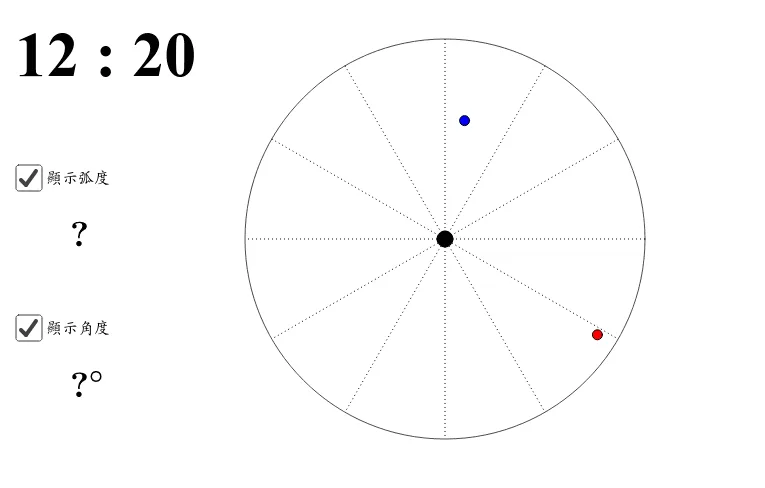
This GeoGebra example constructs a dynamic clock model to demonstrate real-time calculation of the angle between the hour and minute hands. Using commands such as Circle, Vector, Angle, and Sequence, it simulates clock movement and displays the angle in both degrees and radians. Ideal for learning angle calculation, angular velocity concepts, and clock-related math problems, this interactive applet provides an intuitive visual understanding of how clock hands move at different speeds and how their relative angular positions change over time.
The applet allows users to adjust the time by dragging the hands or inputting specific hour and minute values, and the geometry automatically updates to show the current angle between the two hands. The mathematical formulas used derive from the constant angular velocities of each hand: the minute hand rotates 360 degrees per hour, while the hour hand rotates only 30 degrees per hour. The angle is computed as the absolute difference between their respective positions, with the smaller angle always displayed. This reinforces key trigonometry and geometry concepts including unit circle reasoning, angle measurement conversions, and piecewise linear functions.
Students can explore questions such as at what times during a 12-hour cycle do the hands form a right angle, a straight line, or overlap entirely. The dynamic nature of the construction encourages experimentation and pattern recognition, making abstract angle relationships concrete and accessible. Teachers can use this tool as a classroom demonstration, a guided exploration activity, or a self-paced learning resource. It is particularly useful for middle school and high school curricula covering angles, time, rates of change, and introductory kinematics.
Loading the math board and drawing, please wait…