
Adding Like Fractions
Loading the math board and drawing, please wait…
In collections
Erstes Rechnen mit Brüchen - Addieren
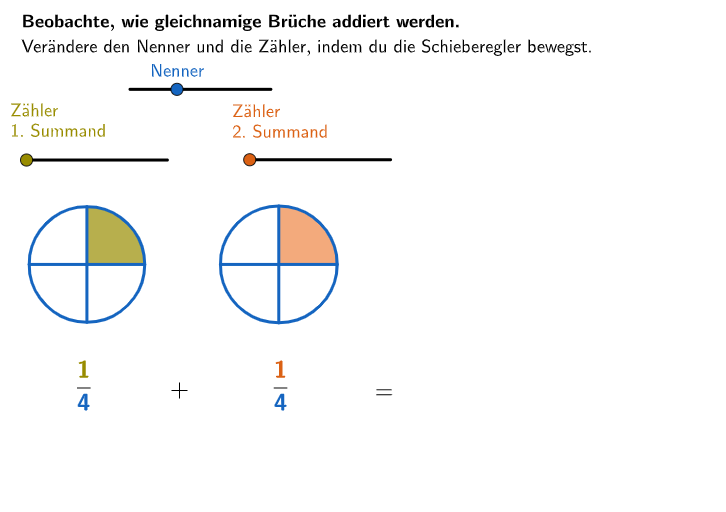
This example demonstrates how to add like fractions using GeoGebra. The core math concept involved is fraction addition. Construction highlights include commands and objects such as Sequence, Point, Circle, Segment, Textfield, SelectedIndex, If; and H, widthNennerBar, widthZaehlerBar, I, allowedPositionsNennerBar, PNenner, nenner2, zaehler, zaehler2. Suitable for 5-6th grade students learning fraction addition.
GeoGebra Commands & Parameters
Sequence(I + ((i * widthNennerBar / 12) * (1, 0)), i, 1, 12) → allowedPositionsNennerBarPoint(allowedPositionsNennerBar) → PNennerCircle(M, B) → cSegment(M, M + (Radius[c] * (0, 1))) → fSegment(H, H + (widthZaehlerBar * (1, 0))) → gSegment(I, I + (widthNennerBar * (1, 0))) → hSequence(H + ((i * widthZaehlerBar / 12) * (1, 0)), i, 0, nenner2 - 1) → allowedPositionsZaehlerBarPoint(allowedPositionsZaehlerBar) → PZaehlerSequence(Rotate[f, ((i * 2) * pi / nenner2), M], i, 0, nenner2 - 1) → l1Sequence(J + ((i * widthZaehlerBar / 12) * (1, 0)), i, 0, nenner2 - 1) → allowedPositionsZaehlerBar2Point(allowedPositionsZaehlerBar2) → PZaehler1Segment(J, J + (widthZaehlerBar * (1, 0))) → iCircle(M_1, B_1) → dSegment(M_1, M_1 + (Radius[d] * (0, 1))) → jSequence(Rotate[j, ((i * 2) * pi / nenner2), M_1], i, 0, nenner2 - 1) → l3Circle(M_2, B_2) → eSegment(M_2, M_2 + (Radius[e] * (0, 1))) → kSequence(Rotate[k, ((i * 2) * pi / nenner2), M_2], i, 0, nenner2 - 1) → l5Sequence(Rotate[K, (((-(i + 1)) * 2) * pi / nenner2), M_2], i, 0, zaehler2 - 1) → l7Textfield(aInput) → InputBox1SelectedIndex(z1) → index1SelectedIndex(z2) → index2Circle(M_{3}, B_{3}) → e_{1}Circle(M_{3}, B_{3}) → pSegment(M_{3}, M_{3} + (Radius[p] * (0, 1))) → k_1Sequence(Rotate[k_1, ((i * 2) * pi / nenner2), M_{3}], i, 0, nenner2 - 1) → l9Sequence(CircleSector[M, Rotate[KreisOben, (((-(i + 1)) * 2) * pi / nenner2), M], Rotate[KreisOben, (((-i) * 2) * pi / nenner2) - 0.0001, M]], i, 0, zaehler2 - 1) → l2Sequence(CircleSector[M_1, Rotate[KreisOben1, (((-(i + 1)) * 2) * pi / nenner2), M_1], Rotate[KreisOben1, (((-i) * 2) * pi / nenner2) - 0.0001, M_1]], i, 0, zaehler3 - 1) → l4Sequence(CircleSector[M_2, Rotate[KreisOben2, (((-(i + 1)) * 2) * pi / nenner2), M_2], Rotate[KreisOben2, (((-i) * 2) * pi / nenner2) - 0.0001, M_2]], i, 0, zaehler2 - 1) → l6Sequence(Rotate[K_1, (((-(i + 1)) * 2) * pi / nenner2), M_{3}], i, 0, zaehler2 - 1) → l10Sequence(CircleSector[M_{3}, Rotate[StartPoint2, (((-(i + 1)) * 2) * pi / nenner2), M_{3}], Rotate[StartPoint2, (((-i) * 2) * pi / nenner2) - 0.0001, M_{3}]], i, 0, zaehler2 + zaehler3 - nenner2 - 1) → l11Sequence(CircleSector[M_2, Rotate[StartPoint, (((-(i + 1)) * 2) * pi / nenner2), M_2], Rotate[StartPoint, (((-i) * 2) * pi / nenner2) - 0.0001, M_2]], i, 0, nenner2 - zaehler2 - 1) → l8Sequence(CircleSector[M_2, Rotate[StartPoint, (((-(i + 1)) * 2) * pi / nenner2), M_2], Rotate[StartPoint, (((-i) * 2) * pi / nenner2) - 0.0001, M_2]], i, 0, zaehler3 - 1) → l12Textfield(bInput) → InputBox2Textfield(cInput) → InputBox3If(zaehler2 + zaehler3 > nenner2, P2 + (0.1, 0), P1 + (0.1, 0)) → PosGleich
AI Drawing Prompt Reference
Construct a fraction-addition diagram using circular sectors to represent adding like fractions. Set up two concentric sector grids on the same plane, with the sector angles determined by the common denominator and with matching sizes for the numerator portions. First draw circles and use vertical segments to fix the radius and initial orientation, then place sector boundaries by rotating a sector around the center for each step around the circle. Add straight segment bars aligned with a common baseline to mark the numerator widths, and place their corresponding rotated positions consistently. Use two input parameters for the two fractions; select the appropriate sector ranges on each circle so the highlighted portions correspond to each addend, and if the combined numerator exceeds the denominator, shift the displayed/compared alignment region accordingly.
The prompt above was compiled from the original drawing commands and is for reference only.