
Adding Fractions by Celia Jimenez
Loading the math board and drawing, please wait…
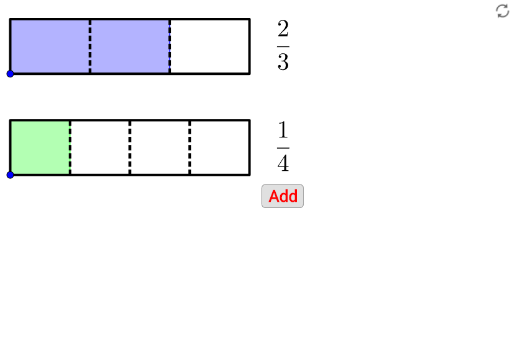
This example demonstrates the process of adding fractions. The core mathematical concepts involved are fraction addition. Using GeoGebra commands such as Point, Ray, Polygon, Sequence, etc., it dynamically illustrates the geometric meaning of fraction addition. Suitable for high-grade elementary and junior high school students to learn fraction addition.
GeoGebra Commands & Parameters
Point(yAxis) → CPoint(Segment[C + (0, h), C + (0, (1.85 * h))]) → BIf(t ≤ 0.5, 0, (2 * (t - 0.5))) → t2If(t ≤ 0.5, (2 * t), 1) → t1Point(Segment[B + (0, h), B + (0, (1.85 * h))]) → ARay((0, 1.9), (0, 2.9)) → fPolygon({A, A + (l, 0), A + (l, h), A + (0, h)}) → poly1Polygon({B, B + (l, 0), B + (l, h), B + (0, h)}) → poly2Sequence(Segment[A + ((i * l / a1), 0), A + ((i * l / a1), h)], i, 1, a1 - 1) → list1Sequence(Segment[B + ((i * l / a2), 0), B + ((i * l / a2), h)], i, 1, a2 - 1) → list2Polygon({A, A + ((b1 * l / a1), 0), A + ((b1 * l / a1), h), A + (0, h)}) → poly3Polygon({B, B + ((b2 * l / a2), 0), B + ((b2 * l / a2), h), B + (0, h)}) → poly4Sequence(Sequence[Segment[A + ((i * l / a1) + (j * l / ((a1 * c1))), 0), A + ((i * l / a1) + (j * l / ((a1 * c1))), h)], j, 1, c1 - 1], i, 0, a1 - 1) → list3Sequence(Sequence[Segment[B + ((i * l / a2) + (j * l / ((a2 * c2))), 0), B + ((i * l / a2) + (j * l / ((a2 * c2))), h)], j, 1, c2 - 1], i, 0, a2 - 1) → list4If(a1 ≟ a2, true, false) → equaldIf(equald ∧ ((Div[b1 + b2, a1] > 0) ∨ (GCD[b1 + b2, a1] > 1)), true, If[(Div[(b1 * c1) + (b2 * c2), (a1 * c1)] > 0) ∨ (GCD[(b1 * c1) + (b2 * c2), (a1 * c1)] > 1), true, false]) → simplifyTextfield(a1) → InputBox1Textfield(b1) → InputBox2Textfield(a2) → InputBox3Textfield(b2) → InputBox4Polygon({A', A' + (l, 0), A' + (l, h), A' + (0, h)}) → poly5Polygon({B', B' + ((b2 / a2 * l), 0), B' + ((b2 / a2 * l), h), B' + (0, h)}) → poly6Polygon({A', A' + ((b1 * l / a1), 0), A' + ((b1 * l / a1), h), A' + (0, h)}) → poly7Polygon({B', B' + ((b2 * l / a2), 0), B' + ((b2 * l / a2), h), B' + (0, h)}) → poly8Sequence(Sequence[Segment[A' + ((i * l / a1) + (j * l / ((a1 * c1))), 0), A' + ((i * l / a1) + (j * l / ((a1 * c1))), h)], j, 1, c1 - 1], i, 0, b1 - 1) → list8Sequence(Sequence[Segment[B' + ((i * l / a2) + (j * l / ((a2 * c2))), 0), B' + ((i * l / a2) + (j * l / ((a2 * c2))), h)], j, 1, c2 - 1], i, 0, b2 - 1) → list9Segment(C - (0, 0.5), C - (0, 1)) → gSegment(C + ((b1 / a1 * l), -0.5), C + ((b1 / a1 * l), -1)) → iSegment(C + ((b1 / a1 * l) + (b2 / a2 * l), -0.5), C + ((b1 / a1 * l) + (b2 / a2 * l), -1)) → jVector(Midpoint[g], Midpoint[i]) → uVector(Midpoint[i], Midpoint[g]) → vVector(Midpoint[i], Midpoint[j]) → wVector(Midpoint[j], Midpoint[i]) → aSequence(Segment[A' + ((i * l / a1), 0), A' + ((i * l / a1), h)], i, 0, b1) → list6Sequence(Segment[B' + ((i * l / a2), 0), B' + ((i * l / a2), h)], i, 0, b2) → list7Sequence(Polygon[{C + ((i * l), 0), C + ((i * l) + l, 0), C + ((i * l) + l, h), C + ((i * l), h)}], i, 1, floor(b1 / a1 + b2 / a2)) → list5Segment(B', B' + ((b2 / a2 * l), 0)) → kSegment(B' + ((b2 / a2 * l), h), B' + (0, h)) → mIf(b1 / a1 + b2 / a2 ≥ 1, true, false) → improperFractionText(b1 / a1 + b2 / a2) → text19FractionText(b1 / a1 + b2 / a2 - 1) → text20Sequence(Sequence[Segment[C + ((i * l / ((a1 * c1))) + (j * l), 0), C + ((i * l / ((a1 * c1))) + (j * l), h)], i, 1, (a1 * c1) - 1], j, 0, If[b1 / a1 + b2 / a2 ≤ 1, 0, 1]) → list10
AI Drawing Prompt Reference
Draw a dynamic illustration of adding fractions geometrically. Start by creating two rays, then form two polygons on one ray to represent the numerators and denominators of two fractions. Draw several segments between these polygons to show the细分 of the fractions. Finally, represent the sum of the two fractions with a larger polygon, and label the values and the addition process with arrows and text.
The prompt above was compiled from the original drawing commands and is for reference only.