
A Reflection and a Rotation
Loading the math board and drawing, please wait…
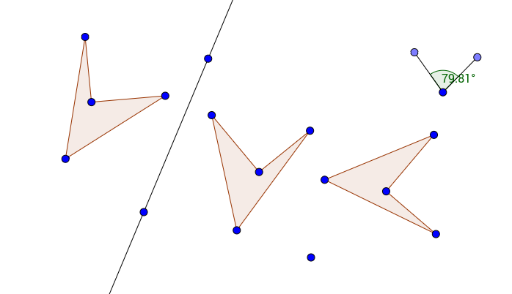
This GeoGebra example demonstrates the combined effects of a reflection and a rotation on a polygon in the plane. It visually shows how the original shape is first mirrored across a line and then rotated around a point, producing two successive transformed images. The core mathematical concepts include reflection (axial symmetry), rotation (about a point), composition of transformations, and the correspondence between original and transformed vertices, sides, and angles. The construction uses commands such as Polygon, Line, Mirror, Circle, Point, Segment, Angle, and Rotate, creating multiple sets of primed and double-primed objects (e.g., A', B', C', D', poly1', and A'', B'', C'', D'', poly1'') to track the images after each step. This resource is suitable for middle or high school geometry classes, helping students grasp the properties of rigid motions and how transformations can be composed. It can be used for teacher demonstrations or student exploration in dynamic geometry environments.
GeoGebra Commands & Parameters
Polygon(A, B, C, D) → poly1, a, b, c, dLine(E, F) → fMirror(A, f) → A'Mirror(B, f) → B'Mirror(C, f) → C'Mirror(D, f) → D'Polygon(A', B', C', D') → poly1', a', b', c', d'Circle(G, H) → ePoint(e) → ISegment(G, I) → gPoint(e) → JSegment(G, J) → hAngle(J, G, I) → αRotate(A', (-α), K) → A''Rotate(B', (-α), K) → B''Rotate(C', (-α), K) → C''Rotate(D', (-α), K) → D''Polygon(A'', B'', C'', D'') → poly1'', a'', b'', c'', d''
AI Drawing Prompt Reference
Draw a quadrilateral, reflect its vertices across a line to get a mirrored quadrilateral, then rotate the mirrored quadrilateral around a point by a certain angle to obtain a rotated quadrilateral, demonstrating the combined effect of reflection and rotation.
The prompt above was compiled from the original drawing commands and is for reference only.