
3-bar Linkage
Loading the math board and drawing, please wait…
In collections
Locus Line Equations demos
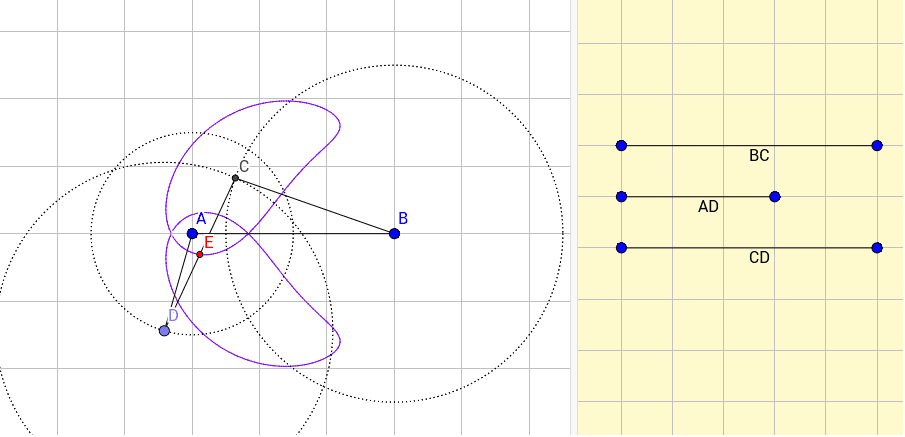
This example demonstrates the geometric construction and motion principles of a three-bar linkage mechanism. Key math concepts include the cosine rule, vector operations, circle properties, and geometric distribution. Construction involves commands like Segment, Circle, Point, Intersect, Midpoint, and LocusEquation in GeoGebra, suitable for high school and above students studying mechanical principles, geometric constructions, and vector applications.
GeoGebra Commands & Parameters
Segment(A, B) → fSegment(C_1, D_1) → BCCircle(B, BC) → cSegment(E_1, F) → ADCircle(A, AD) → dPoint(d) → DSegment(G, H) → CDCircle(D, CD) → eIntersect(c, e, 2) → CSegment(B, C) → iSegment(C, D) → jSegment(A, D) → kMidpoint(j) → ELocusEquation(E, D) → a
AI Drawing Prompt Reference
Draw a three-bar linkage mechanism. Start by drawing points A and B, then draw segment AB. Next, draw points C1 and D1, draw segment C1D1, and draw circle c with B as the center and C1D1 as the radius. Then, draw points E1 and F, draw segment E1F, and draw circle d with A as the center and E1F as the radius. On circle d, pick point D, draw segment BD. Next, draw points G and H, draw segment GH, and draw circle e with D as the center and GH as the radius. Circle c and circle e intersect at point C, draw segments BC and CD. On CD, find the midpoint E, and finally draw the locus of point E with respect to D, which is the trajectory line a.
The prompt above was compiled from the original drawing commands and is for reference only.