
用值表探索函数:从方程到图像的互动练习
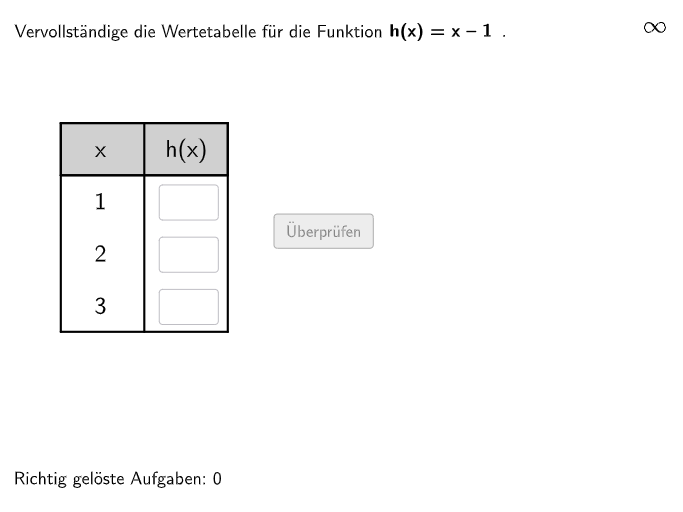
几何画板及绘图内容加载中,请稍等……
① 本范例是一个面向初中生的互动练习,演示如何通过函数的值表(Wertetabelle)来理解函数关系,并在函数方程、值表和图像之间进行切换。② 核心数学概念是实值函数的多种表示形式,包括函数方程、值表和函数图像,以及它们之间的相互转换,帮助学生建立对函数概念的直观认识。③ 作图要点:从构造摘要看,该范例使用了GeoGebra的文本字段(Textfield)、列表元素(Element)、随机数(Shuffle)、多边形(Polygon)、中点(Midpoint)、线段(Segment)、交点(Intersect)等命令,并设计了多个输入框(InputBox)、验证按钮(btnValidate)、显示答案(showanswer)等交互对象,以及用于生成随机函数和数值的变量(randomNosForFunction、selFunction等),实现了动态出题和即时反馈。④ 适合7-8年级学生,
GeoGebra 命令及参数
Textfield(input1) → InputBox1Textfield(input2) → InputBox2Join({Shuffle[{2, 3, 13}], Shuffle[{1, 4, 5, 6, 7, 8, 9, 10, 11, 12, 14, 15, 16, 17}]}) → randomNosForFunctionElement(randomNosForFunction, Mod[questionCount, 100] + 1) → selFunctionShuffle(1…8) → randomNosForNums, {4, 5, 7, 6, 1, 8, 2, 3}Element(randomNosForNums, Mod[questionCount2, 100] + 1) → selNumShuffle({{1, 2, 3}, {-1, 0, 1}, {2, 4, 6}, {-3, -2, -1}, {0, 1, 2}, {-5, 0, 5}, {0, 5, 10}, {-4, -2, 0}}) → listNums, {{-5, 0, 5}, {0, 1, 2}, {0, 5, 10}, {1, 2, 3}, {-3, -2, -1}, {-1, 0, 1}, {-4, -2, 0}, {2, 4, 6}}Textfield(input3) → InputBox3Polygon(PtopLeftCornerFeedback, PtopRightCornerFeedback, PbottomRightCornerFeedback, PbottomLeftCornerFeedback) → rectangleCorrect, rectangleCorrectS3, rectangleCorrectS4, rectangleCorrectS2, rectangleCorrectS1Polygon(A, B, C, D) → q1, a_1, b_1, c_1, d_1Midpoint(A, B) → GMidpoint(A, D) → EMidpoint(E, D) → FMidpoint(A, E) → HMidpoint(B, C) → IMidpoint(I, C) → JMidpoint(B, I) → KMidpoint(D, C) → LSegment(H, K) → kSegment(G, L) → lPolygon(A, H, K, B) → q2, a_2, h_1, k_1, b_2Intersect(l, k) → M