
梯形与矩形连接
几何画板及绘图内容加载中,请稍等……
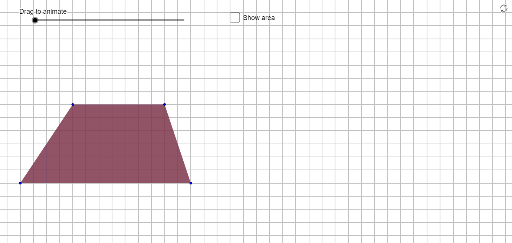
①本范例演示梯形与矩形之间的几何关系与构造方法;②涉及核心数学概念包括多边形、解析几何、几何作图、三角函数等;③作图要点提炼自构造摘要,使用了PointIn, Ray, Point, Segment, Polygon, Midpoint, OrthogonalLine, Intersect等GeoGebra命令与对象;④适合高中数学教学或几何爱好者探索图形变换与性质。
GeoGebra 命令及参数
PointIn(y ≥ 1) → CRay((0, 0), (1, 0)) → bbPoint(bb) → APointIn(y ≥ 1 ∧ x ≥ 0) → BSegment((1, 0), (20, 0)) → q_1Point(q_1) → DPolygon(A, B, C, D) → poly1, a, b, c, dMidpoint(c) → FMidpoint(a) → EOrthogonalLine(E, d) → eIntersect(top, e) → GOrthogonalLine(F, d) → fIntersect(e, y = 0) → HIntersect(f, y = 0) → IPolygon(Rotate[E, ((-Min[deg, 180]))°, E], Rotate[H, ((-Min[deg, 180]))°, E], Rotate[A, ((-Min[deg, 180]))°, E]) → poly2, h, m, nPolygon(Rotate[F, Min[deg, 180]°, F], Rotate[I, Min[deg, 180]°, F], Rotate[D, Min[deg, 180]°, F]) → poly3, i, r, sPolygon(Rotate[E, Min[deg, 180]°, E], Rotate[G, Min[deg, 180]°, E], Rotate[B, Min[deg, 180]°, E]) → poly4, g, k, lIntersect(top, f) → JPolygon(Rotate[F, ((-Min[deg, 180]))°, F], Rotate[C, ((-Min[deg, 180]))°, F], Rotate[J, ((-Min[deg, 180]))°, F]) → poly5, j, p, qPolygon(D, A, E, G, J, F) → poly6, t, a_1, b_1, c_1, d_1, e_1Polygon(H, E, B, J, F, D) → poly7, f_1, g_1, h_1, i_1, j_1, k_1Polygon(G, E, A, I, F, C) → poly8, g_2, e_2, a_2, i_2, f_2, c_2Polygon(H, E, B, C, F, I) → poly9, h_2, e_3, b_2, c_3, f_3, i_3Polygon(B, A, I, F, C) → poly10, b_3, a_3, i_4, f_4, c_4Polygon(B, C, D, H, E) → poly11, b_4, c_5, d_2, h_3, e_4Polygon(A, B, C, D) → poly12, a_4, b_5, c_6, d_3Polygon(A, E, G, C, D) → poly13, a_5, e_5, g_3, c_7, d_4Polygon(Translate[A, ((movement * (deg / 100 - 2)), 0)], Translate[B, ((movement * (deg / 100 - 2)), 0)], Translate[C, ((movement * (deg / 100 - 2)), 0)], Translate[D, ((movement * (deg / 100 - 2)), 0)]) → ghost, l_1, m_1, n_1, p_1Polygon(A, B, J, F, D) → poly14, a_6, b_6, j_2, f_5, d_5
AI 绘图提示语参考
绘制一个梯形与矩形关联的几何图形。先画一条水平底边,在其上取两点作为下底端点,再在上方区域取两点作为上底端点,连接四点构成梯形。分别取两腰的中点,过中点作底边的垂线,与上底或底边相交,得到若干交点。以这些中点和交点为顶点,构造多个旋转后的三角形和多边形,形成对称的折叠效果。最后将整个梯形沿水平方向平移一段距离,得到虚影,展示动态变化。
以上提示语为根据原始绘图命令整理而来,仅供参考。