
根式乘积与商的最简化简:GeoGebra 交互练习
几何画板及绘图内容加载中,请稍等……
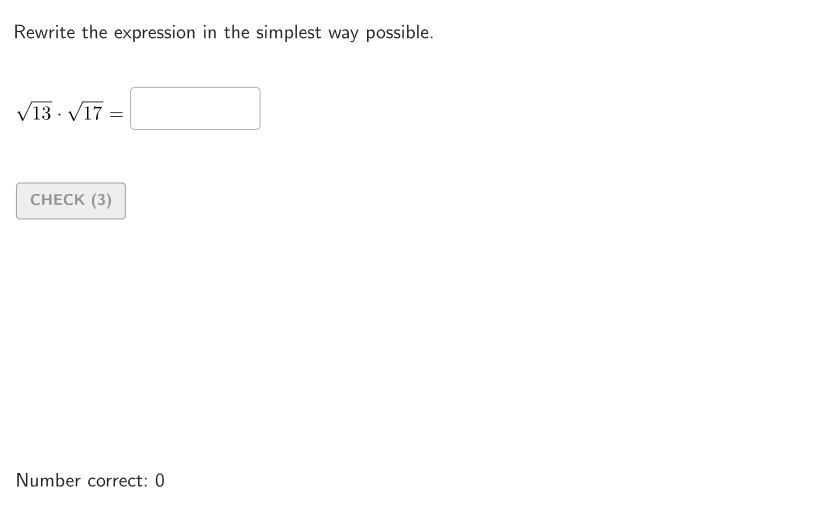
该范例用于演示如何把含根号的乘积与商运算改写成最简形式。核心数学概念包括:二次根式的乘法性质(√(a)·√(b)=√(ab))、除法性质(√(a)/√(b)=√(a/b) 在适当条件下)、以及把被开方数分解因数后进行配对化简,最终得到最简根式。作图与交互要点主要体现在:使用“Textfield”输入待化简的表达式,再通过“AreEqual”进行等值性校验;通过“Sequence”“Shuffle”等对象组织多组题目与随机化参数;用“Element”“Take”“RemoveUndefined”“Defined”“If”处理对象有效性、条件判断与流程控制;并借助“Polygon”“Corner”“TextToUnicode”等元素进行界面呈现与反馈文字的构造。适合 9–12 年级学生用于根式运算的巩固训练,也可作为课堂练习或自学的交互式作业资源。
GeoGebra 命令及参数
Element(allCaseNum, Mod[countQuestion, Length[allCaseNum]] + 1) → caseNumSequence(Random[0, 99] / 100, A, 1, 200) → allRandomSeeds, {0.88, 0.49, 0.55, 0.81, 0.63, 0.45, 0.91, 0.69, 0.11, 0, 0.5, 0.23, 0.23, 0.53, 0.35, 0.94, 0.03, 0.33, 0.72, 0.69, 0.82, 0.39, 0.25, 0.08, 0.22, 0.2, 0.35, 0.82, 0.36, 0.57, 0.93, 0.99, 0.86, 0.15, 0.02, 0.5, 0.31, 0.22, 0.35, 0.16, 0.97, 0.98, 0.68, 0.41, 0.22, 0.06, 0.98, 0.99, 0.05, 0.74, 0.19, 0.25, 0.81, 0.4, 0.82, 0.36, 0.4, 0.87, 0.02, 0.46, 0.7, 0.38, 0.3, 0.68, 0.57, 0.24, 0.63, 0.3, 0.37, 0.8, 0.46, 0.99, 0.13, 0.91, 0.9, 0.39, 0.93, 0.66, 0.09, 0.58, 0.43, 0.47, 0.95, 0.93, 0.88, 0.6, 0.8, 0.52, 0.64, 0.72, 0.6, 0.43, 0.78, 0.45, 0.29, 0.86, 0.11, 0.79, 0.64, 0.73, 0.54, 0.87, 0.12, 0.68, 0.17, 0.52, 0.8, 0.8, 0.46, 0.91, 0.09, 0.43, 0.17, 0.29, 0.57, 0.58, 0.35, 0.15, 0.51, 0.22, 0.24, 0.41, 0.71, 0.53, 0.07, 0.29, 0.03, 0.31, 0.02, 0.16, 0.67, 0.25, 0.73, 0.31, 0.14, 0.17, 0.75, 0.99, 0.46, 0.36, 0.92, 0.89, 0.42, 0.5, 0.46, 0.5, 0.87, 0.4, 0.07, 0.2, 0.84, 0.83, 0.57, 0, 0.92, 0.8, 0.53, 0.56, 0.87, 0.8, 0.18, 0.71, 0.82, 0.48, 0.1, 0.23, 0.47, 0.55, 0.95, 0.54, 0.12, 0.6, 0.24, 0.9, 0.55, 0.7, 0.55, 0.64, 0.79, 0.82, 0.75, 0.64, 0.19, 0.88, 0.71, 0.04, 0.6, 0.29, 0.05, 0.14, 0.22, 0.65, 0.73, 0.16, 0.59, 0.3, 0.06, 0.03, 0.4, 0.23}Take(allRandomSeeds, randIndex, randIndex + numRandoms - 1) → currentRandomSeedsShuffle({3, 5, 7, 11, 13, 17}) → allA1, {13, 17, 7, 5, 11, 3}Element(allA1, Mod[countQuestion, Length[allA1]] + 1) → factA1Shuffle(allA1 \ {factA1}) → allB1, {17, 11, 7, 5, 3}Element(allB1, Mod[countQuestion, Length[allB1]] + 1) → factB1Shuffle({3, 5, 7, 11}) → allA2, {5, 3, 7, 11}Element(allA2, Mod[countQuestion, Length[allA2]] + 1) → baseA2Shuffle({2, 3, 4, 5}) → allB2, {4, 3, 2, 5}Element(allB2, Mod[countQuestion, Length[allB2]] + 1) → divisorB2Textfield(inputB) → InputBoxBTextfield(inputA) → InputBoxAAreEqual(InputBoxA, givenVal1) → correctValue1Polygon(Zip[PixelsToPoint[Corner[1], Corner[3], Corner[5], A], A, {(pixelsLeft, pixelsTop), (pixelsLeft, y(Corner[5]) - pixelsBottom), Corner[5] - (pixelsRight, pixelsBottom), (x(Corner[5]) - pixelsRight, pixelsTop)}]) → borderBoxCorner(5) → layoutAppSizeonboardingTextOffset(Corner[onboardingText, 1], Corner[onboardingText, 3], onboardingCase, Corner[1], Corner[3], Corner[5]) → OnboardingTextOffsetTextfield(inputC) → InputBoxCAreEqual(InputBoxA, givenVal2) → correctValue2TextToUnicode("0123456789") → allDigitsRemoveUndefined(Zip[If[Defined[IndexOf[A, allDigits]], A], A, inputCurrentUni]) → studentDigitsDefined(IndexOf[Sort[studentDigits], expectedDigits]) → correctSimpl1Defined(IndexOf[Sort[studentDigits], expectedDigits]) → correctSimpl2If(caseNum ≟ 1 ∧ prod ≥ 100, 125, caseNum ≟ 1 ∧ prod < 100, 115, 78) → inputPosX
AI 绘图提示语参考
这是一个交互式数学练习界面,包含三个输入框用于学生填写简化后的根式表达式。界面下方有答案验证区域,通过对比输入结果与预期值来判断正确性。右侧随机生成根式乘积或商的问题案例,案例编号和随机种子由系统自动分配。整体布局简洁,输入框与验证区域对齐,随机问题案例以列表形式展示,适合课堂练习和自适应学习。
以上提示语为根据原始绘图命令整理而来,仅供参考。