
使用最大公约数简化分数
几何画板及绘图内容加载中,请稍等……
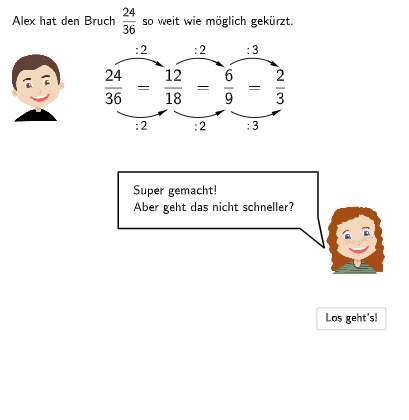
①本范例演示如何通过最大公约数(ggT)简化分数;②涉及核心数学概念:最大公约数、分数简化、数感、分数运算;③作图要点:使用了SpeechBubbleRight, CircleArc, Point, Vector, Textfield, SpeechBubbleLeft, Segment等GeoGebra命令/对象进行交互式演示;④适合小学5-6年级学生,用于教学分数的扩展与简化,结合可视化理解。
GeoGebra 命令及参数
SpeechBubbleRight(E, 6, 1.5) → bubble1CircleArc(F, G, H) → cPoint(c) → IVector(I, J) → uCircleArc(F_{1}, G_{1}, H_{1}) → c_{1}Point(c_{1}) → I_{1}Vector(I_{1}, J_{1}) → u_{1}CircleArc(F_{2}, G_{2}, H_{2}) → c_{2}Point(c_{2}) → I_{2}Vector(I_{2}, J_{2}) → u_{2}CircleArc(K, L, M) → dPoint(d) → NPoint(d) → OVector(N, O) → vCircleArc(K_{1}, L_{1}, M_{1}) → d_{1}Point(d_{1}) → N_{1}Point(d_{1}) → O_{1}Vector(N_{1}, O_{1}) → v_{1}CircleArc(K_{2}, L_{2}, M_{2}) → d_{2}Point(d_{2}) → N_{2}Point(d_{2}) → O_{2}Vector(N_{2}, O_{2}) → v_{2}SpeechBubbleRight(E, 9.8, 2) → bubble2Textfield(aInput) → InputBox1SpeechBubbleLeft(T, 10, 1) → bubble3Textfield(bInput) → InputBox2Textfield(cInput) → InputBox3Segment(U, V) → fCircleArc(W, Z, A_1) → ePoint(e) → B_1Vector(B_1, C_1) → wCircleArc(D_1, E_1, P_1) → gPoint(g) → Q_1Vector(Q_1, R_1) → aTextfield(dInput) → InputBox4Textfield(eInput) → InputBox5