
百分数转小数的数轴表示与作图建模
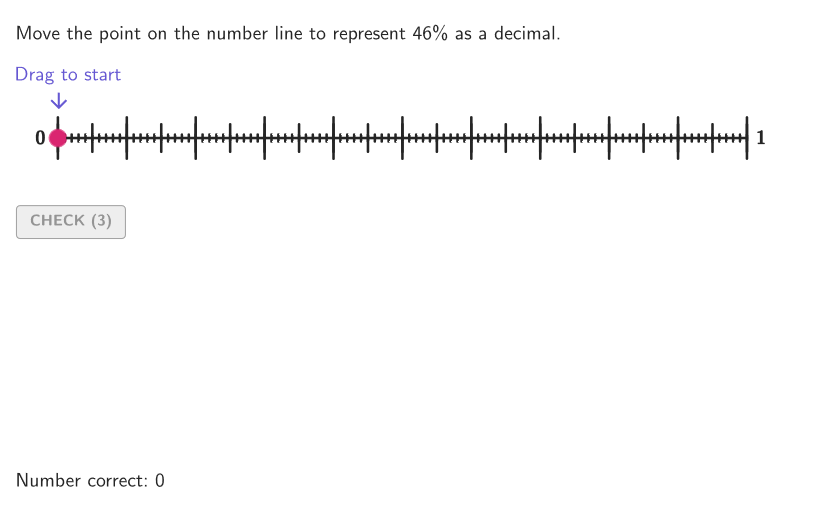
几何画板及绘图内容加载中,请稍等……
该范例通过在数轴上标出百分数对应的位置,让学习者直观看到“百分数—小数”的等价关系。核心数学概念包括百分比的含义、分数/小数表示,以及将给定百分数换算为等值小数并在坐标线上定位。作图要点:使用 GeoGebra 的随机化与交互结构生成不同百分数样本(如 Shuffle、Sequence、Point、Vector、Take、IndexOf 等),再将当前给定百分数 givenPerc 转换为数轴位置并在 numberLine 上生成标记点与可视化元素(对象含 numberLine、givenPerc、A、O、ptGrid 等);同时用 Element/Segment/Polygon/Corner 等几何对象组织显示,用 validate、showanswer、showsolution、btnValidate、showhint 与 tries 等控件实现验证、答案展示与提示流程,并配合 labelBtnValidate、textAnswer 等文字反馈。适合用于小学高年级到初中阶段(GR.6-8)理解并建模百分数与小数的转换,可作为课堂演示、练习或形成性评价材料。
GeoGebra 命令及参数
Shuffle(Sequence[t, t, 1, 99, 1]) → allPerc, {46, 64, 99, 34, 83, 38, 91, 77, 68, 56, 89, 57, 62, 15, 48, 2, 12, 41, 40, 45, 36, 47, 80, 74, 90, 76, 16, 59, 35, 79, 60, 61, 92, 51, 6, 86, 53, 31, 4, 66, 54, 14, 26, 96, 13, 33, 43, 7, 88, 29, 44, 10, 73, 49, 85, 78, 65, 20, 81, 75, 19, 17, 52, 27, 11, 71, 95, 28, 3, 1, 97, 42, 70, 84, 30, 18, 21, 72, 67, 82, 24, 69, 50, 55, 39, 22, 63, 32, 87, 23, 25, 8, 58, 37, 93, 98, 94, 5, 9}Take(allRandomSeeds, randIndex, randIndex + numRandoms - 1) → currentRandomSeedsElement(allPerc, Mod[countQuestion, Length[allPerc]] + 1) → givenPercSequence((k, y(O)), k, x(O), x(A), Distance[O, A] / 100) → ptGridPoint(ptGrid) → inputPointPolygon(Zip[PixelsToPoint[Corner[1], Corner[3], Corner[5], A], A, {(pixelsLeft, pixelsTop), (pixelsLeft, y(Corner[5]) - pixelsBottom), Corner[5] - (pixelsRight, pixelsBottom), (x(Corner[5]) - pixelsRight, pixelsTop)}]) → borderBoxSegment((x(Vertex[borderBox, 1]), 0), (x(Vertex[borderBox, 3]), 0)) → numberLineCorner(5) → layoutAppSizeonboardingTextOffset(Corner[onboardingText, 1], Corner[onboardingText, 3], onboardingCase, Corner[1], Corner[3], Corner[5]) → OnboardingTextOffsetcirclePixels(inputPoint, 7 + (7 * pulsing), Corner[1], Corner[3], Corner[5]) → pulsingObjectSequence(Segment[(t, y(O) - 0.3), (t, y(O) + 0.3)], t, x(O), x(A), Distance[O, A] / 10) → longTicksSequence(Segment[(t, y(O) - 0.2), (t, y(O) + 0.2)], t, x(O), x(A), Distance[O, A] / 20) → mediumTicksSequence(Segment[(t, y(O) - 0.05), (t, y(O) + 0.05)], t, x(O), x(A), Distance[O, A] / 100) → shortTicksSegment(O, A) → displaySegmIndexOf(1, allRandomSeeds) → testValVector(SP + (0, -0.5), SP + (0, -0.1)) → arrowSol
AI 绘图提示语参考
画一个数轴,上面有一个点表示某个百分比的小数形式。数轴从0到1,刻度包括长刻度、短刻度等。点与数轴上的刻度对齐,表示该百分比对应的数值。数轴两端有起点和终点,刻度线均匀分布。点周围有一个小圆圈表示选中值。整体简洁明了,适合教学使用。
以上提示语为根据原始绘图命令整理而来,仅供参考。