
乘积的幂运算规则练习
几何画板及绘图内容加载中,请稍等……
所属专题
Rechnen mit Potenzen
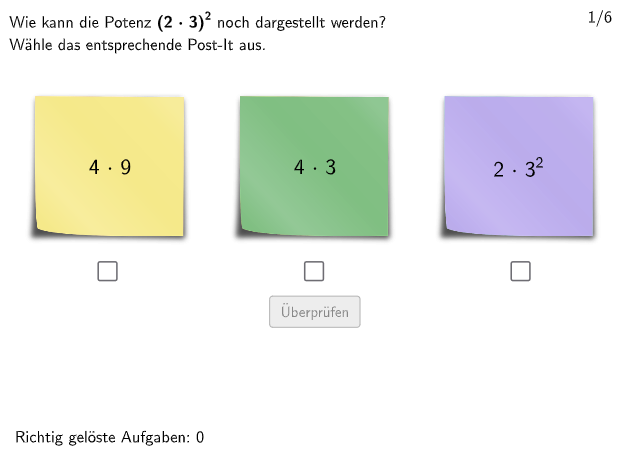
本范例通过互动练习帮助学生掌握乘积的幂运算规则(ab)ⁿ=aⁿ·bⁿ。学生需要针对随机生成的题目,判断给出的等式是否正确,并进行验证。构造要点:使用Textfield命令创建输入框接收学生答案,通过Shuffle命令随机打乱题目顺序,Element命令从列表中抽取题目,validate和showanswer命令实现答案验证与提示功能,attemptCount和correctCount记录练习次数与正确率。题目涵盖整数指数的乘积运算,培养学生描述、应用和论证基本幂运算规则的能力,适合七至八年级学生课堂练习或自主复习。
GeoGebra 命令及参数
Textfield(input1) → InputBox1Textfield(input2) → InputBox2Shuffle(Sequence[Element[Shuffle[Sequence[(k * 2), k, 1, 50] \ Shuffle[Sequence[(k * 10), k, 1, 10]]], i], i, 1, 5]) → RandomList2, {78, 82, 56, 64, 22}Shuffle(Sequence[Element[Shuffle[Sequence[(k * 5), k, 1, 20] \ Shuffle[Sequence[(k * 10), k, 1, 10]]], i], i, 1, 5]) → RandomList5, {65, 15, 45, 15, 55}Shuffle(Sequence[Element[Shuffle[Sequence[(k * 10), k, 1, 10]], i], i, 1, 5]) → RandomList10, {50, 10, 10, 50, 20}Shuffle(Join[{RandomList2, RandomList5, RandomList10}]) → RandomListNum, {82, 15, 55, 15, 50, 65, 56, 20, 50, 64, 10, 22, 45, 78, 10}Shuffle({1, 2, 3, 4, 5, 6}) → ExNumList, {1, 3, 2, 5, 6, 4}Shuffle({1, 2, 3}) → Order, {2, 1, 3}Polygon(PtopLeftCornerFeedback, PtopRightCornerFeedback, PbottomRightCornerFeedback, PbottomLeftCornerFeedback) → rectangleCorrect, rectangleCorrectS3, rectangleCorrectS4, rectangleCorrectS2, rectangleCorrectS1Shuffle(Sequence[Random[0, 10], i, 1, 100]) → randomNosForX, {2, 10, 8, 4, 10, 9, 0, 1, 8, 7, 9, 3, 3, 10, 5, 7, 1, 8, 9, 10, 10, 10, 4, 8, 5, 6, 5, 9, 8, 6, 6, 8, 3, 4, 5, 10, 10, 0, 9, 3, 1, 7, 4, 3, 6, 10, 3, 9, 2, 8, 4, 5, 5, 10, 8, 0, 4, 5, 7, 5, 9, 0, 7, 6, 3, 8, 3, 7, 7, 4, 8, 10, 7, 9, 1, 7, 3, 4, 9, 5, 10, 5, 8, 4, 3, 3, 7, 5, 4, 6, 10, 8, 5, 2, 5, 8, 6, 8, 4, 1}Element(randomNosForX, Mod[questionCount, 100] + 1) → numXShuffle(Sequence[Random[0, 10], i, 1, 100]) → randomNosForY, {1, 7, 7, 9, 0, 0, 9, 2, 9, 6, 0, 7, 0, 4, 4, 8, 4, 3, 6, 3, 1, 10, 3, 9, 1, 9, 9, 0, 9, 8, 5, 5, 6, 1, 1, 9, 5, 9, 4, 6, 4, 2, 5, 8, 0, 7, 5, 0, 3, 5, 7, 7, 10, 10, 9, 6, 0, 7, 3, 5, 6, 0, 1, 0, 7, 10, 10, 9, 8, 8, 4, 10, 10, 3, 4, 0, 3, 10, 8, 4, 1, 2, 4, 7, 8, 7, 10, 6, 4, 6, 3, 5, 8, 0, 10, 5, 6, 5, 8, 4}Element(randomNosForY, Mod[questionCount, 100] + 1) → numYAppend(true, Sequence[If[randomNosForX(i) ≟ randomNosForX(i - 1), false, true], i, 2, 100]) → stayXAppend(true, Sequence[If[randomNosForY(i) ≟ randomNosForY(i - 1), false, true], i, 2, 100]) → stayYRemove(Sequence[If[stayX(i), randomNosForX(i), 0], i, 1, 100], Sequence[0, i, 1, 100]) → randomNosForXwithoutRepeatRemove(Sequence[If[stayY(i), randomNosForY(i), 0], i, 1, 100], Sequence[0, i, 1, 100]) → randomNosForYwithoutRepeatElement(randomNosForXwithoutRepeat, Mod[questionCount, Length[randomNosForXwithoutRepeat]] + 1) → numXwithoutRepeatElement(randomNosForYwithoutRepeat, Mod[questionCount, Length[randomNosForYwithoutRepeat]] + 1) → numYwithoutRepeatShuffle({1, 2}) → Vis1, {2, 1}Shuffle({1, 2}) → Vis2, {2, 1}Shuffle({1, 2}) → Vis3, {2, 1}Corner(PostIt11, 3) → PostIt1_3Corner(PostIt11, 4) → PostIt1_4Corner(PostIt21, 3) → PostIt2_3Corner(PostIt21, 4) → PostIt2_4Corner(PostIt31, 3) → PostIt3_3Corner(PostIt31, 4) → PostIt3_4Length(AuswahlAnzahlList) → auswahlanzahlText(correctText, CorrP, false, true, 0, 0) → Text4Text(PostText1Helper, A, false, true, 0, 0) → PostText1Text(PostText2Helper, B, false, true, 0, 0) → PostText2Text(PostText3Helper, C, false, true, 0, 0) → PostText3
AI 绘图提示语参考
画一个包含多个随机分布的点的图形,点的坐标由两个随机数序列生成,序列中每个数字代表 x 轴或 y 轴上的一个点的坐标。图形中还包含一个随机分布的点的序列,用于表示某些点的坐标是否连续或重复。请根据给定的随机数序列生成这些点,并将它们绘制在图形中。
以上提示语为根据原始绘图命令整理而来,仅供参考。