
平面图形2:几何作图与极限概念
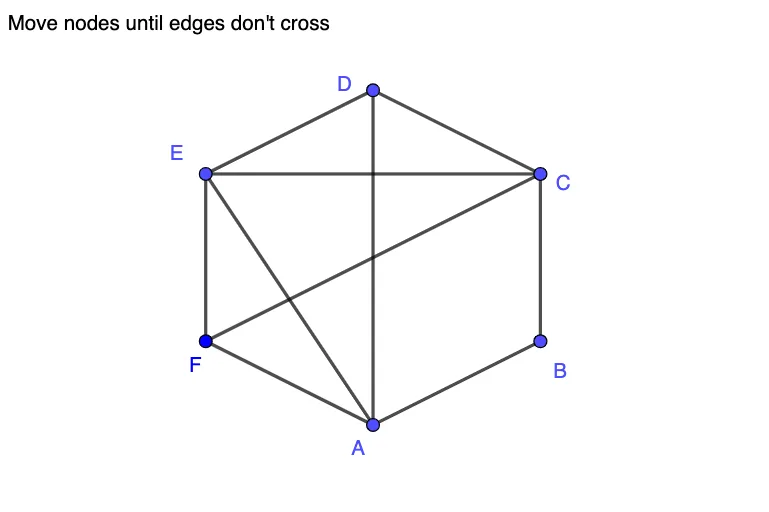
几何画板及绘图内容加载中,请稍等……
本范例演示了平面图形的几何构造与极限现象。核心数学概念包括几何作图、向量与极限。作图要点涉及使用GeoGebra命令如Segment、Intersect、If等对象进行图形构建。适合高中生或大学低年级学生用于学习几何与解析几何。
GeoGebra 命令及参数
Segment(E, F) → L8Segment(D, E) → L4Segment(F, C) → L10Intersect(L4, L10) → P4XSegment(E, C) → L7Segment(C, D) → L3Intersect(L3, L8) → P38Segment(B, C) → L2Intersect(L2, L8) → P28Intersect(L2, L4) → P24Segment(F, A) → L9Intersect(L4, L9) → P49Intersect(L3, L9) → P39Intersect(L2, L9) → P29Segment(A, D) → L6Intersect(L6, L10) → P6XIntersect(L6, L8) → P68Intersect(L6, L7) → P67Intersect(L2, L6) → P26Segment(E, A) → L5Intersect(L5, L10) → P5XIntersect(L3, L5) → P35Intersect(L2, L5) → P25Segment(A, B) → L1Intersect(L1, L10) → P1XIntersect(L1, L8) → P18Intersect(L1, L7) → P17Intersect(L1, L4) → P14Intersect(L1, L3) → P13If(Defined[P13] ∨ Defined[P14] ∨ Defined[P17] ∨ Defined[P18] ∨ Defined[P24] ∨ Defined[P25] ∨ Defined[P26] ∨ Defined[P28] ∨ Defined[P29] ∨ Defined[P35] ∨ Defined[P38] ∨ Defined[P39] ∨ Defined[P49] ∨ Defined[P67] ∨ Defined[P68] ∨ Defined[P1X] ∨ Defined[P4X] ∨ Defined[P5X] ∨ Defined[P6X], 0, 1) → outputIntersect(L7, L9) → P79
AI 绘图提示语参考
画一个平面图,包含多个线段和交点。首先绘制几条线段,然后找出这些线段的交点。接着,根据交点的位置关系,继续绘制新的线段,并找出新的交点。重复这个过程,直到所有关键点都被连接起来。最终图形应该展示出几何构造和极限现象,适合用于学习几何和坐标几何的学生。
以上提示语为根据原始绘图命令整理而来,仅供参考。