
乘除以10的幂的倍数
几何画板及绘图内容加载中,请稍等……
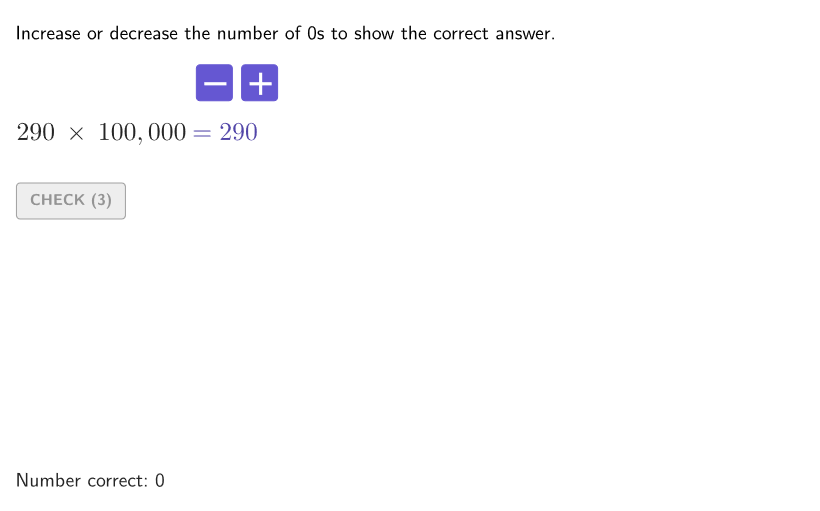
本范例演示如何乘除以10的幂的倍数。通过寻找结果中零的数量规律,可以快速找到乘积或商。涉及的核心数学概念是识别和利用10的幂(带或不带指数)的模式来乘除整数和小数。作图要点包括使用Shuffle、Element、Reverse、If、UnicodeToText、Sequence、Take、Textfield、Polygon、Corner、expandSegment、onboardingTextOffset等GeoGebra命令和对象。适合4-5年级学生,用于练习和掌握乘除10的幂的技巧。
GeoGebra 命令及参数
Shuffle(Sequence[100, 400, 10]) → allBases, {290, 240, 370, 400, 230, 340, 120, 150, 350, 390, 200, 190, 260, 140, 320, 330, 100, 170, 180, 160, 360, 270, 280, 310, 110, 130, 250, 300, 380, 220, 210}Element(allBases, Mod[countQuestion, Length[allBases]] + 1) → baseShuffle(Sequence[2, 5, 1]) → allN, {5, 2, 3, 4}Element(allN, Mod[countQuestion, Length[allN]] + 1) → numNShuffle(KeepIf[x ≤ numN, {2, 3, 4, 5}]) → allD, {2, 4, 3, 5}Element(allD, Mod[countQuestion, Length[allD]] + 1) → numDShuffle({1, 2}) → allCases, {2, 1}Element(allCases, Mod[countQuestion, Length[allCases]] + 1) → caseNumReverse(TextToUnicode[("" * secondNum2)]) → secondNum2RUReverse(RemoveUndefined[Flatten[Sequence[{secondNum2RU(k), secondNum2RU(k + 1), secondNum2RU(k + 2), 44}, k, 1, Length[secondNum2RU], 3]]]) → secondNum2CIf(secondNum2C(1) ≟ 44, Take[secondNum2C, 2], secondNum2C) → secondNum2OKUnicodeToText(secondNum2OK) → textSecondNum2Reverse(TextToUnicode[("" * secondNum1)]) → secondNum1RUReverse(RemoveUndefined[Flatten[Sequence[{secondNum1RU(k), secondNum1RU(k + 1), secondNum1RU(k + 2), 44}, k, 1, Length[secondNum1RU], 3]]]) → secondNum1CIf(secondNum1C(1) ≟ 44, Take[secondNum1C, 2], secondNum1C) → secondNum1OKUnicodeToText(secondNum1OK) → textSecondNum1Sequence(Random[0, 99] / 100, A, 1, 200) → allRandomSeeds, {0.21, 0.43, 0.13, 0.69, 0.53, 0.48, 0.58, 0.75, 0.79, 0.29, 0.93, 0.83, 0.81, 0.52, 0.6, 0.17, 0.91, 0.55, 0.8, 0.2, 0.47, 0.28, 0.1, 0.53, 0.53, 0.53, 0.3, 0.7, 0.55, 0.58, 0.55, 0.2, 0.3, 0.61, 0.51, 0.62, 0.29, 0.52, 0.21, 0.01, 0.9, 0.14, 0.52, 0.6, 0.28, 0.27, 0.98, 0.49, 0.81, 0.18, 0.18, 0.67, 0.57, 0.25, 0.84, 0.79, 0.39, 0.04, 0.76, 0.74, 0.91, 0.95, 0.19, 0.69, 0.81, 0.54, 0.82, 0.32, 0.78, 0.31, 0.39, 0.45, 0.28, 0.3, 0.06, 0.76, 0.13, 0.14, 0.32, 0.4, 0.73, 0.61, 0.68, 0.37, 0.81, 0.22, 0.96, 0.5, 0.22, 0.23, 0.99, 0.79, 0.13, 0.17, 0.81, 0.91, 0.57, 0.36, 0.42, 0.95, 0.82, 0.04, 0.13, 0.39, 0.65, 0.86, 0.98, 0.83, 0.18, 0.81, 0.59, 0.66, 0.53, 0.96, 0.29, 0.27, 0.86, 0.16, 0.33, 0.92, 0.92, 0.56, 0.25, 0.8, 0.86, 0.81, 0.46, 0.46, 0.3, 0.17, 0.89, 0.08, 0.9, 0.08, 0.47, 0.62, 0.35, 0.97, 0.8, 0.63, 0.24, 0.51, 0.88, 0.43, 0.36, 0.35, 0.41, 0.39, 0.54, 0.63, 0.53, 0.74, 0.39, 0.53, 0.77, 0.09, 0.02, 0.66, 0.06, 0.89, 0.24, 0.39, 0.2, 0.06, 0.69, 0.7, 0.77, 0.71, 0.83, 0.18, 0.33, 0.3, 0.66, 0.36, 0.85, 0.5, 0.02, 0.38, 0.8, 0.35, 0.62, 0.62, 0.06, 0.16, 0.02, 0.24, 0.84, 0.94, 0.64, 0.97, 0.61, 0.41, 0.43, 0.04, 0.81, 0.53, 0.32, 0.79, 0.11, 0.07}Take(allRandomSeeds, randIndex, randIndex + numRandoms - 1) → currentRandomSeedsTextfield(input1) → InputBox1Textfield(input2) → InputBox2Polygon(Zip[PixelsToPoint[Corner[1], Corner[3], Corner[5], A], A, {(pixelsLeft, pixelsTop), (pixelsLeft, y(Corner[5]) - pixelsBottom), Corner[5] - (pixelsRight, pixelsBottom), (x(Corner[5]) - pixelsRight, pixelsTop)}]) → borderBoxCorner(5) → layoutAppSizeexpandSegment(PMoveA, PMoveB, (pulsing * 7), Corner[1], Corner[3], Corner[5]) → pulsingObjectonboardingTextOffset(Corner[onboardingText, 1], Corner[onboardingText, 3], onboardingCase, Corner[1], Corner[3], Corner[5]) → OnboardingTextOffsetReverse(TextToUnicode[("" * input1)]) → input1RUReverse(RemoveUndefined[Flatten[Sequence[{input1RU(k), input1RU(k + 1), input1RU(k + 2), 44}, k, 1, Length[input1RU], 3]]]) → input1UCIf(input1UC(1) ≟ 44, Take[input1UC, 2], input1UC) → input1OKUnicodeToText(input1OK) → textInputReverse(TextToUnicode[("" * firstNum1)]) → firstNum1RUReverse(RemoveUndefined[Flatten[Sequence[{firstNum1RU(k), firstNum1RU(k + 1), firstNum1RU(k + 2), 44}, k, 1, Length[firstNum1RU], 3]]]) → firstNum1CIf(firstNum1C(1) ≟ 44, Take[firstNum1C, 2], firstNum1C) → firstNum1OKUnicodeToText(firstNum1OK) → textFirstNum1Reverse(TextToUnicode[("" * ans1)]) → ans1RUReverse(RemoveUndefined[Flatten[Sequence[{ans1RU(k), ans1RU(k + 1), ans1RU(k + 2), 44}, k, 1, Length[ans1RU], 3]]]) → ans1CIf(ans1C(1) ≟ 44, Take[ans1C, 2], ans1C) → ans1OKReverse(TextToUnicode[("" * ans2)]) → ans2RUReverse(RemoveUndefined[Flatten[Sequence[{ans2RU(k), ans2RU(k + 1), ans2RU(k + 2), 44}, k, 1, Length[ans2RU], 3]]]) → ans2CIf(ans2C(1) ≟ 44, Take[ans2C, 2], ans2C) → ans2OKUnicodeToText(ans1OK) → textAns1UnicodeToText(ans2OK) → textAns2Reverse(RemoveUndefined[Flatten[Sequence[{firstNum1RU(k), firstNum1RU(k + 1), firstNum1RU(k + 2), 44}, k, 1, Length[firstNum1RU], 3]]]) → test
AI 绘图提示语参考
请绘制一个交互式乘除法练习界面。界面包含两个输入框,用于输入数字;一个边框框住输入区域;一个脉冲动画在边框内缓慢移动;一个引导文本提示用户操作;以及一些数字和答案显示区域。图形应清晰展示输入、计算和结果反馈的流程,适合学生练习与理解乘除法与10的幂的倍数模式。
以上提示语为根据原始绘图命令整理而来,仅供参考。