
测量角度的方法
几何画板及绘图内容加载中,请稍等……
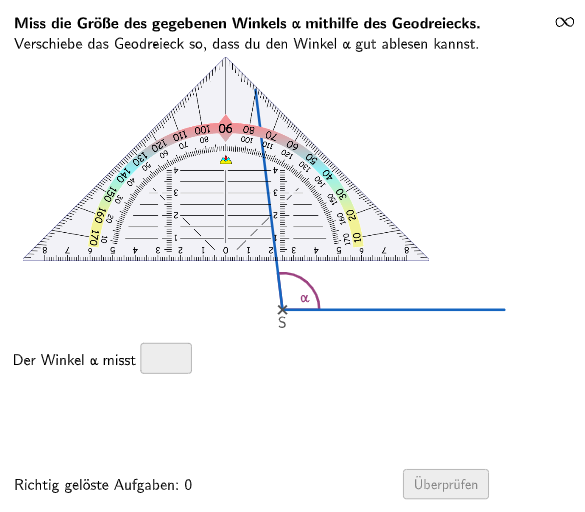
本范例演示了如何使用地面三角形来测量角度。核心数学概念包括角度的测量和三角形的性质。作图要点包括使用 GeoGebra 命令 Shuffle、Element、Rotate、Angle、Text、Textfield、Polygon、Append、Remove、Defined、Sequence、Point、Vector、Midpoint、Join 等。适合的学段或用途包括初中数学教育,特别是测量角度和三角形的性质。
GeoGebra 命令及参数
Shuffle(Sequence[Random[30, 175], i, 1, 100]) → randomNosForX, {97, 175, 67, 116, 51, 108, 104, 163, 151, 99, 104, 74, 116, 156, 93, 150, 62, 51, 113, 55, 133, 106, 67, 104, 103, 85, 134, 79, 48, 35, 138, 66, 105, 108, 91, 96, 73, 161, 39, 145, 40, 110, 93, 124, 65, 64, 47, 69, 107, 55, 109, 117, 169, 62, 74, 43, 59, 106, 54, 141, 142, 118, 57, 132, 166, 164, 46, 151, 59, 77, 48, 32, 174, 34, 174, 137, 124, 115, 166, 156, 88, 124, 121, 117, 111, 52, 65, 48, 146, 91, 106, 91, 46, 36, 127, 84, 54, 74, 44, 149}Element(randomNosForX, Mod[questionCount, 100] + 1) → numXRotate((circlewidth, 0), numXwinkel) → P2Angle(P2) → βText(input1) → textinput1Textfield(input1) → InputBox1Textfield(input2) → InputBox2Polygon(PtopLeftCornerFeedback, PtopRightCornerFeedback, PbottomRightCornerFeedback, PbottomLeftCornerFeedback) → rectangleCorrect, rectangleCorrectS3, rectangleCorrectS4, rectangleCorrectS2, rectangleCorrectS1Shuffle(Sequence[Random[0, 10], i, 1, 100]) → randomNosForY, {4, 5, 2, 4, 0, 5, 6, 8, 7, 10, 1, 6, 6, 9, 6, 4, 7, 7, 9, 9, 3, 1, 5, 5, 1, 0, 4, 5, 4, 4, 0, 4, 10, 7, 3, 9, 4, 7, 5, 1, 6, 8, 8, 8, 1, 7, 1, 9, 5, 2, 8, 3, 4, 2, 5, 9, 9, 3, 7, 3, 8, 0, 9, 0, 8, 4, 6, 0, 5, 4, 3, 9, 7, 8, 10, 4, 0, 2, 5, 0, 4, 0, 10, 2, 2, 6, 9, 7, 3, 9, 0, 1, 10, 2, 0, 0, 0, 8, 10, 4}Element(randomNosForY, Mod[questionCount, 100] + 1) → numYAppend(true, Sequence[If[randomNosForX(i) ≟ randomNosForX(i - 1), false, true], i, 2, 100]) → stayXAppend(true, Sequence[If[randomNosForY(i) ≟ randomNosForY(i - 1), false, true], i, 2, 100]) → stayYRemove(Sequence[If[stayX(i), randomNosForX(i), 0], i, 1, 100], Sequence[0, i, 1, 100]) → randomNosForXwithoutRepeatRemove(Sequence[If[stayY(i), randomNosForY(i), 0], i, 1, 100], Sequence[0, i, 1, 100]) → randomNosForYwithoutRepeatElement(randomNosForXwithoutRepeat, Mod[questionCount, Length[randomNosForXwithoutRepeat]] + 1) → numXwithoutRepeatElement(randomNosForYwithoutRepeat, Mod[questionCount, Length[randomNosForYwithoutRepeat]] + 1) → numYwithoutRepeatDefined(input1) → fixedSequence(Rotate[(circlewidth, 0), m°], m, 0, 360) → listCirclePointsPoint(listCirclePoints) → PAngle(Vector[(circlewidth, 0)], Vector[P]) → αVector((0, 0), P) → uRotate((1, 0), (0.5 * β)) → MPoint(Translate[Segment[EE + (((-geodreieckwidth) * 0.5), 0), S + (((-geodreieckwidth) * 0.5), 0)], (geodreieckwidth, 0)]) → DPoint(Segment[EE + (((-geodreieckwidth) * 0.5), 0), S + (((-geodreieckwidth) * 0.5), 0)]) → CMidpoint(C, D) → EJoin(Sequence[Shuffle[Sequence[1, 5]], m, 1, 25]) → randomNosForWinkelNames
AI 绘图提示语参考
画一个动态角度测量示意图,包含一个随机生成的角度和一个由该角度决定的旋转点,展示角度的测量和三角形的性质。首先绘制一个圆,并在圆上标记一个随机点,然后根据该点与圆心连线旋转生成另一个点,测量这两点连线和圆心连线的夹角。接着,在角度的两条边上分别标记点,并连接这些点形成一个四边形,最后在四边形内部绘制一个三角形,以展示角度测量和三角形性质的应用。
以上提示语为根据原始绘图命令整理而来,仅供参考。