
在数轴上绘制有理数 by Celia Jimenez
几何画板及绘图内容加载中,请稍等……
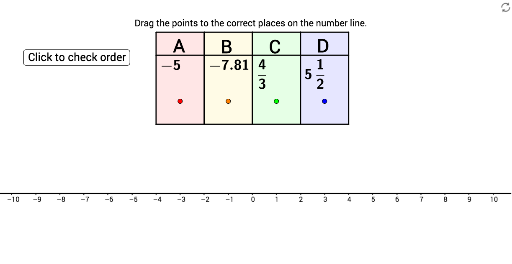
本范例演示如何在数轴上准确放置有理数。核心数学概念包括有理数的性质及其在数轴上的表示。通过使用GeoGebra命令如RandomElement、If、Polygon等,可以动态地展示有理数的位置。适合初中及以上学生学习有理数的相关知识。
GeoGebra 命令及参数
RandomElement({2, 3, 4, 5, 6, 7, 8, 9, 10, 11, 12}) → CdenomIf(Cdenom ≟ 2, Random[-20, 20, true], If[Cdenom ≟ 3, Random[-30, 30, true], If[Cdenom ≟ 4, Random[-40, 40, true], If[Cdenom ≟ 5, Random[-50, 50, true], If[Cdenom ≟ 6, Random[-60, 60, true], If[Cdenom ≟ 7, Random[-70, 70, true], If[Cdenom ≟ 8, Random[-80, 80, true], If[Cdenom ≟ 9, Random[-90, 90, true], If[Cdenom ≟ 10, Random[-100, 100, true], If[Cdenom ≟ 11, Random[-110, 110, true], If[Cdenom ≟ 12, Random[-120, 120, true]]]]]]]]]]]) → CnumPolygon(I, W, V, J) → poly1, i, w, v, jPolygon(J, V, U, K) → poly2, j_1, v_1, u, kPolygon(K, U, T, L) → poly3, k_1, u_1, t, lPolygon(L, T, S, M) → poly4, l_1, t_1, s, mSegment(H, G) → cSegment(G, Z) → dSegment(Z, E) → eSegment(E, F) → fFractionText(C) → CfancyRandomElement({2, 3, 4, 5, 6, 7, 8, 9, 10, 11, 12}) → DdenomRandomElement({-9, -8, -7, -6, -5, -4, -3, -2, -1, 1, 2, 3, 4, 5, 6, 7, 8, 9}) → DwholeRandom(1, Ddenom - 1, true) → DnumFractionText(Dnum / Ddenom) → DfancyIf(Dwhole < 0, Dwhole - Dnum / Ddenom, Dwhole + Dnum / Ddenom) → DSegment(A_1, Aact) → aerrSegment(B_1, Bact) → berrSegment(C_1, Cact) → cerrSegment(D_1, Dact) → derrSort({A, B, C, D}) → testSort({x(A_1), x(B_1), x(C_1), x(D_1)}) → test2If(IndexOf[A, Sort[{A, B, C, D}]] ≟ IndexOf[x(A_1), Sort[{x(A_1), x(B_1), x(C_1), x(D_1)}]], 1) → orderAIf(IndexOf[B, Sort[{A, B, C, D}]] ≟ IndexOf[x(B_1), Sort[{x(A_1), x(B_1), x(C_1), x(D_1)}]], 1) → orderBIf(IndexOf[C, Sort[{A, B, C, D}]] ≟ IndexOf[x(C_1), Sort[{x(A_1), x(B_1), x(C_1), x(D_1)}]], 1) → orderCIf(IndexOf[D, Sort[{A, B, C, D}]] ≟ IndexOf[x(D_1), Sort[{x(A_1), x(B_1), x(C_1), x(D_1)}]], 1) → orderD
AI 绘图提示语参考
在数轴上绘制有理数,展示不同分母的随机有理数的位置。首先画出数轴,然后在数轴上标记出随机生成的有理数点,并用不同颜色的线段连接这些点,最后按顺序排列这些点,并用文本标签显示每个有理数的值。
以上提示语为根据原始绘图命令整理而来,仅供参考。