
二维一次不等式的图形表示与解集判定
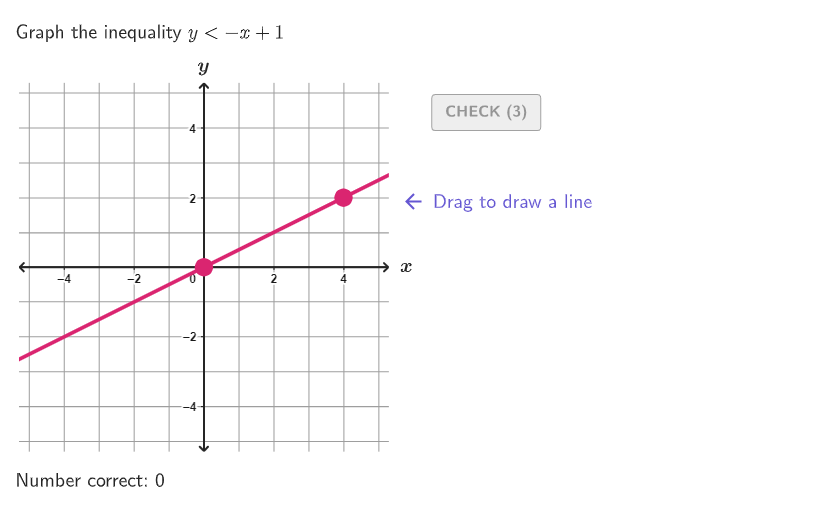
几何画板及绘图内容加载中,请稍等……
该范例演示如何在二维坐标平面中绘制一次不等式(含边界是否取等)的图形,并用测试点判断不等式的解集区域。核心数学概念包括:线性不等式、半平面/区域表示、边界直线(严格不等与非严格不等对应实线或虚线)、以及代数/图形法解二元一次不等式。作图要点来自构造摘要中的 GeoGebra 元素与命令:用 Inequality 生成不等式模型,并借助 Line 构造边界直线;用 IsInRegion 对测试点 TestPointInReg 判断其是否落在不等式解区域内;使用 Segment、Polygon、IntersectPath 等进行图形元素组织与区域描绘;通过 Split 将对象按边界分割,并用 Zip/IndexOf/AreEqual 处理分支与情形切换;文本与交互反馈使用 Textfield、Text、Translate 生成提示/说明;教学流程与引导显示用 onboardingTextOffset、onboardingStage、showhint1 以及多对象状态对象(如 selectedSide1/selectedSide2、side1/side2、InSide1/InSide2)来实现随机测试与反馈。本资源适合 9-12 年级的代数学习,也适合作为课堂探究、分层练习或图形法/代数法结合教学的交互材料。
GeoGebra 命令及参数
Sequence(Random[0, 99] / 100, A, 1, 200) → allRandomSeeds, {0.39, 0.65, 0.37, 0.82, 0.69, 0.31, 0.54, 0.23, 0.13, 0.95, 0.22, 0.94, 0.8, 0.59, 0.16, 0.17, 0.95, 0.96, 0.11, 0.03, 0.62, 0.42, 0.72, 0.7, 0.15, 0.93, 0.34, 0.58, 0.85, 0.92, 0.12, 0.31, 0.26, 0.11, 0.82, 0.73, 0.76, 0.16, 0.38, 0.19, 0.51, 0.84, 0.98, 0.97, 0.53, 0.87, 0.02, 0.79, 0.12, 0.14, 0.47, 0.23, 0.86, 0, 0.39, 0.54, 0.35, 0.89, 0.49, 0.76, 0.43, 0.47, 0.06, 0.55, 0.71, 0.39, 0.5, 0.11, 0.65, 0.68, 0.81, 0.12, 0.2, 0.91, 0.49, 0.23, 0.69, 0.72, 0.17, 0.9, 0.89, 0.12, 0, 0.92, 0.53, 0.44, 0.56, 0.41, 0.93, 0.54, 0.43, 0.12, 0.5, 0.83, 0.62, 0.31, 0.01, 0.49, 0.5, 0.59, 0.56, 0.62, 0.36, 0.02, 0.07, 0.5, 0.93, 0.49, 0.17, 0.51, 0.56, 0.95, 0.22, 0.63, 0.71, 0.45, 0.93, 0.44, 0.57, 0.87, 0.31, 0.79, 0.78, 0.53, 0.75, 0.46, 0.33, 0.47, 0.05, 0.41, 0.36, 0.06, 0.57, 0.76, 0.66, 0.21, 0.89, 0.96, 0.25, 0.63, 0.2, 0.07, 0.32, 0.27, 0.06, 0.22, 0.9, 0.78, 0.93, 0.38, 0.69, 0.68, 0.14, 0.78, 0.51, 0.84, 0.21, 0.21, 0.39, 0.7, 0.19, 0.48, 0.21, 0.27, 0.65, 0.87, 0.64, 0.12, 0.06, 0.37, 0.93, 0.44, 0.9, 0.09, 0.24, 0.92, 0.31, 0.49, 0.62, 0.32, 0.26, 0.7, 0.74, 0.72, 0.22, 0.63, 0.86, 0.8, 0.76, 0.71, 0.03, 0.98, 0.34, 0.24, 0.9, 0.19, 0.43, 0.78, 0.73, 0.09}Take(allRandomSeeds, randIndex, randIndex + numRandoms - 1) → currentRandomSeedsIf(currentRandomSeeds(3) ≥ 0.5, 1, 2) → CaseLine((If[randomNum1 ≟ 0, 1, randomNum1], 0), (0, If[randomNum2 ≟ 0, 1, randomNum2])) → lineCase1If(Case ≟ 1, AreCollinear[TestPoint, Intersect[lineCase1, xAxis], Intersect[lineCase1, yAxis]], AreCollinear[TestPoint, (0, randomNum2), (1, randomNum1 + randomNum2)]) → TestPointInLineIf(Mod[Inequality, 2] ≟ 1, y < (randomNum1 * x) + randomNum2, y > (randomNum1 * x) + randomNum2) → ineq2Element({"≤", "≥", "<", ">"}, Inequality) → InequalityTextIf(invert, If[Mod[Inequality, 2] ≟ 1, y > (Slope[lineCase1] * x) + If[randomNum2 ≟ 0, 1, randomNum2], y < (Slope[lineCase1] * x) + If[randomNum2 ≟ 0, 1, randomNum2]], If[Mod[Inequality, 2] ≟ 1, y < (Slope[lineCase1] * x) + If[randomNum2 ≟ 0, 1, randomNum2], y > (Slope[lineCase1] * x) + If[randomNum2 ≟ 0, 1, randomNum2]]) → ineq1IsInRegion(TestPoint, If[Case ≟ 1, ineq1, ineq2]) → TestPointInRegSplit(TextCase1, {"≥", "≤", ">", "<"}) → Text1SplitZip(AreCollinear[PP, (0, randomNum2), (1, randomNum1 + randomNum2)], PP, TestPoints) → InLineCase2Zip(AreCollinear[PP, Intersect[lineCase1, xAxis], Intersect[lineCase1, yAxis]], PP, TestPoints) → InLineCase1IndexOf(false, If[Case ≟ 1, InLineCase1, InLineCase2]) → pointNumElement({"Drag to draw a line", "Click to change the line style", "Click to select a region"}, onboardingStage) → onboardingTextLine(P1, P2) → studLineIf(Defined[Slope[studLine]], y < (Slope[studLine] * x) + studLine(0) ∧ (-GVsize) ≤ x ≤ GVsize ∧ (-GVsize) ≤ y ≤ GVsize, x(P1) < x < GVsize ∧ (-GVsize) ≤ y ≤ GVsize) → side2Zip(IsInRegion[PP, side2], PP, TestPoints) → InSide2If(Defined[Slope[studLine]], y > (Slope[studLine] * x) + studLine(0) ∧ (-GVsize) ≤ x ≤ GVsize ∧ (-GVsize) ≤ y ≤ GVsize, (-GVsize) < x < x(P1) ∧ (-GVsize) ≤ y ≤ GVsize) → side1Zip(IsInRegion[PP, side1], PP, TestPoints) → InSide1AreEqual(studLine, If[Case ≟ 1, lineCase1, lineCase2]) → correct1Zip(IsInRegion[PP, ineq2], PP, TestPoints) → InIneq2Zip(IsInRegion[PP, ineq1], PP, TestPoints) → InIneq1Textfield(input1) → InputBox1Textfield(input2) → InputBox2Corner(5) → layoutAppSizePointToPixels(Corner[onboardingDisplayText, 2], Corner[1], Corner[3], Corner[5]) → layoutOnboardingPolygon({((-GVsize), (-GVsize)), (GVsize, (-GVsize)), (GVsize, GVsize), ((-GVsize), GVsize)}) → q1Text("x", (GVsize + 0.5, 0.1), true, true, 0, 0) → text1Text("y", (0, GVsize + 0.5), true, true, 0, 0) → text2Translate(hGL, Vector[(Vector[Corner[4], Corner[1]] / 500 * 16)]) → hGL'Translate(vGL, Vector[(Vector[Corner[1], Corner[2]] / 800 * 16)]) → vGL'onboardingTextOffset(Corner[onboardingText, 1], Corner[onboardingText, 3], onboardingCase, Corner[1], Corner[3], Corner[5]) → OnboardingTextOffsetcirclePixels(P1, 7 + (7 * pulsing), Corner[1], Corner[3], Corner[5]) → pulsingObjectcirclePixels(P2, 7 + (7 * pulsing), Corner[1], Corner[3], Corner[5]) → pulsingObject2IntersectPath(studLine, q1) → fexpandSegment(Vertex[f, 1], Vertex[f, 2], (7 * pulsing), Corner[1], Corner[3], Corner[5]) → pulsingObject3Split(Text1Replace, {"≥", "≤", ">", "<"}) → l1Split(TextCase2, {"≥", "≤", ">", "<"}) → Text2SplitReplaceAll(ReplaceAll[Text1Split(1), "x", (("(" * x(TestPoint)) * ")")], "y", (("(" * y(TestPoint)) * ")")) → text3Segment(((-GVsize) + a, 0), (GVsize - a, 0)) → fakeXAxisSegment((0, (-GVsize) + a), (0, GVsize - a)) → fakeYAxiscirclePixels(TestPoint, 9 + (7 * pulsing), Corner[1], Corner[3], Corner[5]) → pulsingSol
AI 绘图提示语参考
在二维坐标系中绘制线性不等式,展示边界线和解区域。首先生成随机点和直线,根据不等式类型确定边界线是实线还是虚线。通过测试点判断点是否在解区域内,并用不同颜色或样式区分。最后,添加坐标轴、标签和说明文字,解释不等式的解法和解区域的意义。
以上提示语为根据原始绘图命令整理而来,仅供参考。