
情境转方程:线性方程与不等式应用
几何画板及绘图内容加载中,请稍等……
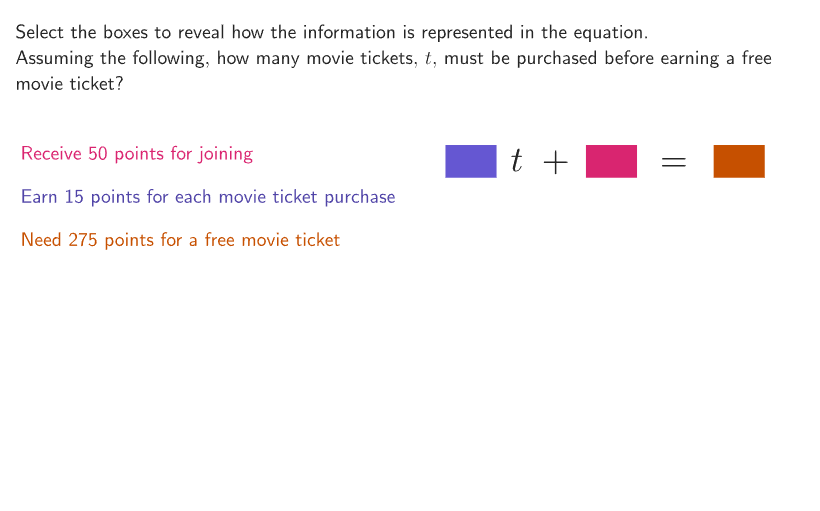
本范例演示如何将实际生活情境逐步转化为数学方程。学生需要根据给定的储蓄问题(现有30美元,目标5周后达到350美元),写出每周需要存款多少的线性方程并求解。核心数学概念包括列方程求解实际问题、线性方程的建立与解法、不等式的应用。作图要点:利用Shuffle命令随机生成不同情境,Sequence命令生成数列,Text命令显示问题文本,Polygon绘制辅助图形,并通过slider实现交互式求解演示。适合6-8年级学生使用,可用于培养代数思维和实际问题建模能力,是练习列方程解应用题的优质互动资源。
GeoGebra 命令及参数
Shuffle(Sequence[3]) → randomSituation, {3, 1, 2}Corner(5) → AppSizeShuffle({{1, 2, 3}, {1, 3, 2}, {2, 1, 3}, {2, 3, 1}, {3, 1, 2}, {3, 2, 1}}) → randomOrderCB, {{1, 2, 3}, {2, 3, 1}, {3, 1, 2}, {3, 2, 1}, {1, 3, 2}, {2, 1, 3}}Element(randomOrderCB, Mod[example, Length[randomOrderCB]] + 1) → orderCBElement(randomSituation, Mod[example, Length[randomSituation]] + 1) → situationZip((kk, 0), kk, If[situation ≟ 1, {3.2, 2.5, 3}, situation ≟ 2, {1.8, 3, 2}, {1.8, 1.3, 1.3}]) → xcoordsTranslate(hGuideline, Vector[(Vector[Corner[4], Corner[1]] / 500 * 16)]) → hGuideline'Sequence(yFirstCB + (ii * (26 + 16)), ii, 0, 2) → ycoordsCB, {138, 180, 222}Zip(XX + YY - (0.8, 0), XX, xcoords, YY, ycoords) → departureSort(Zip[(kk, -0.5), kk, {If[situation ≟ 1, 7.5, 8], 10.75, 13.25}], {2, 1, 3}) → arrivalSemicircle(A1, D1) → c1Semicircle(A2, D2) → c2Semicircle(A3, D3) → c3Point(c1, anim2) → Panim1Point(c2, anim1) → Panim2Point(c3, anim3) → Panim3Text((("\" * Element[sizes, floor((anim2 * 3)) + 1]) * initialValues(situation)), Panim1, true, true, 1, 1) → animtext1Text((("\" * Element[sizes, floor((anim1 * 3)) + 1]) * rates(situation)), Panim2, true, true, 1, 1) → animtext2Text((("\" * Element[sizes, floor((anim3 * 3)) + 1]) * finalvalues(situation)), Panim3, true, true, 1, 1) → animtext3Polygon({arrival(1), arrival(1) + (wid, 0), arrival(1) + (wid, hei), arrival(1) + (0, hei)}) → q2Polygon({arrival(2), arrival(2) + (wid, 0), arrival(2) + (wid, hei), arrival(2) + (0, hei)}) → q1Polygon({arrival(3), arrival(3) + (wid, 0), arrival(3) + (wid, hei), arrival(3) + (0, hei)}) → q3Text(equation, PointEq, true, true, -1, -1) → equationPosPolygon({Vertex[q2, 1] + ((-disth), (-distv)), Vertex[q2, 2] + (disth, (-distv)), Vertex[q2, 3] + (disth, distv), Vertex[q2, 4] + ((-disth), distv)}) → q2whitePolygon({Vertex[q2, 1] + ((-2 * disth), (-2 * distv)), Vertex[q2, 2] + ((2 * disth), (-2 * distv)), Vertex[q2, 3] + ((2 * disth), (2 * distv)), Vertex[q2, 4] + ((-2 * disth), (2 * distv))}) → q2SelectedPolygon({Vertex[q1, 1] + ((-disth), (-distv)), Vertex[q1, 2] + (disth, (-distv)), Vertex[q1, 3] + (disth, distv), Vertex[q1, 4] + ((-disth), distv)}) → q1whitePolygon({Vertex[q1, 1] + ((-2 * disth), (-2 * distv)), Vertex[q1, 2] + ((2 * disth), (-2 * distv)), Vertex[q1, 3] + ((2 * disth), (2 * distv)), Vertex[q1, 4] + ((-2 * disth), (2 * distv))}) → q1SelectedPolygon({Vertex[q3, 1] + ((-2 * disth), (-2 * distv)), Vertex[q3, 2] + ((2 * disth), (-2 * distv)), Vertex[q3, 3] + ((2 * disth), (2 * distv)), Vertex[q3, 4] + ((-2 * disth), (2 * distv))}) → q3SelectedPolygon({Vertex[q3, 1] + ((-disth), (-distv)), Vertex[q3, 2] + (disth, (-distv)), Vertex[q3, 3] + (disth, distv), Vertex[q3, 4] + ((-disth), distv)}) → q3white
AI 绘图提示语参考
在画面中创建一个带有三段半圆标记的三列情境图:先放置三个半圆,三者共享相近的基准位置但彼此错开,分别用三个点放在半圆上并加上对应文字,文字内容随三个情境数据在这些点上方动态变化;再在底部形成三个矩形卡片区域并给出三块“白色轮廓+选中轮廓”,让它们与三个底部位置一一对应。整体同时呈现情境文本、速率与终值文本,并用移动的方式展示从起点到终点的对应位置关系。
以上提示语为根据原始绘图命令整理而来,仅供参考。