
分数扩展
几何画板及绘图内容加载中,请稍等……
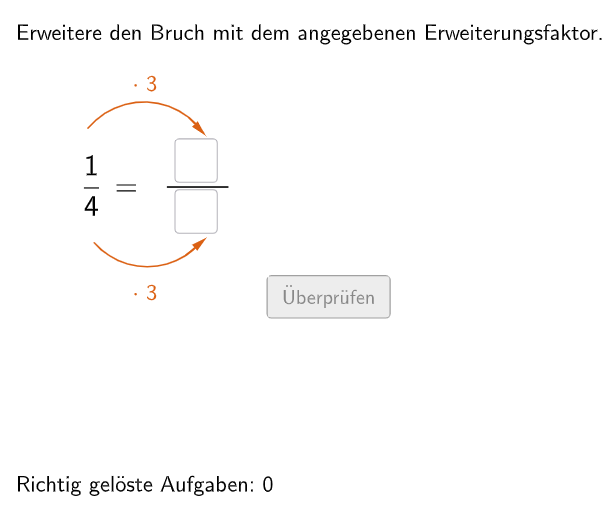
本范例演示了如何扩展分数。它涉及的核心数学概念是分数的扩展和简化。作图要点包括使用 GeoGebra 的 Join、Element、If 等命令和对象,如 bInput、questionCount、randomNosForY 等。适合的学段或用途是中小学数学教育,特别是初中六年级。
GeoGebra 命令及参数
Join({{4}, Shuffle[Sequence[Random[2, 10], i, 1, 100]]}) → randomNosForYElement(randomNosForY, Mod[questionCount, 100]) → numYJoin({{1}, Shuffle[Sequence[Random[1, numY - 1], i, 1, 100]]}) → randomNosForXElement(randomNosForX, Mod[questionCount, 100]) → numXJoin({{3}, Shuffle[Sequence[Random[2, 10], i, 1, 100]]}) → randomNosForZElement(randomNosForZ, Mod[questionCount, 100]) → numZIf(questionCount ≟ 1, aInput ≟ 3, aInput ≟ (numX * numZ)) → correct1If(questionCount ≟ 1, bInput ≟ 12, bInput ≟ (numY * numZ)) → correct2Textfield(aInput) → InputBox1Textfield(bInput) → InputBox2Polygon(PtopLeftCornerFeedback, PtopRightCornerFeedback, PbottomRightCornerFeedback, PbottomLeftCornerFeedback) → rectangleCorrect, ptopleftcornerfeedback, ptoprightcornerfeedback, pbottomrightcornerfeedback, pbottomleftcornerfeedbackDefined((aInput * bInput)) → fixedSegment(A, B) → fCircleArc(C, D, E) → cCircleArc(F, G, H) → dPoint(c) → IVector(I, J) → uPoint(d) → KVector(K, L) → vPolygon(PtopLeftCornerFeedback_{1}, PtopRightCornerFeedback_{1}, PbottomRightCornerFeedback_{1}, PbottomLeftCornerFeedback_{1}) → rectangleCorrect_{1}, ptopleftcornerfeedback_{1}, ptoprightcornerfeedback_{1}, pbottomrightcornerfeedback_{1}, pbottomleftcornerfeedback_{1}CircleArc(M, N, O) → eCircleArc(P, Q, R) → gPoint(e) → SVector(S, T) → wPoint(g) → UVector(U, V) → a