
绘制对称多边形
几何画板及绘图内容加载中,请稍等……
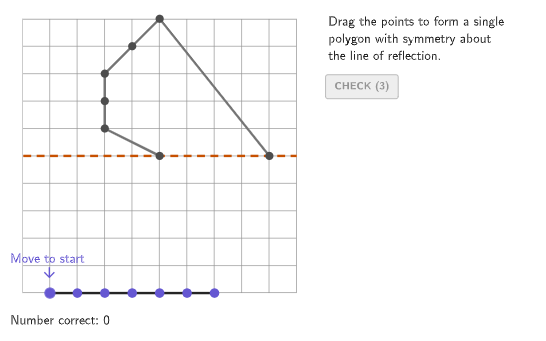
本范例演示如何通过镜像对称点来绘制对称多边形。核心数学概念包括对称性和多边形。使用GeoGebra命令如Rotate、Polygon、PointIn等进行多边形的构造。适合小学四年级至五年级学生学习对称性识别和绘制。
GeoGebra 命令及参数
Element({0°, 90°, 45°}, caseNum) → rotAngleRotate(xAxis, rotAngle) → axisPolygon({(min, min), (min, max), (max, max), (max, min)}) → viewboxPointIn(viewbox) → P1PointIn(viewbox) → P2PointIn(viewbox) → P3PointIn(viewbox) → P4PointIn(viewbox) → P5PointIn(viewbox) → P6PointIn(viewbox) → P7Shuffle({-5, -1}) → randomX5, {-1, -5}Element({0, Element[randomX5, Mod[countQuestion, Length[randomX5]] + 1], 0}, caseNum) → x5Shuffle({-1, -1, -1, -1, -2, -2, -2, -2, -3, -3, -3, -3, -4, -4, -4, -4}) → randomX, {-2, -2, -2, -1, -1, -4, -4, -2, -3, -1, -3, -4, -4, -3, -3, -1}Element(randomX, Mod[(4 * countQuestion) + 3, Length[randomX]] + 1) → x4Element(randomX, Mod[(4 * countQuestion) + 2, Length[randomX]] + 1) → x3Element(randomX, Mod[(4 * countQuestion) + 1, Length[randomX]] + 1) → x2Element(randomX, Mod[(4 * countQuestion), Length[randomX]] + 1) → x1Zip(Mirror[A, axis], A, givenPoints) → expectedResultZip(A ≟ B, A, expectedResult, B, studentPoints) → correctCheck1Zip(A ≟ B, A, expectedResult, B, Reverse[studentPoints]) → correctCheck2If(reverseOrder, Reverse[correctCheck2], correctCheck1) → correctFinalIf(reverseOrder, Reverse[studentPoints], studentPoints) → studentOrderedPointsFlatten(Zip[{x(A), y(A)}, A, studentPoints]) → inputCurrentPolygon(Element[{{(min, min), (min, 0), (max, 0), (max, min)}, {(0, min), (0, max), (max, max), (max, min)}, {(min, min), (max, max), (max, min)}}, caseNum]) → correctRegionZip(IsInRegion[A, correctRegion], A, studentPoints) → regionCheckPolygon(Zip[PixelsToPoint[Corner[1], Corner[3], Corner[5], A], A, {(pixelsLeft, pixelsTop), (pixelsLeft, y(Corner[5]) - pixelsBottom), Corner[5] - (pixelsRight, pixelsBottom), (x(Corner[5]) - pixelsRight, pixelsTop)}]) → borderBoxCorner(5) → layoutAppSizeexpandCircle(P1, 7 + haloPixels, Corner[1], Corner[3], Corner[5]) → pulsingObjectPolyLine(givenPoints) → givenPatternPolyLine(expectedResult) → expectedPatternZip(If[(¬A) ∧ (¬B) ∧ tries > 0, {228 / 255, 68 / 255, 97 / 255}, {101 / 255, 87 / 255, 210 / 255}], A, correctFinal, B, pointMoved) → pointColorPolyLine(studentPoints) → studentPatternSequence((A, -5), A, -4, 3) → startPointsZip(Vector[A, B], B, If[correctFinal ≟ correctCheck1, expectedResult, Reverse[expectedResult]], A, studentPoints) → moveVecsZip(A + (animate * B), A, studentPoints, B, moveVecs) → movePointsPolyLine(movePoints) → animateAnsPolygon({(min - 0.5, min - 0.5), (min - 0.5, max + 1), (max + 1, max + 1), (max + 1, min - 0.5)}) → coverScreenSequence((((((("SetFixed(P" * A) * ",") * correctFinal(A)) * ",!") * correctFinal(A)) * ")"), A, If[reverseOrder, Length[studentPoints], 1], If[reverseOrder, 1, Length[studentPoints]], If[reverseOrder, -1, 1]) → cmdLockPointsSequence((("SetFixed(P" * A) * ",false,true)"), A, 1, Length[studentPoints]) → cmdUnlockPointsRemoveUndefined(Zip[If[A, B], A, correctFinal, B, studentPoints]) → correctPointsPolygon({(min, min), (min, max), (max, max), (max, min)}) → viewBorderSequence((("SetFixed(P" * A) * ",true,false)"), A, 1, Length[studentPoints]) → cmdLockAll
AI 绘图提示语参考
绘制一个对称多边形,例如正方形或矩形,通过镜像给定点来创建对称图形。图形包含一个矩形作为基础区域,多边形以及点在矩形内的标记。学生需要识别对称轴并绘制对称图形,同时检查点是否在多边形内部。构造顺序为:先创建矩形,再通过镜像操作生成对称点,最后验证点与多边形的关系。
以上提示语为根据原始绘图命令整理而来,仅供参考。