
菱形面积公式计算与验证
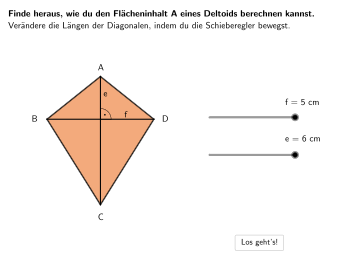
几何画板及绘图内容加载中,请稍等……
本范例通过GeoGebra演示菱形(Deltoid)面积计算公式A=(e×f)/2,涉及菱形对角线长度与面积的关系。作图要点:使用Polygon命令绘制菱形四边形,用Segment绘制对角线,通过Circle创建辅助圆展示对角线互相垂直平分的性质,用Angle测量角度验证垂直关系,用Text添加公式说明。包含三个交互任务:①选择题验证面积公式;②分析错误计算并纠正;③通过几何图形解释公式原理。适合5-6年级学生理解特殊四边形面积计算,培养几何直观与公式应用能力。
GeoGebra 命令及参数
SelectedIndex(DropDown2) → index2Circle(Tri1M, Length[Segment[A, M]]) → HelperKreis4Point(HelperKreis4) → Tri1AnchorRotate(Tri1Anchor, 90°, Tri1M) → I'Spline({M, I, H}, 3) → aCircle(Tri4M, Length[Segment[A, M]]) → HelperKreis1Circle(Tri2M, Length[Segment[C, M]]) → HelperKreis2Circle(Tri3M, Length[Segment[C, M]]) → HelperKreis3Point(HelperKreis2) → Tri2AnchorPoint(HelperKreis3) → Tri3AnchorPoint(HelperKreis1) → Tri4AnchorRotate(Tri4Anchor, -90°, Tri4M) → L'Angle(Tri4Anchor, Tri4M, L') → αAngle(Tri1Anchor, Tri1M, I') → βRotate(Tri2Anchor, -90°, Tri2M) → J'Angle(J', Tri2M, Tri2Anchor) → γRotate(Tri3Anchor, 90°, Tri3M) → K'Angle(Tri3Anchor, Tri3M, K') → δPolygon(Tri2E, Tri2M, Tri2Anchor) → d1, j, o, gPolygon(Tri1E, Tri1Anchor, Tri1M) → d2, f_1, n, iPolygon(Tri3M, Tri3Anchor, Tri3E) → d3, p, h, kPolygon(Tri4M, Tri4Anchor, Tri4E) → d4, q, e_1, lPolygon(E, F, G) → AnimOrange, g_1, e, fRotate(AnimTri1Anchor + Vector[M, B], ε, AnimTri1Anchor) → AnimTri1E1Spline({M, O, N}, 3) → bRotate(AnimTri1Anchor + (Vector[M, A] * (-helperinvert)), ε, AnimTri1Anchor) → AnimTri1E2SelectedIndex(DropDown) → index1Midpoint(Corner[Texte, 1], Corner[Texte, 3]) → TextePosMidpoint(Corner[Texte2, 1], Corner[Texte2, 3]) → Texte2PosMidpoint(Corner[Textf2, 1], Corner[Textf2, 3]) → Textf2PosMidpoint(Corner[Textf, 1], Corner[Textf, 3]) → TextfPosPolygon(ZuordnungVE1, ZuordnungVE2, ZuordnungVE3, ZuordnungVE4) → ZV1, zuordnungve1, zuordnungve2, zuordnungve3, zuordnungve4Polygon(ZuordnungV2E1, ZuordnungV2E2, ZuordnungV2E3, ZuordnungV2E4) → ZV2, zuordnungv2e1, zuordnungv2e2, zuordnungv2e3, zuordnungv2e4IsInRegion(Textf2Pos, ZV2) → correctZuordnungMidpoint(M, D) → QRotate(Triforce1 + Vector[M, D], (neoanim1 * 180°), Triforce1) → RRotate(Triforce1 + Vector[M, A], (neoanim1 * 180°), Triforce1) → SRotate(Triforce2 + Vector[M, D], (neoanim2 * 180°), Triforce2) → TRotate(Triforce2 + Vector[M, C], (neoanim2 * 180°), Triforce2) → USelectedIndex(DD3) → index3SelectedIndex(DD4) → index4Point(AnimOrangeKanten) → WCircle(W, 0.5) → validateC1Circle(F, 0.5) → validateC2Circle(V, 0.5) → validateC3Circle(Triforce1, 0.5) → validateC4Circle(G, 0.5) → validateC5Circle(Triforce2, 0.5) → validateC6Angle(D, M, A) → ζSegment(A, C) → mSegment(Midpoint[B, D], D) → rSegment(E_1, E_1 + (4, 0)) → sPoint(s, distanzAnim / 5) → F_1Text(Text10, F_1, false, true, 0, 0) → Text18Segment(G_1, G_1 + (0, (-LA1))) → tSegment(H_1, H_1 + (0, -0.92)) → h_1CircleArc(Tri1M, Rotate[Tri1Anchor, (-williwingl), Tri1M], Rotate[Tri1Anchor, williwingl, Tri1M]) → c_1Segment(Rotate[Tri1Anchor, williwingl - 1°, Tri1M], Rotate[Tri1Anchor, williwingl, Tri1M]) → i_1Segment(Rotate[Tri1Anchor, (-williwingl) + 1°, Tri1M], Rotate[Tri1Anchor, (-williwingl), Tri1M]) → j_1
AI 绘图提示语参考
画一个风筝形状的图形,展示其对角线长度和面积的关系,面积公式为A=(e×f)/2。首先绘制风筝的四边形,然后画出两条对角线,并使用圆来辅助构造显示对角线的垂直平分线。接着验证直角,并显示公式。最后,通过交互式任务让学生验证公式、分析错误并解释公式,适合5-6年级学生学习。
以上提示语为根据原始绘图命令整理而来,仅供参考。