
平行四边形的几何作图
几何画板及绘图内容加载中,请稍等……
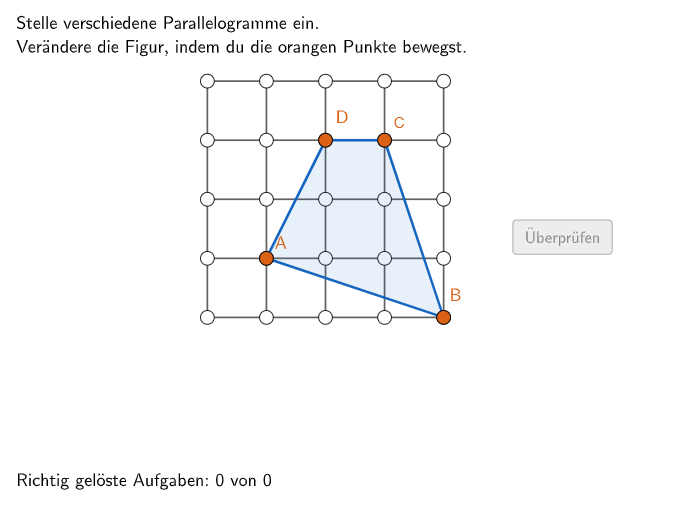
这个范例演示了如何使用几何工具构造平行四边形。核心数学概念包括平行线、角度和多边形。通过使用GeoGebra命令如Join、Polygon和Vector,学生可以学习如何精确地构造特殊四边形。适合5-6年级学生进行几何作图练习。
GeoGebra 命令及参数
Join(Sequence[Shuffle[{1, 2, 3, 4, 5, 6, 7}], i, 1, 20]) → listNumSolutionFlatten(Sequence[Sequence[P + ((c * widthcell) * (1, 0)) + ((r * heightcell) * (0, 1)), c, 0, cells], r, 0, cells]) → gridPointsUnique(val) → valsinglePoint(gridPoints) → APoint(gridPoints) → BPoint(gridPoints) → CPoint(gridPoints) → DPolygon(A, B, C, D) → vieleck1, a, b, c, dAngle(Polygon[A, B, C, D]) → α, β, γ, δCountIf(M ≟ Join[aktuell], M, val) → countSameTextfield(input1) → InputBox1Textfield(input2) → InputBox2Polygon(PtopLeftCornerFeedback, PtopRightCornerFeedback, PbottomRightCornerFeedback, PbottomLeftCornerFeedback) → rectangleCorrect, rectangleCorrectS3, rectangleCorrectS4, rectangleCorrectS2, rectangleCorrectS1Shuffle(Sequence[Random[0, 10], i, 1, 100]) → randomNosForX, {9, 4, 10, 10, 3, 6, 6, 4, 0, 4, 0, 7, 0, 7, 2, 5, 9, 8, 2, 8, 1, 5, 4, 2, 10, 4, 7, 8, 2, 2, 10, 6, 5, 5, 2, 6, 1, 0, 9, 5, 9, 6, 0, 5, 4, 5, 4, 5, 1, 9, 9, 10, 1, 3, 6, 0, 4, 2, 4, 0, 0, 2, 10, 6, 7, 2, 1, 8, 4, 1, 10, 7, 9, 10, 9, 9, 0, 3, 4, 7, 1, 6, 0, 1, 6, 8, 8, 8, 3, 2, 5, 3, 3, 3, 10, 0, 10, 8, 6, 1}Element(randomNosForX, Mod[questionCount, 100] + 1) → numXShuffle(Sequence[Random[0, 10], i, 1, 100]) → randomNosForY, {5, 8, 1, 4, 6, 8, 2, 7, 8, 7, 7, 10, 9, 3, 8, 6, 5, 0, 6, 3, 8, 10, 0, 4, 10, 6, 3, 8, 10, 0, 6, 6, 5, 4, 5, 2, 3, 4, 1, 1, 1, 9, 5, 5, 4, 4, 1, 10, 10, 8, 0, 0, 5, 7, 6, 6, 3, 9, 4, 9, 1, 1, 6, 10, 6, 0, 5, 8, 10, 0, 7, 3, 7, 2, 5, 6, 8, 5, 1, 7, 0, 9, 1, 5, 5, 10, 10, 5, 10, 2, 7, 9, 0, 6, 0, 1, 9, 5, 9, 4}Element(randomNosForY, Mod[questionCount, 100] + 1) → numYAppend(true, Sequence[If[randomNosForX(i) ≟ randomNosForX(i - 1), false, true], i, 2, 100]) → stayXAppend(true, Sequence[If[randomNosForY(i) ≟ randomNosForY(i - 1), false, true], i, 2, 100]) → stayYRemove(Sequence[If[stayX(i), randomNosForX(i), 0], i, 1, 100], Sequence[0, i, 1, 100]) → randomNosForXwithoutRepeatRemove(Sequence[If[stayY(i), randomNosForY(i), 0], i, 1, 100], Sequence[0, i, 1, 100]) → randomNosForYwithoutRepeatElement(randomNosForXwithoutRepeat, Mod[questionCount, Length[randomNosForXwithoutRepeat]] + 1) → numXwithoutRepeatElement(randomNosForYwithoutRepeat, Mod[questionCount, Length[randomNosForYwithoutRepeat]] + 1) → numYwithoutRepeatElement(gridPoints, g) → PunktVersuchVector(A, B) → v1Vector(A, D) → v2Angle(v1, v2) → alphaLaTeX(isSquare, true, true) → Text1LaTeX(isRectangle, true, true) → Text2LaTeX(isParallel, true, true) → Text3Length(val) → lengthvalIf(Defined[valsingle], Length[valsingle], 0) → lengthvalsingleLaTeX(isRhombus, true, true) → Text11LaTeX(sameInput, true, true) → Text12Polygon(listSolutionPoints) → vieleckSolution
AI 绘图提示语参考
画一个平行四边形,展示其构造过程。首先用点工具在网格上标记四个顶点,然后连接这些顶点形成平行四边形。接着,标注平行四边形的对边和内角,并计算对角线的长度。最后,用向量工具表示平行四边形的边向量,并验证对边是否平行。
以上提示语为根据原始绘图命令整理而来,仅供参考。