
Kiepert 抛物线的中心
几何画板及绘图内容加载中,请稍等……
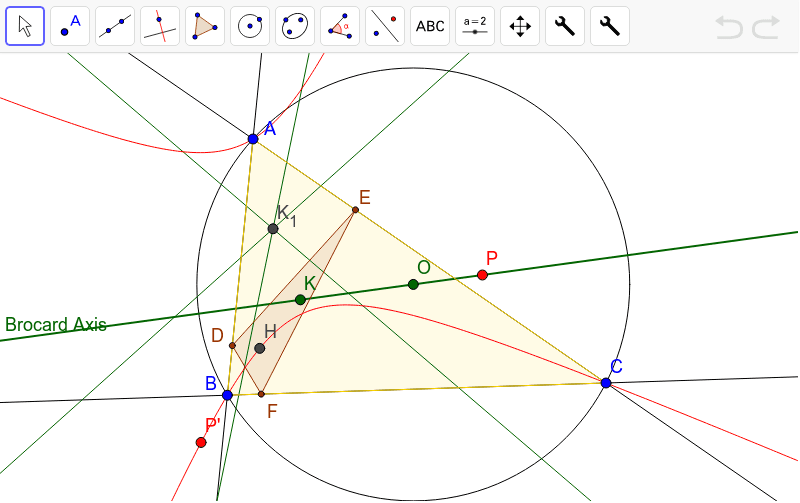
本范例演示了如何找到 Kiepert 抛物线的中心。首先构造三角形 ABC 的垂足三角形 DEF,然后分别找到三角形 ADE、BDF 和 CEF 的布罗卡轴。通过这些步骤,可以确定 Kiepert 抛物线的中心。本范例涉及三角形、垂足三角形和布罗卡轴等核心概念。使用了 GeoGebra 的 Line、Circle、Center、Centroid、Mirror、LineBisector、Intersect、Point、Locus、Polygon、OrthogonalLine 等命令。适合高中几何教学和学习。
GeoGebra 命令及参数
Line(A, B) → aLine(B, C) → bLine(C, A) → cCircle(A, B, C) → dCenter(d) → OCentroid(Polygon[A, B, C]) → GMirror(G, c) → G'Mirror(G, a) → G'_1Mirror(G, b) → G'_2LineBisector(G'_1, G') → eLineBisector(G', G'_2) → fIntersect(e, f) → KLine(K, O) → gPoint(g) → PMirror(P, a) → P'_3Mirror(P, c) → P'_1Mirror(P, b) → P'_2LineBisector(P'_3, P'_1) → hLineBisector(P'_1, P'_2) → iIntersect(h, i) → P'Locus(P', P) → loc1Polygon(A, B, C) → poly1, c_1, a_1, b_1OrthogonalLine(A, b) → jOrthogonalLine(B, c) → kOrthogonalLine(C, a) → lIntersect(a, l) → DIntersect(c, k) → EIntersect(b, j) → FPolygon(D, E, F) → poly2, f_1, d_1, e_1Intersect(l, j) → HTool2(A, D, E) → mTool2(B, D, F) → nTool2(F, E, C) → pIntersect(m, n) → K_1
AI 绘图提示语参考
绘制三角形ABC的外接圆,找到其圆心O。构造ABC的垂心G,然后分别镜像G关于BC、AC、AB得到G'、G'_1、G'_2。作G'_1和G'的角平分线e,G'和G'_2的角平分线f,它们的交点K即为Kiepert双曲线的中心。作K和O的连线g,镜像g上的点P关于BC、AC、AB得到P'_3、P'_1、P'_2,作P'_3和P'_1的角平分线h,P'_1和P'_2的角平分线i,它们的交点P'即为Kiepert双曲线的另一个焦点。P'的轨迹即为Kiepert双曲线。构造三角形ABC的垂足三角形DEF,作DE、DF、EF的垂线交点H,然后构造三角形DEF的垂足三角形的垂心K_1。
以上提示语为根据原始绘图命令整理而来,仅供参考。