
平行四边形面积计算
几何画板及绘图内容加载中,请稍等……
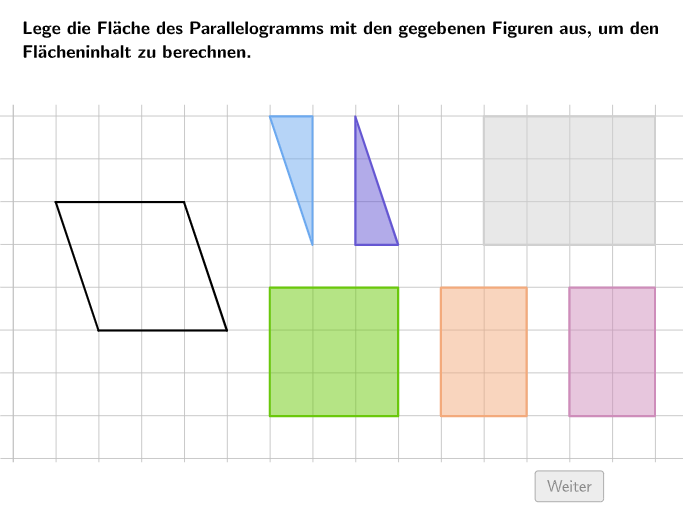
①本范例演示如何通过分割和组合平行四边形来计算其面积;②涉及的核心数学概念包括平行四边形面积公式、三角形面积计算、几何变换与分割;③作图要点——使用了Textfield, Point, Polygon, PointIn, Spline, SelectedIndex, Vertex, Translate, Text等GeoGebra命令/对象来创建图形、文本和交互功能;④适合小学5-6年级学生,用于学习和理解平行四边形面积公式的推导和应用。
GeoGebra 命令及参数
Textfield(input1) → InputBox1Textfield(input2) → InputBox2Textfield(input3) → InputBox3Textfield(input4) → InputBox4Point(KantenParallelogramm) → EPoint(KantenParallelogramm) → FPolygon(A, E, D) → Area1, d, a, ePolygon(D, F, B, E) → Area2, d_1, f, b, e_1Polygon(F, C, B) → Area3, b_1, f_1, cPolygon(BoundaryP1, BoundaryP2, BoundaryP3, BoundaryP4) → Boundary, boundaryp1, boundaryp2, boundaryp3, boundaryp4PointIn(Boundary) → TriBlueAnchorPointIn(Boundary) → TriCyanAnchorPointIn(Boundary) → RectGrayAnchorPointIn(Boundary) → RectLilaAnchorPointIn(Boundary) → RectOrangeAnchorPointIn(Boundary) → RectGreenAnchorSpline({D, SplineMidOrange, RectOrangeAnchor}, 3) → hSpline({C, SplineMidCyan, TriCyanAnchor}, 3) → iSelectedIndex(DD1) → Index1SelectedIndex(DD2) → Index2Spline({D, SplineMidBlue, TriBlueAnchor}, 3) → gSpline({TriCyanAnchor, Midpoint[TriCyanAnchor, TriBlueAnchor], TriBlueAnchor}, 3) → jVertex(PolyAnimBlue(1), 1) → PolyAnimBluePVertex(PolyAnimCyan(1), 1) → PolyAnimCyanPVertex(PolyAnimOrange(1), 1) → PolyAnimOrangePTranslate(l1, (0, -13.5)) → l1'Text("\textsf{A_1}", O, false, true, 0, 0) → Text8Text("\textsf{A_3}", M, false, true, 0, 0) → Text9Text((("\textsf{\textcolor{" * ColorText) * "}{A_2}"), N, false, true, 0, 0) → Text10
AI 绘图提示语参考
画一个平行四边形的面积分解示意:在坐标平面中给出平行四边形的四个顶点并连成四边形边界,随后在内部把它划分为三块多边形区域,包括三个三角形区域与一个(相应的)边界矩形/多边形外框区域。对每个区域用清晰的多边形轮廓表示,并在图中放置若干面积标注文字,分别对应不同子区域(例如用不同编号的A样式标记),必要时可用不同颜色的文字以区分各部分。
以上提示语为根据原始绘图命令整理而来,仅供参考。