
梯形在网格中的面积
几何画板及绘图内容加载中,请稍等……
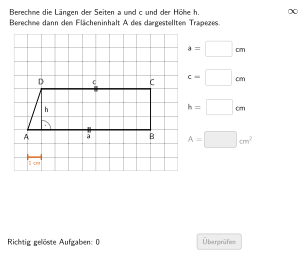
本范例演示梯形在网格中的面积计算。核心数学概念包括梯形面积公式及其应用。通过使用GeoGebra命令如Shuffle、Element、Zip等,学生可以动态探索梯形的面积变化。适合5-6年级学生进行练习。
GeoGebra 命令及参数
Shuffle(Sequence[Random[3, coordheight - 4], m, 1, 100]) → randomNosForH, {3, 5, 3, 5, 4, 3, 5, 3, 6, 6, 6, 6, 3, 4, 5, 6, 4, 5, 6, 6, 4, 3, 5, 6, 4, 3, 5, 4, 5, 6, 6, 3, 4, 3, 5, 4, 6, 3, 4, 4, 3, 5, 5, 5, 6, 5, 6, 6, 4, 5, 6, 3, 6, 6, 3, 3, 6, 3, 5, 6, 6, 5, 4, 6, 6, 5, 6, 3, 3, 6, 3, 6, 6, 6, 3, 5, 6, 5, 3, 5, 6, 6, 5, 3, 3, 3, 4, 4, 5, 3, 5, 4, 6, 5, 4, 3, 5, 5, 6, 3}Element(randomNosForH, Mod[questionCount, 100] + 1) → numHShuffle(Sequence[Random[6, coordwidth - 2], m, 1, 100]) → randomNosForA, {9, 6, 7, 9, 7, 6, 10, 8, 9, 8, 9, 9, 10, 8, 9, 8, 8, 10, 7, 9, 9, 8, 8, 8, 9, 7, 8, 9, 6, 10, 9, 10, 9, 9, 6, 8, 9, 10, 6, 7, 6, 8, 8, 7, 9, 9, 9, 9, 6, 10, 9, 7, 10, 6, 6, 10, 10, 10, 10, 7, 7, 7, 10, 10, 6, 8, 10, 7, 9, 6, 9, 7, 8, 6, 7, 10, 8, 10, 10, 7, 8, 9, 7, 10, 9, 9, 9, 6, 6, 6, 7, 9, 9, 6, 8, 9, 6, 10, 8, 9}Element(randomNosForA, Mod[questionCount, 100] + 1) → numAZip(Random[3, m - 1], m, randomNosForA) → randomNosForCElement(randomNosForC, Mod[questionCount, 100] + 1) → numCZip(Max[{0, Random[1, coordwidth - a - 3]}], a, randomNosForC) → randomNosForAbsLinksJoin(Sequence[Shuffle[{2, 3, 4, 5}], m, 1, 30]) → listEHSegment(PA, PC) → esTextfield(input1) → InputBox1Textfield(input2) → InputBox2Polygon(PtopLeftCornerFeedback, PtopRightCornerFeedback, PbottomRightCornerFeedback, PbottomLeftCornerFeedback) → rectangleCorrect, rectangleCorrectS3, rectangleCorrectS4, rectangleCorrectS2, rectangleCorrectS1Append(true, Sequence[If[randomNosForA(i) ≟ randomNosForA(i - 1), false, true], i, 2, 100]) → stayXAppend(true, Sequence[If[randomNosForC(i) ≟ randomNosForC(i - 1), false, true], i, 2, 100]) → stayYRemove(Sequence[If[stayX(i), randomNosForA(i), 0], i, 1, 100], Sequence[0, i, 1, 100]) → randomNosForXwithoutRepeatRemove(Sequence[If[stayY(i), randomNosForC(i), 0], i, 1, 100], Sequence[0, i, 1, 100]) → randomNosForYwithoutRepeatElement(randomNosForXwithoutRepeat, Mod[questionCount, Length[randomNosForXwithoutRepeat]] + 1) → numXwithoutRepeatElement(randomNosForYwithoutRepeat, Mod[questionCount, Length[randomNosForYwithoutRepeat]] + 1) → numYwithoutRepeatDefined(input4) → fixedFlatten(Sequence[Sequence[O + (m * (size, 0)) + (j * (0, size)), m, 0, coordwidth - 1], j, 0, coordheight - 1]) → listPointsRandom(2, numA - 2) → propSegment(PB, PD) → fsSegment(G1, G2) → gTranslate(Segment[(0, -0.1), (0, 0.1)], G1) → hTranslate(Segment[(0, -0.1), (0, 0.1)], G2) → iIntersect(Line[PA, PB], Line[PD, yAxis]) → STextfield(input4) → InputBox4Zip(Polygon[P, P + (0, size), P + (0, size) + (size, 0), P + (size, 0)], P, listPoints) → listCoordsSegment(PD, Intersect[Line[PD, yAxis], Line[PA, xAxis]]) → fAngle(PB, S, PD) → αTextfield(input3) → InputBox3Segment(PA, PB) → streckeaSegment(PD, PC) → streckec
AI 绘图提示语参考
在坐标网格中画一个梯形用于面积练习:给定两条平行的上、下边框,分别用四个顶点构成梯形的多边形。让顶点都落在网格交点附近,并设置上边与下边为左右相对的两条水平线段,左右两腰分别由上、下对应顶点连接形成。为辅助理解,画出梯形的一条腰的对应线段,以及与左右边的交点形成的角度标记;同时在图上放置若干输入框让用户记录高度与角度等参数,并可在网格中观察梯形形状变化。最后保证图形轮廓清晰可数。
以上提示语为根据原始绘图命令整理而来,仅供参考。